Can't Disable Anonymous Access

We are running 4.10.0, using HTML5 viewers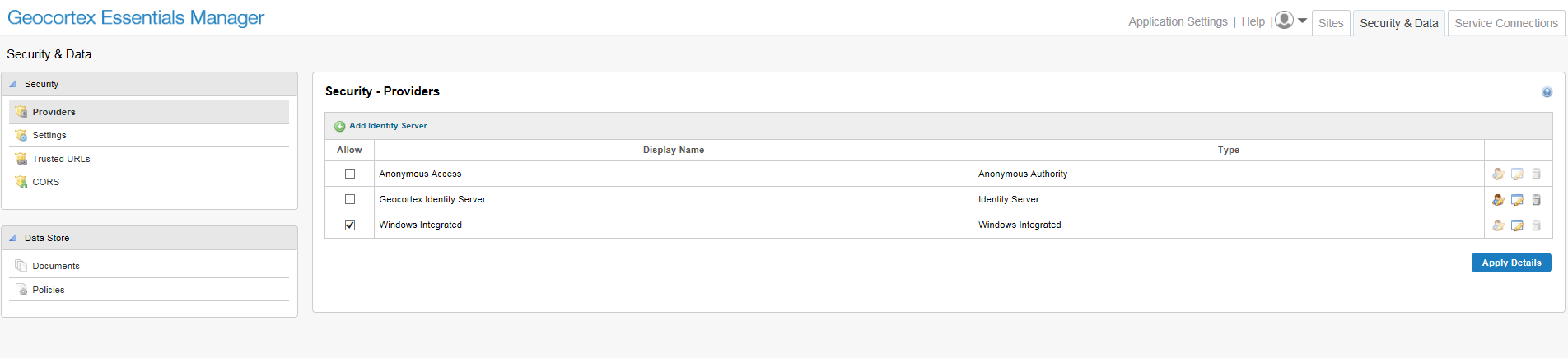
We would like users to access our viewers using SSO. This is configured, and works. However users accessing the viewer always default to anonymous access and then have to click the Sign-In button.
I've tried to disable anonymous access through the Security Providers page, but with no success. What am I missing?
Thanks.
0
-
Did you also disable anonymous access in IIS or whatever web server you are using? 0 -
Are you specifically denying anonymous access for the site in Manager? Also, if you are using Active Directory, there is a way to create a short-cut that by-passes the sign-in all together. 0 -
Thanks for responding.
Yes, I have disabled Anonymous Authentication in IIS. It doesn't seem to make any difference.0 -
Here is how I was told to create the shortcut by LG for Active Directory:
In case you need to do it for your other sites, here's what I did: 1) Take the first part of the URL, and put it in a notepad document, like so: https://maps.srcity.org/Geocortex/Essentials/REST/security/signIn?token_type=fragment&app= 2) Take the app part of your URL (in this case "https://maps.srcity.org/Html5Viewer/Index.html?viewer=parcel&runWorkflow=SearchAPN&ParcelId=134320042") and plug it into a URL encoder like this one: http://meyerweb.com/eric/tools/dencoder/ 3) Add the encoded URL to the end of the string in your notepad document 4) Add this bit to the end of your string: &idp_name=AD+AUTHORITY"0 -
Also, if I remember correctly, if you are going to use Anonymous Access for ANY of your sites, you need to have it checked where you showed in Security - Providers, and then you specifically deny site by site. 0 -
Ah, thanks Mike. I hadn't disabled access to the site permissions tab. Thanks for your help. 0
Du måste logga in om du vill lämna en kommentar.
Kommentarer
6 kommentarer