autocomplete box in workflow form - look changed

We just upgraded to the latest GCE and HTMLViewer and noticed the autocomplete box dropdown list in the workflow form has "condensed" the options.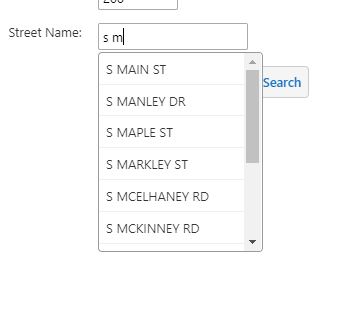
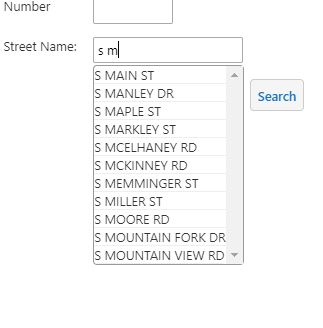
Before upgrade:
AFter upgrade:
Has anyone else seen this and/or know where to change it? People using touchscreen laptops would prefer the larger spacing.
Thanks,
Carmen
0
-

Hi Carmen,
You can use custom CSS to get the spacing you are looking for, the CSS would look like -
.list-menu-item {
padding: 3px;
}
but you would need to test it to see if it had an undesirable effect on other lists within the viewer.
Regards,
Wayne0
Du måste logga in om du vill lämna en kommentar.
Kommentarer
1 kommentar