getmapserviceinfo change in behaviour returning dynamicLayer

Hi: Not sure when it happened but i think one of the upgrades to 2.10 or 2.11.2 changed the behaviour of the workflow getMapServiceInfo - it is now returning the url that ends with dynamicLayer (e.g. ...rest/services/Infrastructure_v15/MapServer/dynamicLayer ) before i am pretty sure i got the actual layer id (in this case 52 - ...rest/services/Infrastructure_v15/MapServer/52) has anyone else noticed this change? or is it just me - with the dynamic layer the query doesnt work - and i am sure it worked at least a few versions ago
0
-

See https://support.geocortex.com/essentialsGSCkba?sub-nav=kba&main-nav=essentials&#!/feedtype=SINGLE_ARTICLE_DETAIL&criteria=BESTANSWERS&id=kA3f2000000k9cGCAQ
Using the GetMapServiceInfo activity on Dynamic Layers
In 2.10.x or lower, services that support dynamic layers don't convert to dynamic layers in the HTML5 viewer until a feature or tool that requires that functionality is used. For example, using the layer visualization options to resymbolize a layer in the viewer will convert the service to dynamic layers. In version 2.11+, all map services that support dynamic layers will be converted to such on startup, instead of waiting for user actions to trigger the change.0 -
with the change i am now unable to get the Map Service ID as that function gave it - but Query still wants it -- i am trying to fix a workflow that does a generic search that took 3 inputs:
- the layer name,
- the attribute to search
- value to search for (in the attribute)
-- and i cant figure out how to get the map service id since the changte to GetMapServiceInfo0 -
Hi Mike,
If the variable you used in the source field is called layerSource1, try something like this: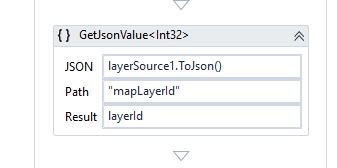
Regards,
Wayne0 -

Like Robert I couldn't get it to work when trying what was suggested in the Using the GetMapServiceInfo activity on Dynamic Layers knowledge base article.
Robert's suggestion worked for me. You can also output the layerSource to JSON which does contain the layerID e.g. layerSource1.ToJson gave me the following output
{"type":"mapLayer","mapLayerId":9}0
Du måste logga in om du vill lämna en kommentar.
Kommentarer
4 kommentarer