Dots on IE default toolbar.

Not sure when this may have shown its head, but in IE we are seeing dots on our toolbar. It looks like solid dots for toolbar groups and hollow dots on buttons/tools. The odd thing, is that this only happens on the first/default tool tab. The other tool tabs do not show these dots. Chrome does not show any dots. 
Anybody have any idea what may be going on here? We have some custom CSS make the toolbar a bit more compact. Perhaps this is causing an issue?
.toolbar-group h2 {
height: 0em;
font-size: 0em;
}
.toolbar-body.large .toolbar-group {
min-height: 5.2em;
padding-bottom: 0em;
}
.toolbar-item p, .toolbar-item label {
line-height: 0.9em;
margin: 0 0.3em 0em 0em;
}
.toolbar-group p, .toolbar-group label {
font-size: 0.85em;
}
.toolbar-item {
height: 4.8em;
}
.toolbar-body button {
margin: 0em 0em;
}
.transient-toolbar li, .toolbar-body ul li, .flyout-menu ul li {
margin: 0.12em;
}
/* Toolbar Tab - "Main...Find Data...Tasks...Mapping...Tools" - 08-06-2015 */
ul.toolbar-tab-control li button {
font-size: 0.9em;
padding: 0.1em 0.75em;
}
ul.toolbar-tab-control {
padding: 0.15em 0em 0em 0.5em;
}
.transient-toolbar .toolbar-item > img, .transient-toolbar .toolbar-item > span.icon {
margin: 0.2em auto 0.2em auto;
}
.toolbar-item.select-double select {
margin-top: 0.55em;
}
.toolbar-item.select-double select + select {
margin-top: 0.45em;
}
/* ------End Group Tabbed Toolbar Modifications - 4-4-2016 */
0
-

Hi Erik,
I added your CSS to my test viewer and although I could see the styling changes, I could not see the dots (except for one but I wiped it off my screen and it was gone).
Do they show up with Chrome as well? Can you see what code is causing them using the browser developer tools?
Regards,
Wayne0 -

Erik,
I also do not see the dot pattern in IE 11.0.9600 or Chrome 72.0.3626.
Try this revised CSS for the "thin" toolbar that I had posted awhile back on this forum.
Cheers...Rick
/* ------Begin Group Tabbed Toolbar Modifications GVH 2.11 06-29-2018 */
/* Toolbar Tab - "Main...Find Data...Tasks...Mapping...Tools" */
ul.toolbar-tab-control li button {
padding: 0.3em 0.75em;
font-size: 1em;
}
/* Removes "Navigation, Find Data, Tasks...labels" from toolbar groups - GVH 2.11 06-29-2018 */
.toolbar-group h2 {
height: 0;
font-size: 0em;
}
.toolbar-body.large .toolbar-group {
min-height: 4.5em;
padding-bottom: 0em;
}
.toolbar-item p, .toolbar-item label {
line-height: 1.5em;
margin: 0 0.3em 0em 0em;
}
.toolbar-group p, .toolbar-group label {
font-size: 0.85em;
}
.toolbar-item {
max-width: 15em;
}
.transient-toolbar {
padding: 0 0 0.15em 0;
margin: 0em 0em 0em 0em;
}
/* Distance Measurment Units Selectors Styling */
.toolbar-item.select-double select {
margin-top: 0.45em;
}
.toolbar-item.select-double select + select {
margin-top: 0.45em;
}
.select-double.toolbar-item select {
margin-top: 0.15em;
}
/* ------End Group Tabbed Toolbar Modifications GVH 2.9 - 07-13-2017 */
/* ------Begin Toolbar Toggle Button Styling------ */
.toolbar-toggle-button {
margin-top: 0px;
margin-right: 10px;
width: 63px;
height: 64px;
border: 1px solid #CECECE;
border-radius: 0.25rem;
position: relative;
z-index: 500;
cursor: pointer;
}
.no-touch .toolbar-toggle-button {
width: 63px;
height: 64px;
}
/* Toolbar toggle button hover */
.toolbar-toggle-button:hover {
border: 1px solid #86cee8;
background-color: #e9f6ff;
}
/* ------End Toolbar Toggle Button Styling------ */
/* ------Begin Toolbar Toggle Label Button Styling - 07-17-2017 */
.no-label .toolbar-actions li.toolbar-label-toggle {
padding: 0.3em 0;
}
.no-label .toolbar-action-button {
width: 2.5em;
height: 2.5em;
}
/* ------End Toolbar Toggle Label Button Styling- 07-17-2017 */0 -
Erik,
I created a new test site and viewer (GE 4.10.1 & GVH 2.11.2). I added the same amount of tabs but was not able to replicate this issue. I recommend to comment out the custom CSS and open the application as a base. Then add one line of CSS at a time to see if there is any offending code that could create this issue.
Rick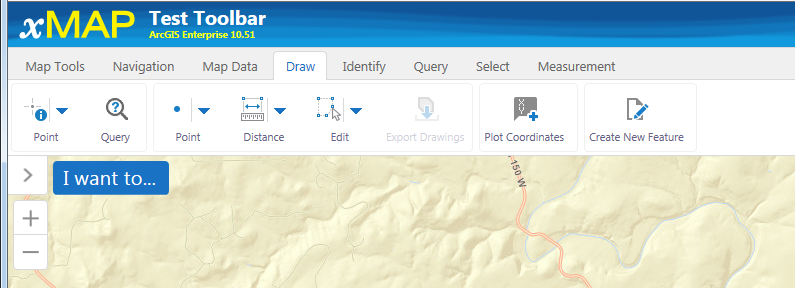 0
0 -
Thanks everyone for your time on this! This is a link to the site if you want to take a look:
https://anrmaps.vermont.gov/websites/anra5/
It does NOT appear to happen in Chrome, only IE (11.967)
I'm curious whether or not it may be a browser setting somewhere... I'll continue to investigate and will do some process of elimination as you describe Rick.
I'll also give my screen a good wipe Wayne ;-)
Thanks again for the help. I'm glad it's not a global issue.0 -
I just verified that it is working fine in Safari 12.0.3. I might add that I tell all of my users to avoid IE like the plague...just sayin' :-)0 -
Erik,
I replicated the issue on your site with IE 11.0.9600. However, the sites within our organization do not exhibit this behaivor with the same IE browser.
Try creating a new site with Essentials, add some data then create a new viewer. Edit the new viewer then load the preset toolbar "Web GIS (full)". Save the project and add the custom CSS. Now test to see if the problem persists. If it does, then proceed to single out the offending CSS tag. If not, then there may be an issue on how the new toolbar tabs were created...but's that's just a big guess on my part.
I was able to remove the dots by clicking the tag "font-size: 0.8em;" on/off when inspecting the "toolbar-tab-container" using the Inspect Element tool in IE...see below: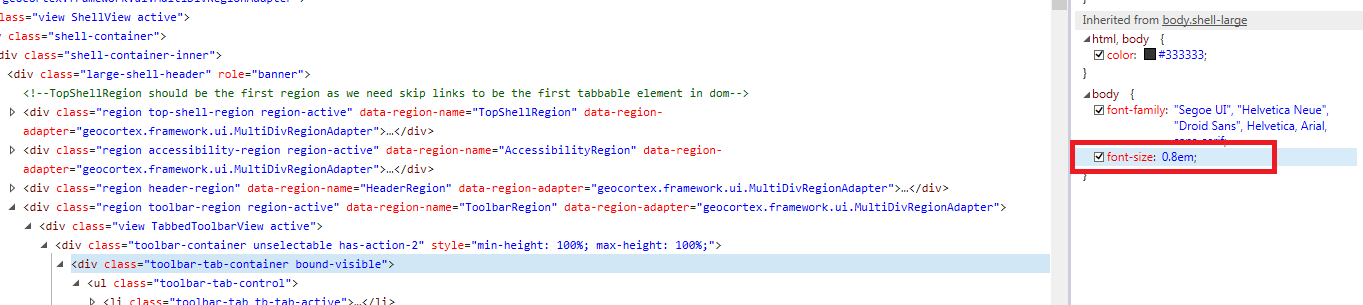 0
0
Du måste logga in om du vill lämna en kommentar.
Kommentarer
6 kommentarer