How to automatically Select or Identify All Features within 100' of a Users Location on Startup? My startup workflow gets, then zooms to a Users location. How can I then get the Site to Select or Identify Features within 100' of a Users Location?

-

Hi Aaron,
If you're using the Geocortex HTML5 viewer, I'd try something like this:
- Add a Buffer Geometry activity.
- For the Geometry Input, use the user's location. Eg =$currentPosition1.position
- Configure the Distance and Unit outputs
- Add a Run Command activity
- For the Command Name input use Identify. For the Command Parameter input, use the output of your Buffer Geometry activity. Eg. =$buffer1.geometry
Using a viewer command would let the viewer handle sending the query to every layer so that you don't have to set up the queries and selection manually. But if you're using a different viewer (Web AppBuilder, GMV, GWV), let us know and we could sort out a method for that.
0 -
Thank you for the response. I was able to get it working, with one issue. When using a mobile device, the application loads, zooms to users location, then performs buffer and identify. The issue is that the users location changes slightly as position accuracy gets better. So, the Users location is roughly 30' off from the 100' buffers center. Is there a way to delay the buffer until users location is fully known o something similar? Thank you again.
0 -
The input options on the Get Current Position activity set the behaviour for getting geolocation readings. For example, if you set:
Enable High Accuracy: true
Timeout: 30000
Use Multiple Readings: true
Accuracy Threshold: 10
Then it will keep taking location readings until it gets one that is accurate to 10 meters of your position, or stops after 30 seconds if it's not reaching that accuracy level and uses the best one that it has at that point.
0 -
Hi Amanda,
Your suggestions worked perfectly. Thank you for the timely and well thought responses. I appreciate your help. Aaron
0 -

Hi @Amanda Frech? ,
"But if you're using a different viewer (Web AppBuilder, GMV, GWV), let us know and we could sort out a method for that."
I'm wanting a startup workflow for Geocortex Web. Something like:
Html5Viewer/index.html?viewer=burnplan&queryLayerMapServiceId=7&queryLayerName=Target%20FMU&query=fru_code=%27TTT401BU%27
Do you have a method?
Regards,
Richard
0 -
@Richard Webb?
Add a Launch Link workflow here:
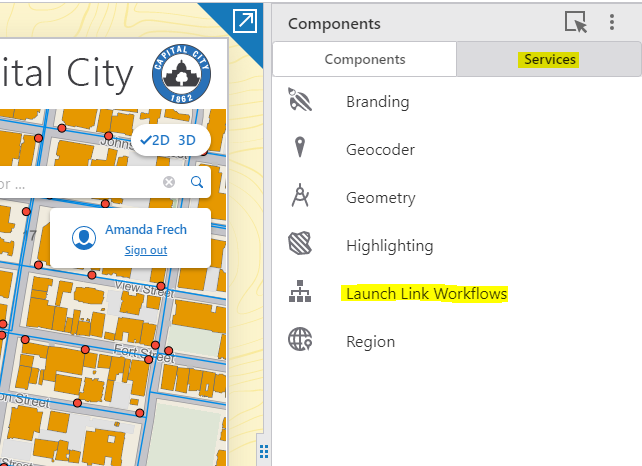
Then use the Get Links option here:

Then pick a workflow from the dropdown here and copy your link:
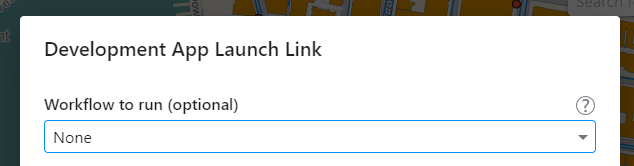
Finally, add your parameters to the end of the URL using JSON format. For the example you gave, the end result would look something like this:
https://apps.geocortex.com/webviewer/?app=xxxxx&workflow=xxxxx&workflowParams={"queryLayerMapServiceId":7,"queryLayerName":"Target%20FMU","query":"fru_code=%27TTT401BU%27"}There's documentation on the process here:
0
Du måste logga in om du vill lämna en kommentar.
Kommentarer
6 kommentarer