Workflows - 2 replica Workflows behave differently on implementation

We have 2 replica workflows that are querying point geometry objects. Both were initially created for our agency by the Geocortex team. We’ve added no customization to the workflows map display settings and both are using parameters set in the Essentials Map manager when adding workflows. We’re running workflow version 4.10.3.23 and HTML5 viewer (2.11.2).
Each workflow will run successfully in different maps from a toolbar button however the zoom to selected feature (presenting a buffer around the selected object) is not consistent in the map display. One workflow will zoom to the feature and the other will not zoom to the feature. Each workflow has a sequence of activities that are the same for displaying results
(SetMapExtent = searchResultsExtent.Extent.Expand(1.25))
We recently completed the workflow training and it confirmed for us the way these workflows return objects and display map features is controlled mainly by the GetFeatureSetExtent & SetMapExtent? Is there some overriding factor in the Essentials manager that can have an impact on these workflows? 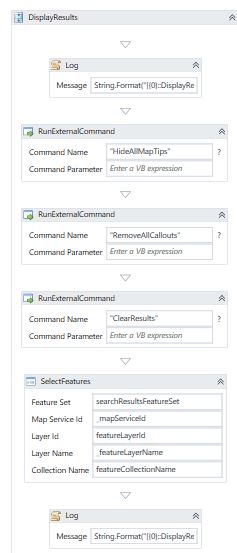
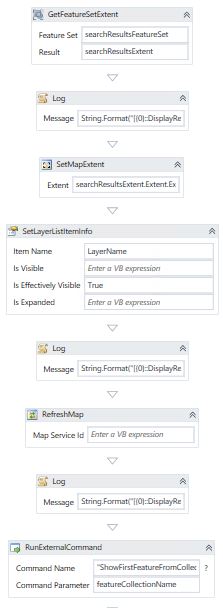
We really would appreciate understanding how two workflows can behave so differently in two separate maps. Similar issues with anyone's workflows that can provide us other ways to troubleshoot?
-

Do the workflows use different layers as input? Is the SHAPE field present in both layers?
Are the workflows in different sites? Is the primary mapservice (bottommost mapservice) different?
How many results are in the searchResultsFeatureSet? If it is a single point, getting the extent will not work (a point has no extent).
I don't think it's related, but what is the value of the defaultPointFeatureZoomScales setting in the Map module in the viewer configuration files?.0 -
Good questions Nico - thank you for your questions and input. I’ll review the questions and respond back shortly with answers. 0 -
Nico – I hope these answers help define the issue better: - No the workflows use the same layers as input.
- Yes, the shape field is present. We are using the same REST endpoint for the two different sites.
- Yes, the same workflow is used in two different sites. Hence, how we noted the differing zoom functionality.
- Yes, the bottom most map service is different for each map - both sites have different imagery as the bottom most map service. Interested to know how that may impact a workflow.
- A single result is returned in the searchResultsFeatureSet. Yes, interesting you mention that is the case with a point not having extent – but not clear what then would control the zoom scale for a returned point feature.
- I am not sure where to review the viewer config files for this setting: defaultPointFeatureZoomScale however I file searched the Site.xaml and the Viewer config files and searched for this parameter but it did not exist.
0 -
4. The viewer will only zoom to tile levels in the imagery, not in between.
The defaultPointFeatureZoomScales property should be present. By default is is an empty array like "defaultPointFeatureZoomScales": [].
You could change it to something like "defaultPointFeatureZoomScales": [3000]0 -

Hi Nico,
Could you elaborate more on how to get my map to zoom into a single point since extent function won't work with a single point?
I do have the 'defaultPointFeatureZoomScale' set for the feature, and it works. But I would like to eliminate that step, as user has to click on the query result in order for 'defaultzoomscale' to come in effect and the map zooms to point.
All of the other search tools I have made and use on my viewer, zoom to the features as soon as the query is submitted. These are all polygon features, so they do have extent and hence I use 'SetMapExtent' function to accomplish that.
Thanks,
0 -
You can e.g. create a new extent Envelope in the following way
New Envelope(pnt.x - 10, pnt.y - 10, pnt.x + 10, pnt.y + 10)0
Du måste logga in om du vill lämna en kommentar.
Kommentarer
6 kommentarer