How do I display a variable in a text box on a form?

-

Add a "Set Form Element Property" activity in the box's "Load" event (click your Text Box > Events > Load )
0 -
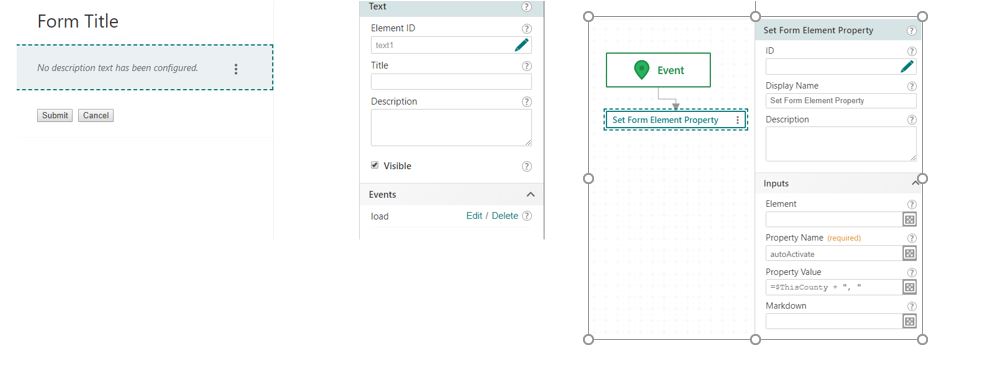
My text box doesn't get updated. I've uploaded a screenshot (is there a better way to share workflows?).
 0
0 -
Your syntax is incorrect, $ThisCounty is a reference to a workflow activity which is an object and thus can't be concatenated to a string (or it can, just not very usefully and probably not in the way that you want unless you are fond of "[object Object]"). I imagine that $ThisCounty has a .result property which you're looking for.
You should test these workflows with your dev console open so that you can watch the workflow process; the console will provide the stack trace and error for these sorts of bugs when available they break a workflow and log activity inputs and outputs as well. I bet that you are getting such an error here, but since the subworkflows are new threads they don't interrupt the execution of the main workflow when they raise errors.
0 -
^Also, what I like to see myself (personal opinion) for sharing workflow troubles is a screenshot of the console, with inputs/outputs expanded as needed for relevant activities as well as any errors that were raised.
0 -
Ah, yes, i needed $ThisCounty.value, which is working in a confirmation box, but still not working in the onload event.
I have the dev console open, but it isn't very meaningful. Its tedious to expand the tree of results, there is a lot of useless noise (like __proto__), and so often what i want just comes out as [object]. :(
Here is the Display form from the console:
bundle.js:1
--> gcx:wf:forms:form:DisplayForm ($form2) {inputs: {…}, outputs: undefined}
inputs:
form:
defaults:
__proto__: Object
elements:
footer: {enabled: true, type: "ButtonBar", items: {…}, section: "footer"}
header: {type: "Header", section: "header", title: {…}}
text1:
description:
markdown: ""
__proto__: Object
enabled: true
index: 0
type: "Text"
__proto__: Object
__proto__: Object
id: 62
__proto__: Object
__proto__: Object
outputs: undefined
__proto__: Object
0 -
You ought to be able to drill down into all of the objects such that you can see their properties and methods.
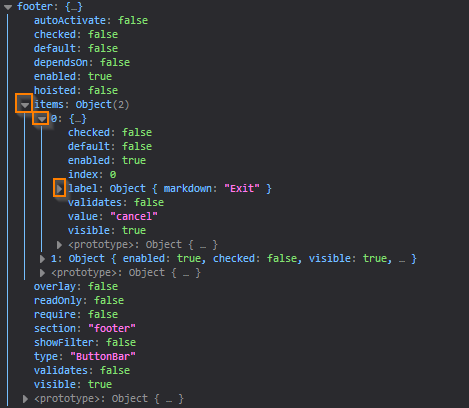
The prototypes can be useful too! They provide information about the class of the object, though I've only really used them myself a handful of times.
I think that looking at the inputs and outputs of that setFormElementProperty activity will help you, and then comparing them to the form textbox's properties.
0 -
I got it!. In the Set Form Element Property, i needed to add the Element name and the Property Name, which was "description". Oddly, now that it is working, the console is not displaying the value of the description (markdown: "") even though it is visible in the form. Perhaps this will get less painful over time. :)
0 -
I'm sure it will! Knowing how to use that console is a game changer haha.
If ever get around to making the time, I intend to compile a list of things to help people get started with this stuff; getting comfortable with the dev tools is pretty near the top of the list. I hope it helps!
0 -

Please do compile that list! If you have already I would greatly appreciate a link to it. Many thanks. :)
0
Du måste logga in om du vill lämna en kommentar.
Kommentarer
9 kommentarer