on-premise WF5 not able to work with Oracle Database

hi there,
I am not able to use SQL query activity to query Oracle database on a WF5 server workflow.
I don't use the databasesettings.json file.
The Connection String which I used is :
Data Source=(DESCRIPTION=(ADDRESS =(PROTOCOL=TCP)(HOST=<hostname>)(PORT=1521))(CONNECT_DATA=(SERVER=DEDICATED)(SERVICE_NAME=<service name>)));User Id=<user>;Password=<password>
Since Geocortex Essential is also installed on the same box, the above extract connection string works for WF4.
SQL command text is very simple, only "select * from <tablename>", and no parameters is passed, I made a test table, only a few records there.
In addition, the Oracle.ManagedDataAccess.dll (version 19) has been copied to \Latitude Geographics\Geocortex Workflow\Deployment\service and recycled the GeocortexWorkflow application pool
There is no error message for me, however, it looks like server has been trying for many times and finally stops, each of trying has no result returned,
For details, please refer to a screen capture below.
Any idea on which would cause the issue? Is this a known issue with current WF5? Thanks a lot !

-

Hi Hua,
In order for Geocortex Workflow on-prem to properly access the Oracle database, you need to configure the databasesettings.js file using the OracleDatabase connection string with the appropriate format, as outlined: https://docs.geocortex.com/workflow/latest/help/Default.htm#wf5/help/database-connections.htm
The workflow is attempting to connect with the database multiple times, but eventually fails when no results are returned.
Thanks, Stefan
0 -

I thought the use of databasesetting.json file is optional
<To configure connection strings in the database settings file:This procedure is optional. If you prefer, you can specify the connection string each time you use an activity that accesses the database.>
0 -
hi Stefan,
Thanks for your quick reply. I have tried to set database connection string into databasesetting.json. Unfortunately this didn't work for me as well, I got the same behavior with trying to connect to database many times.
Would you provide a sample of working database connection string to oracle database? I have tried database connection string as below:
Data Source=(DESCRIPTION=(ADDRESS =(PROTOCOL=TCP)(HOST=<hostname>)(PORT=1521))(CONNECT_DATA=(SERVER=DEDICATED)(SERVICE_NAME=<service name>)));User Id=<user>;Password=<password>
and connection strings displayed on the image:
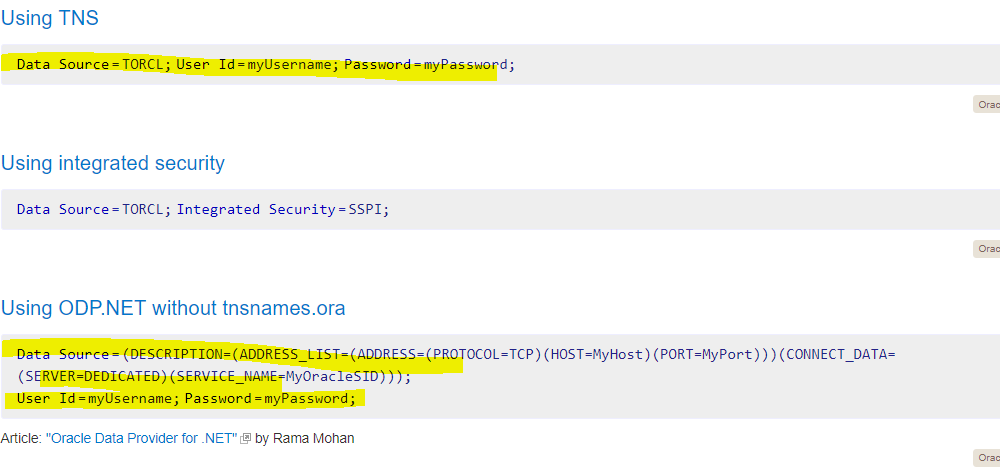
Any input is highly appreciated!
0 -
Yes, this configuration method is optional, but is the preferred method for storing this sensitive information.
A very basic configuration follows this syntax:
"OracleServer":"User Id=system;Password=myPass;DataSource=localhost:1521;"
The only difference that I see is "Data Source" vs. "DataSource" in the connection string.
0 -

Try moving the User and Password to the beginning of the connect string:
"[Connection Config Name]": "User Id=[username]; Password=[password]; Data Source=(DESCRIPTION=(ADDRESS=(PROTOCOL=TCP)(HOST=[server name])(PORT=1521))(CONNECT_DATA=(SERVER=DEDICATED)(SERVICE_NAME=[service name])));"
Not sure why this matters, but it seems to for the Workflow 5 connect strings.
0 -
Thanks Sean and Stefan who replied to me. Unfortunately it didn't work for me, any other ideas? Thanks a lot !
0
Du måste logga in om du vill lämna en kommentar.
Kommentarer
6 kommentarer