Report ran using default values set in report instead of using the date parameters passed to run report activity

I tried these
={inputBeginDate: $formatStartDate.formatted,inputEndDate: $formatEndDate.formatted}
={inputBeginDate:'11/1/2019',inputEndDate:'11/30/2019'}
The report parameters are inputBeginDate and inputEndDate
The report displays the date parameters in the header. The report ran but always using the default values set within the report ignoring the parameters - dates passed to the run report activity.
I hope someone can help me sort this out.
-

Hi there,
For the inputBeginDate and inputEndDate parameters, you'll need to use " around them:
e.g. ={"inputBeginDate": $formatStartDate.formatted, "inputEndDate": $formatEndDate.formatted}
Thanks, Stefan
1 -
Thank you. It works now.
0 -

@Stefan Schweigert? I am running into similar issue that @Oh, Jenny? had.
I am trying to trigger my report though a workflow, and pass 2 parameters: start date and end date. Report gets created by, it uses default values set in report instead of dynamic values that I add in the form.
These are parameters for my run report activity:
At this point I am not entirely sure, if it's my report or workflow that is causing this issue.
Appreciate any help.
Nataliya
0 -
Just realized the image of my parameters didn't upload. Trying again:
 0
0 -
Hi,
You need to format your date. Use the activity "Format Date" , in the Date field, enter this =$form1.state.datePicker1.value.value, then in the Parameters, use formatted output from this activity. Example: the ID in my "Format Date" activity for my startdate is formatStartDate, use $formatStartDate.formatted as input to your "Date_Start". Good luck.
1 -
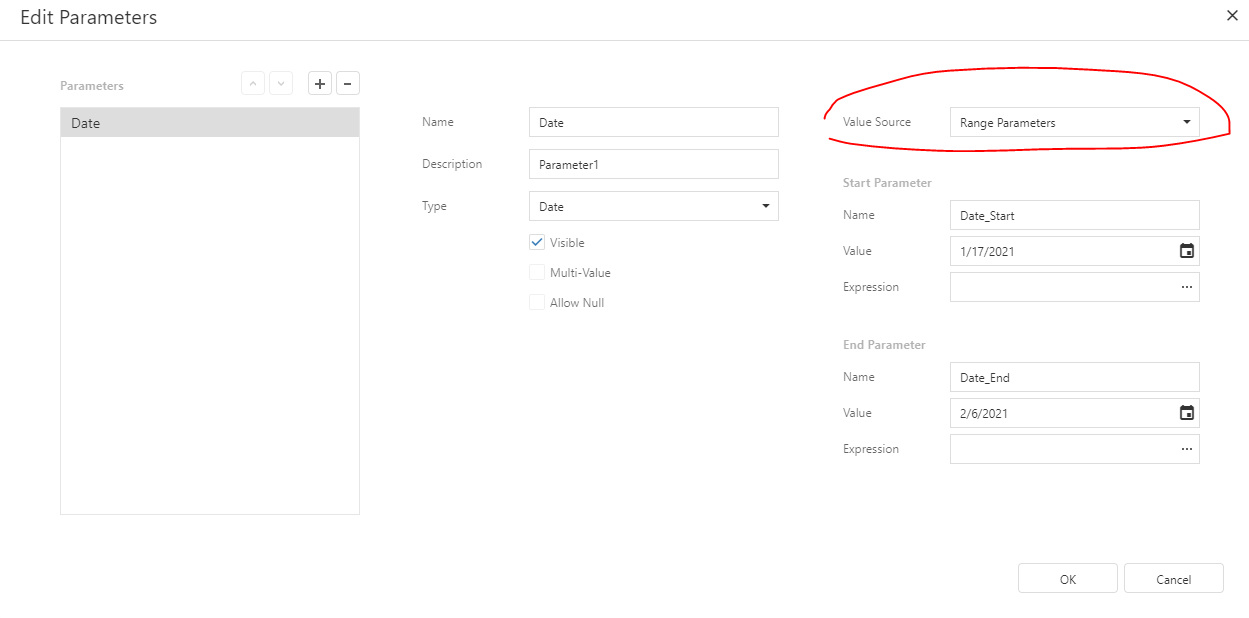
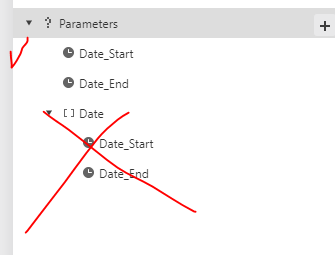
Thank you @Oh, Jenny? . That was a part of my problem. The other part was the date parameter configuration in my report. I had my one date parameter set up with Value Source as 'Range Parameters' - that was a problem. (see attached). But after I create a unique Date_Start and Date_End Parameter, I finally got it to work.
Thank again for your help Jenny!
0
Du måste logga in om du vill lämna en kommentar.
Kommentarer
6 kommentarer