Help on Web Request Actiity

Hi all, I'm tryng tu set headers in a web request workflow activity but I can't be able to do it. No documentation is available for that, so I've tryed with some empiric solutions but it still doesn't work. Anyone can help me?
Thank's
Andrea
-

Hi Andrea,
This attached workflow. It does a Web Request with a custom header.
--Ryan
0 -
I've also just added a few workflows like this to the File > New menu:
- Send Web Request GET Custom Headers
- Send Web Request POST Form
- Send Web Request POST JSON
- Send Web Request POST XML
--Ryan
0 -
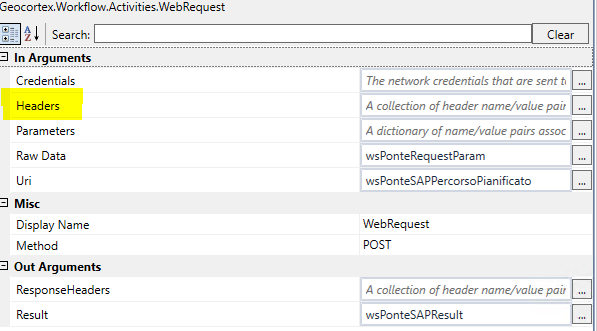 Thank's Ryan, unfortunately I'm looking for server side activity (xaml files).
I'm using Workflow Designer. I didn't understand how to create variable it needs.
Any suggestions?
Regards,
Andrea
0 -
Ahh. It is definitely more involved in Xaml workflows. You have to:
- Create the WebHeaderCollection with an Assign activity
- Then use the Invoke activity to call the "Add" method on the WebHeaderCollection and pass it the name and value of the header.
- Then repeat for each header you want to add.
I've attached an equivalent Xaml workflow. Hope that helps.
--Ryan
0 -
Ryan, It works fine. I was very close but without documentation is very hard to find the right solution.
Thank you so much, I was very helpfull.
Regards,
Andrea
0 -

If, like me, you find the Invoke activity a bit too cumbersome, you can use this directly in the Headers property of the Web Request activity:
New WebHeaderCollection() From { "Content-Type:text/plain", "Accept:text/plain", "HeaderName:HeaderValue", ... }0
Du måste logga in om du vill lämna en kommentar.
Kommentarer
6 kommentarer