Is there a way to query a related table in the "Query Layer" activity?

The geometry is stored in the first layer but the field I am searching for is in another layer with no geometry. This layer is related to the first layer as a table.
Is that possible in the where clause of the Query Activity to query that table?
-

Hi Jenny,
You can use the Query Relationship activity if you know the id of the feature from the first layer and the relationship id. It will return the record from the related table.
0 -

Jenny Oh Did you ever figure out how to get this to work??
Ken Lyon Could you provide more guidance on this? I'm currently trying to use this activity and struggling. I want to query culverts in a district, and then use the Query Relationship to bring out the culverts with a severe condition ratings. Any help would be appreciated!
0 -
Shelley Schulte Do you have links to the layers that you're referring to? I'd need to know the details to be able to give useful feedback. Culverts and districts sound vaguely familiar. Are you using one of Esri's sample sites?
0 -

Ken Lyon we finally go the Query Relationship to provide results. However, the problem now is how do we consume the resulting information from the query relationship activity? Our culvert data is not shared to the public. Please find attached worfklow json file of what we came up with to workaround getting the results out. Is there a better way around this? Ie. Converting it to json? If so, what is the formatting needed to get the json information out.
https://nebraskastategov.sharefile.com/d-sb0869ebcc6374ff7bd4bc066d44b5930
0 -
Hi Claire Inbody,
I had a closer look and I see from the docs that that the format of the "results" output is:
{ [id:String]: esri.FeatureSet }
This means the key matches the id of the relationship (as a string) and the value is a feature set.
In your workflow you referred to relationship 0 (zero).
I think you could just use
=$queryRelationship1.results["0"]
in an expression anywhere that a Feature Set is accepted.
0 -

Ken,
Update:
I did get this to work in this format:
=$queryRelationship1.results[8356].features[0].attributes["Insp_Name"]
I am getting an error when trying to pull a value from the relationship query results. Would this be the correct way to call a value from the query relationship feature set:
=$queryRelationship1.results["0"].features[0].attributes["Insp_Date"]
I have tried several ways, but I believe it always has a problem reading the property
Thanks,
Chris.
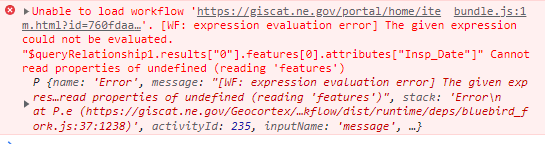 0
0 -
HI Christopher Wiebke,
It might be that the value for the relationship might need to be numeric after all. If the first example is working, then likely the value 8356 is the id of the relationship.
We also have a few activities that can help read attributes from a feature set:
The first one is for getting a value from a single feature. The second lets you read that value from all features in the feature set.
0 -
Ken,
8356 is the ObjectID of one of the rows in the feature class. It is has a related record in the related table, therefore is returned in the relationship query activity results.
Thanks,
Chris.
0 -
Christopher Wiebke Thanks for pointing that out. I should have read the docs more closely:
An object containing zero or more feature sets grouped by object ID.OK, so for a given object ID such as 8356, the value is a feature set.
So, broadly speaking you can query an attribute on a particular feature from the output of Query Relationship like so:
=$queryRelationship1.results[<objectId>].features[<featureIndex>].attributes[<attributeName>]
Where:
- <objectId> is the id of the feature in the layer that was queried. (e.g. 8356)
- <featureIndex> is the position in the array of one of the features in the feature set. (e.g.0, 1, 2, etc.)
- <attributeName> is the name of the attribute you want to read. (e.g. "Insp_Date")
As mentioned above, the part before ".features" is a feature set, so you could use it with any of the activities that accept a Feature Set as an input. The expression in such a case would be something like:
=$queryRelationship1.results[<objectId>]
1
Du måste logga in om du vill lämna en kommentar.
Kommentarer
9 kommentarer