Show Results Error - DataTable to Featureset

I have a workflow that converts a DataTable to a Featureset, then does a Show Results activity using the Featureset, but it throws the error below:
 Clearly there are 96 features in the feature set which the Show Results activity retrieves, but I don't know what to make of the "[WF: activity error] this._graphic.getLayer is not a function"
Any help would be greatly appreciated. Workflow is attached.
-

Hi Sean,
Is it the Essentials (xaml) workflow that does the DataTable to FeatureSet conversion? I don't think I've tested this sequence before but I could check it out.
If we don't find anything else that works, I bet we could at least take that output from the Essentials Workflow and pass it through "Convert To JSON" then "Get Feature Set From JSON" to get a featureset that the "Show Results" activity respects.
0 -
I wondered about that. I also get a SQLResult datatable from the workflow. I could just use the DatatableToFeatureset activity in my WF5 workflow with that result and see if it tastes any better with a locally sourced Featureset. 0 -
Well, I think you meant Convert to JSON which worked. The Show Results is happier, but the results list is wonky:
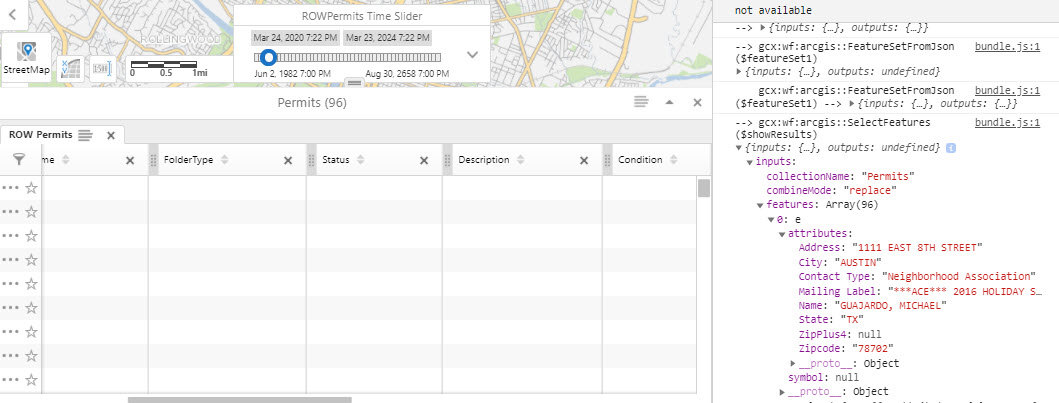 I can see the features and attributes, but the structure seems odd.0
 -
Never mind. I was trying to configure the results to the wrong Map Service ID and Layer ID, so they didn't render in the list. All better now.
0 -
And you said Convert to JSON which I read as Parse JSON, so my bad. The answer was to create the Featureset in the Workflow 5 workflow rather than retrieve one made by an Essentials workflow output. Converting the Essentials Featureset to JSON, then creating the Featureset from that JSON did the trick.
0 -
Don't worry, you probably didn't misread it. I actually wrote Parse JSON when I posted, then edited the post a minute or two later to correct it to Convert to JSON. I always get those 2 mixed up and it took me a minute to realize I had the wrong one this time.
0 -
Ha! Me, too. Maybe they should rename those . . . 0
Du måste logga in om du vill lämna en kommentar.
Kommentarer
7 kommentarer