WF5/GXW Show Results Inherit Display Settings from Layer

I am trying to get a show results to display the result of a query layer and inherit the label and description format from the associated layer in my map. I am using GXW - not an Essentials Map - and I have tried using a Get Layer activity to get the id of the layer and subsequently pass that to the Layer ID input in the show features activity, but I continue to just get the default display for the resulting feature.
The layer that I am querying is a sublayer inside of a grouping in a map service. Is there something that I am missing when feeding that id to the show features activity? The layer ID for the parent group is "Company_Wells_8289" and the sublayer id is "0". Do I need to feed a combination of those two IDs concatenated together in order to get this to work?
Thanks,
Brian
-
@VertiGIS Admin?
Any help or ideas on this?
0 -

Hi @Brian Cunningham?,
You shouldn't need to concatenate the ids for this to work.
If we weren't dealing with sublayers, I'd expect this approach to work:
- In your Get Layer activity, enter the title of the layer in the Layer ID input, e.g. Company Wells.
- In your Query Task activity, use the output layer from Get Layer activity in the Layer input, e.g. =$layer1.layer
- In your Show Results activity, use the output from the Query Task activity in the Features input, e.g. =$query1.results
In your case, though, we have the extra complication of the sublayer id. You can find the sublayer id by loading the service's REST endpoint URL. They should all be listed there. Let me know if you have any difficulties finding that. Worst case, you could maybe use Get Layer to get the parent layer and inspect it to see if it shows the ids of its children.
I hope this helps.
Ken
0 -
@Brian Cunningham? My apologies, I got side-tracked by the question about concatenating ids and now notice that you had already got the sublayer.
It might be that you need to specify Label Format and Description Format to the Show Results activity. It might not be possible to derive that directly from the layer as we do not support HTML, only markdown.
0 -
@Ken Lyon? ,
Thanks for the response; you lead me in the correct direction. I realize now what I had incorrect - I was utilizing the queryURL to query, and not the Layer. After I provided the Layer parameter (from the Get Layer activity), the results from the Query Task honored the settings from the parent layer and displayed as expected.
Thanks for the help!
Brian
0 -
@Brian Cunningham? That's great news! I'm glad to hear you were able to solve it.
Have a good weekend!
0 -

Ken Lyon Hi, we are having another issue regarding this.
We are using the .sublayer but why is it not working when this is used?0 -
Andreas Broothaerts If you have a different issue, it might be best to post a new question as more people are likely to see it. However, you can also reply here if you would prefer.
We will need a lot more information to be able to help you, though. What are you trying to do and what part is not working? What is the outcome?
0 -
Ken Lyon
So we are trying to display our results through a query but we are not getting the domain descriptions when using the sublayer.
Workflow is build in the following way:Get layer activity:
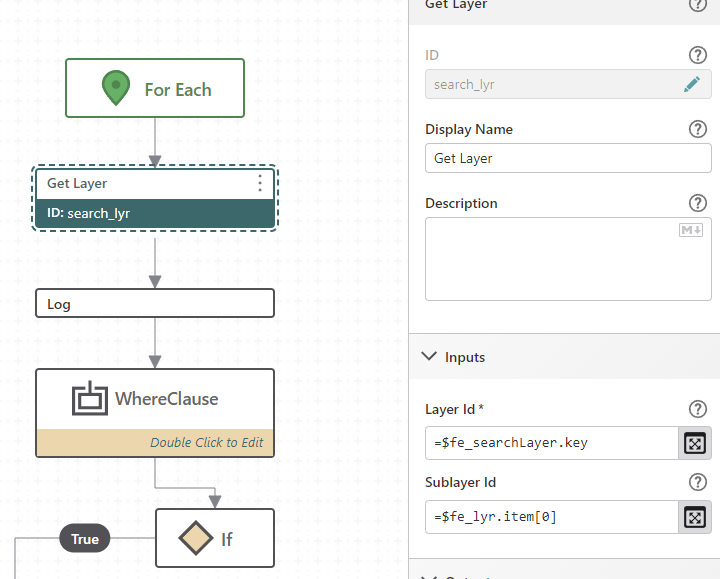
Query activity using result from the get layer activty
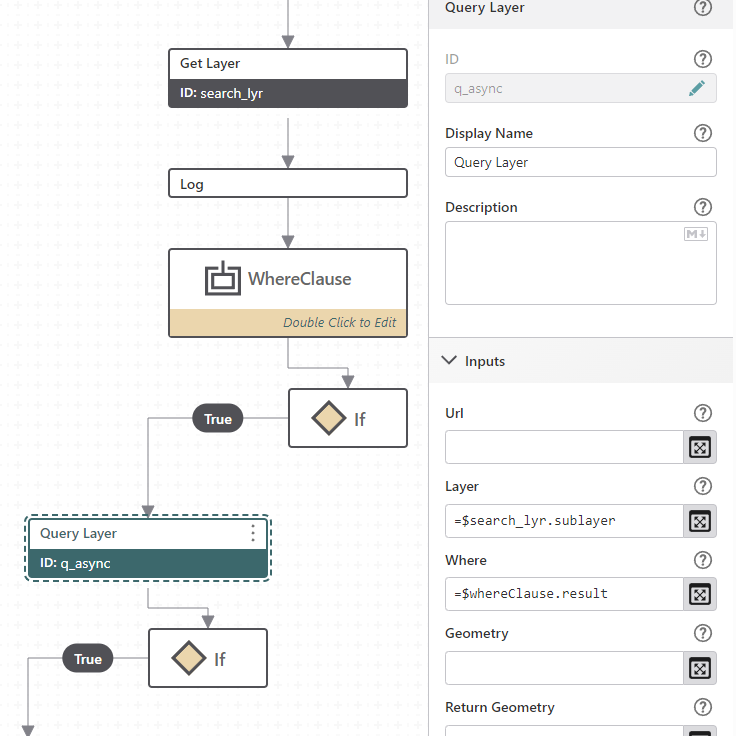
Then results from graphics:
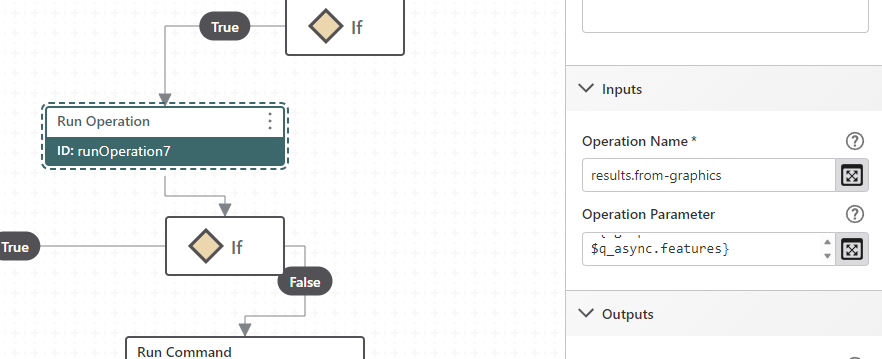
show results or results.display don't show the domain descriptions
0 -
Andreas Broothaerts Thanks for the details. I'm not quite clear where the fault might lie on this one. I wonder if the domain descriptions are meant to be already present in the q_async.features or if that's something the results.from-graphics operation is expected to discover.
0 -
Scott Anderson Could you help clarify this? Should VSW be looking up the description of the coded domains, or is it expected that the supplied features contain that information already?
0 -

It is expected that the results.from-graphics operation would link the features to the layer or sublayer and VSW would then be able to resolve the coded domains as necessary from the source layer.I would suspect that something is not correct in the results.from-graphics operation but its hard to know without a concrete example.
0 -
Scott Anderson
Could you provide an example of how the results.from-graphics operation should look for the results of that query?
Thanks in advance and best wishes0 -
Andreas Broothaerts
Take a look at the result of your query operation and see what you're getting to make sure that you're returning the expected domain values.
Run a Query Layer operation with the Layer parameter set to =$<GetLayerOutput>.layer, the OutputFields parameter set to whatever the name of the field is that has the domain you're looking for, and the Where Clause parameter set to something if you need it.
Then do a log and set the Message parameter to =$<QueryLayer>.results. After that, run the workflow with your browser console window open and see what the output looks like. You'll have to dig through the properties to find what you're looking for, but they'll be there. Expand the fields array, expand the object for the field, expand the object for domain and see what the properties are. If they're missing, then for some reason they're not being returned.
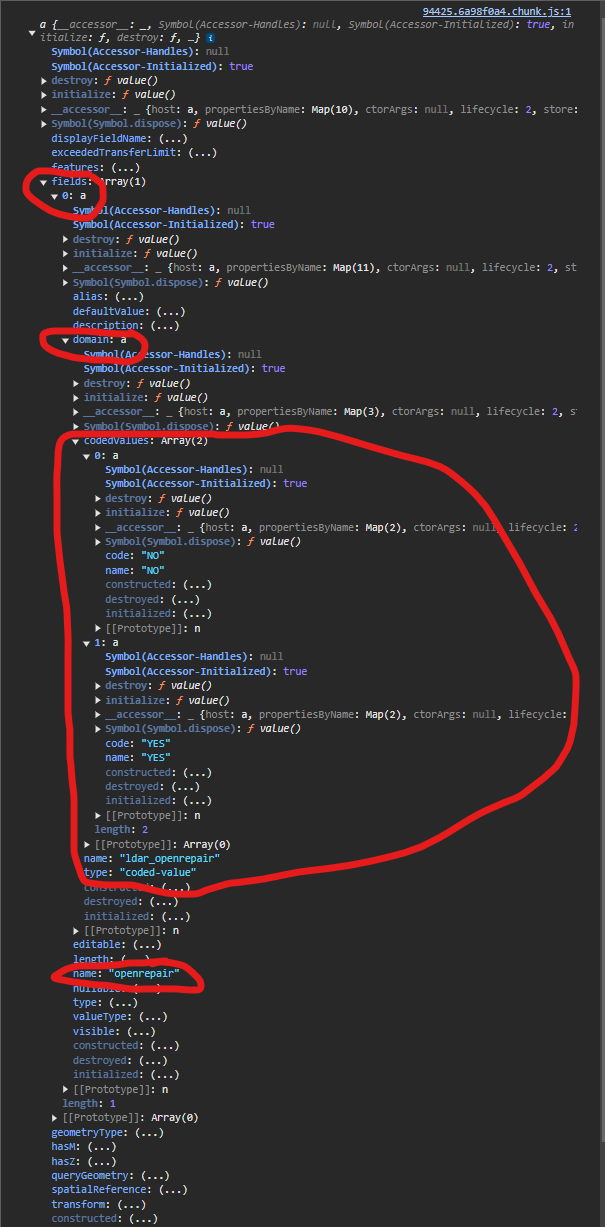
The only other thing I can think of by looking at your screenshots is that in your query you are using the .sublayer property. It's been a while since I've done anything with sublayers, but I seem to recall there being some tricks to getting those to work properly, but that may also have been resolved with a newer release of GFW than when I was working with them.
Double check the properties of your results.from-graphics operation and make sure your Operation Parameter looks something like this ={ graphics:$query1.features}. Then when you run the results.display command it will inherit all of the properties from the queried layer.
Hopefully that gets you some troubleshooting help.
Brian
0 -

Hi Brian,
we've been working together with Andreas on this.
You are right, the issue is that we are not getting the domains in the query results when using sublayers in the query.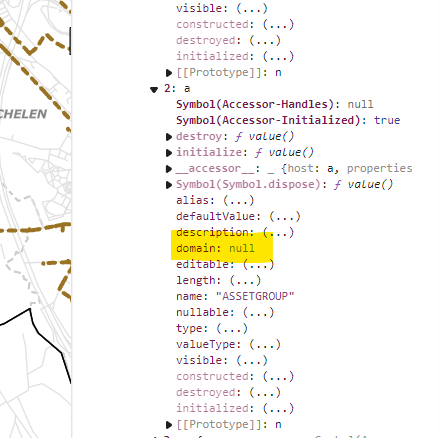
So how can we force the subtypes and domains descriptions into the results? I've tried to give layer and sublayer ids in the results.to-graphic operation but it seems to do absolutely nothing.We have to use the sublayers since the customer wants to have very specifiek layer structure with the group layers in the services
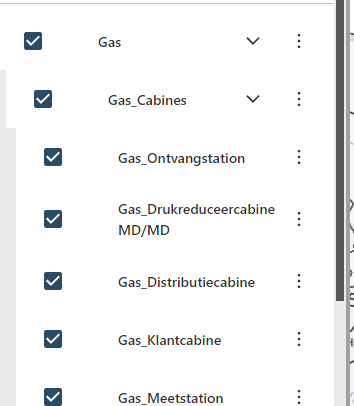
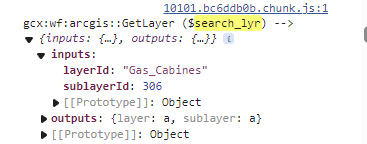
0 -
Good morning Natalia Zheltukhina ,
I believe I may have come across what your issue is. You are using a map service, not a feature service correct?
I created a dummy map service this morning to replicate the grouping layers that I see in your screenshot, and I was also unable to retrieve the domain values.
I then re-published as a feature service, and then inside of the ArcGIS Enterprise (or AGOL) map viewer added the feature services layers to the map and created the layer groupings there because feature services do not support groupings.
Then I was able to dig down into the field object and view the domain properties. Which would make sense because map services don't have editing capabilities, so they can't see the domain properties like a feature service can.
However, this may be a bit more involved than you need to get. When you query the map service, if you set your results.from-graphics Operation Parameter to something like this ={ graphics:$query1.features}, you should still see the coded domain value in the attribute property of the feature object.
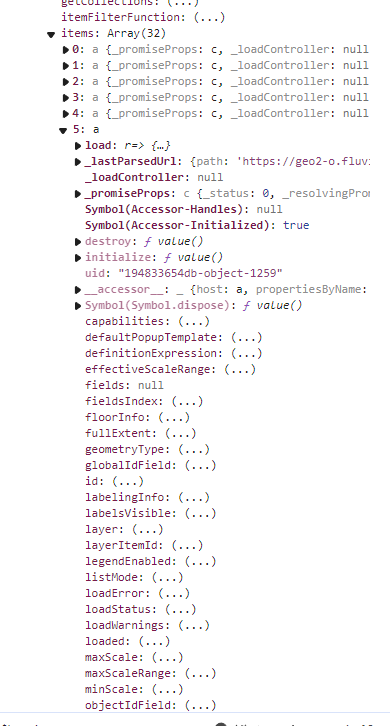
The easiest way to make sure you are feeding your query operation the correct property for the layer query would be to view the list of your layers. Use a Get Layer activity with the Layer Id property being the name of the highest level of the grouping (that looks to be “Gas” for you). Then use a log with the output being =$layer1.layer.allSublayers.items, and run the workflow with your console open. You then get the array of all the layers under that grouping:
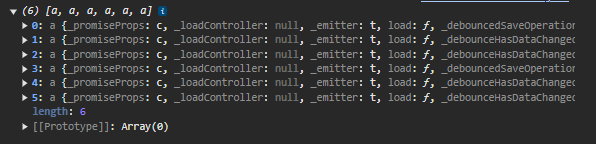
Expand each one of those to find the layer that you're looking for (look at the title property to identify the layer). Then when you run the Query Layer activity, the Layer input should be =$layer1.layer.allLayers.items[<index value of layer>]. When I did that and then ran the results.display command, it honored all of the configurations of the layer.
Hopefully this helps,
Brian
0 -
hi Brian,
thanks a lot for a prompt reply! Really appreciate it :)
i've tried your suggestion but it doesn't seem to do the trick: i still don't see domains in the results of the query. Is it possible that the issue is with the fact we have subtypes as well?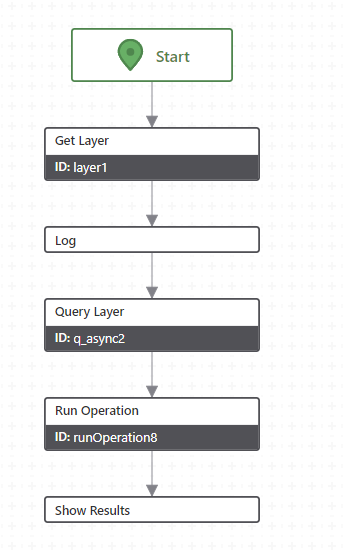
layer1 is this object: i've tried to use the higher level “Gas” or the groups layer from the mapservice “Gas_cabines”
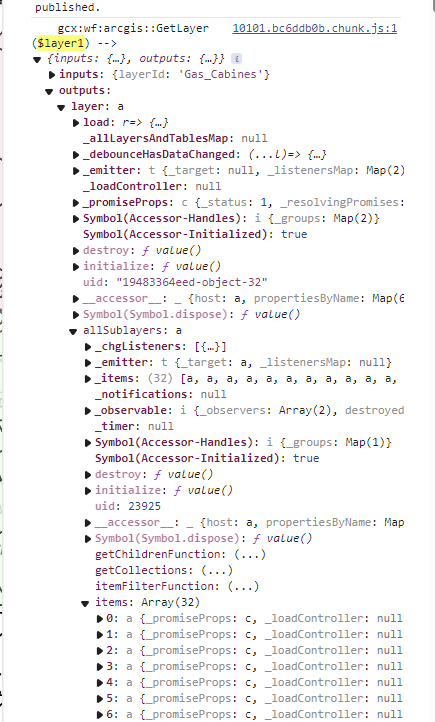
If i look inside one of sublayers i don't see fields/domains there, generally i can't find the schema of the layer, so i have the feeling that the issue is already here and not in the query activity
Anyhow i still tried to query the way you had suggested
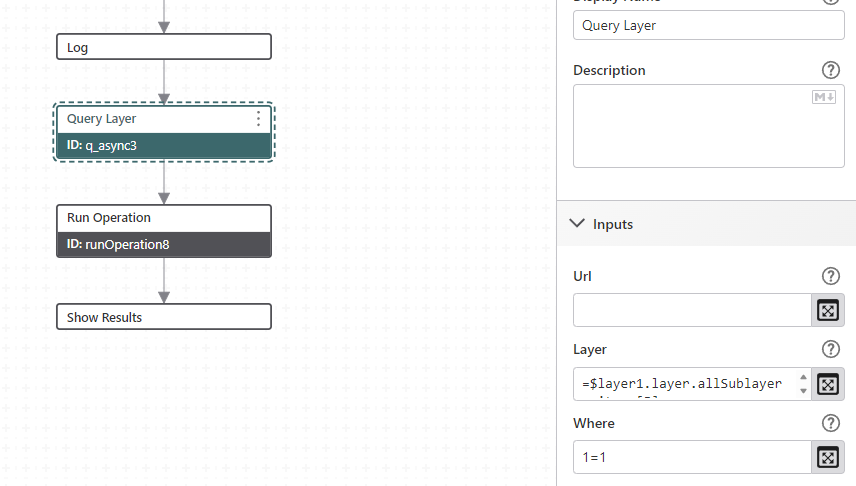
And results don't contain domains :-/
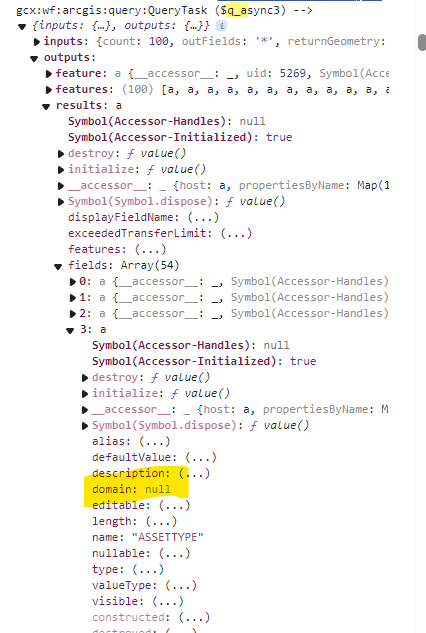
We indeed are working with the mapservices in the map, not feature services.
For another task I already had to add some of the extra layers into the viewer just for quering purposes, which is super annoying since it's UN layers so they are really heavy (something which in HTML5 we would not have to do because we would have just queried the service by url and got domains by setting up the mapservice ID and the layer ID;). I'd like to avoid adding the layers which already exist in the map second time as feature services this time just to be able to get domain descriptions…0 -
Hmm… Subtypes. You might be hitting on something there. I am now seeing the same behavior as you after adding a subtype.
This appears as though it may be an ESRI issue and not a VertiGIS issue. I found this post below, and multiple others with people experiencing the same behavior:
That post has some solutions/workarounds that seemed to work for others, but I could not get any of them to work for me. It may all be dependent on what version of Pro you're publishing from and what version of Portal you're publishing to.
One of the things that can be a workaround would be to change the domains to text-based coded value domains rather than integer-based, and then set the code and the description to be the same text. That way when ArcGIS Server returns the code, you're getting the same text. But that could be a pain if you have to go in and redesign your tables and change fields from integers to text. This does not solve the issue for displaying your subtype field though, as subtype fields have to be integer based.
Best of luck!
Brian
0 -
thank you Brian! i'll check the ESRI forum
0
Du måste logga in om du vill lämna en kommentar.
Kommentarer
18 kommentarer