SaaS Web Viewer Errors

Anyone else getting errors consuming web viewer apps this am in AGOL?
URL like: https://apps.geocortex.com/webviewer/?app=c14a6a82277c40e08a1fc9eecf42c456
Gives this message, after it asks you to sign in even though I am already signed in.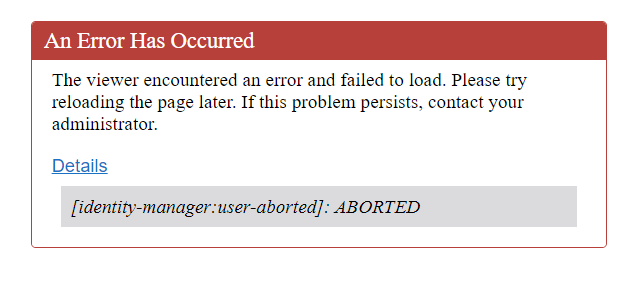
-

Hi Ryan,
I'm not seeing that error myself. Do you still see this error when loading in a different browser?
Thanks, Stefan
0 -
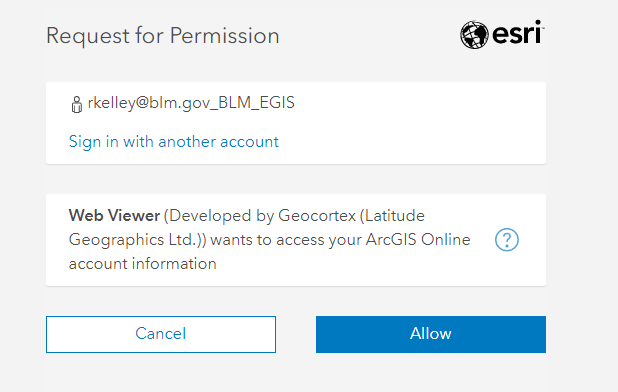
I am using Chrome and it looks like it is not even supported in IE. Before I get the error I posted above, I am asked to use the login option you guys are providing like this. Again, already signed in.
 0
0 -
Hi Ryan,
Yes, IE is not supported; Firefox or Edge are.
That login presents for your user account to gain access into Web. The error that you are seeing suggests that there might be additional secured services that aren't correctly being authenticated against.
Can you provide some details about how your viewer and web map are secured? Has this changed recently and was working previously? I'm not able to load your viewer as it appears to be internal.
Thanks, Stefan
0 -
I get the same issue when using a default web viewer using the Web GIS Expanse template, using your data for "Capital City" / Victoria. No mods. So, not the web map or a secure service thing as I see it. I don't when this stopped working, as we don't typically use the launched app url, just the designer url (which is fine). This is all SaaS, so we don't do much tinkering on the config side of things.
0 -

Hi Ryan,
Are you getting the same login dialog and error when loading just https://apps.geocortex.com/webviewer/?
If you do, would mind loading just that URL in Chrome incognito window? Before doing any sign-in, can the default app load okay for you?
Then repeat your normal sign-in process. Please let me know if the error still persists in incognito window.
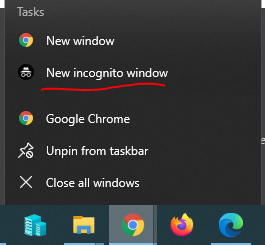
Thanks, Pairin
0 -
I can access this without issue https://apps.geocortex.com/webviewer/
I can even Sign In using the same 'Allow' window I posted above without issue.
But as soon as I append that ?app=7f6fbc261a3a4be3a7db4583de971cc0 it fails with the login. In the federal government in the US, at least my agency, we can't use the Incognit window.
0 -
The "[identity-manager:user-aborted]: ABORTED" error you got there seems very strange. It's indicating that your log-in process was terminated at the some point (like when 'Cancel', 'X' button in 'Allow' window is selected).
What is the relationship between your signed-in user and the app=7f6fbc261a3a4be3a7db4583de971cc0? Are they in the same organization? OR the app lives in different Org from the user and is shared between org ?
It's a bit tricky to know the reason behind the scene. Is it possible for you to share a testing account that shows the same login error? That would be really helpful.
Thanks, Pairin
0 -
These apps all live in the same org. I am the user who owns the item that does not launch properly. Our AGOL is not open to anyone outside of our agency, so I can't grant access. How do you suggest we proceed? Ticket?
0 -
The last shot that may be worth giving it a try on your end:
- Press F12 key in Chrome and clear out all the Oauth keys/values of https://apps.geocortex.com/ in your browser's Local Storage and Session Storage (OR easier way is to clear all "Cookies and other site data", but this will also sign you out other sites)

- Do a hard refresh/reload for https://apps.geocortex.com/webviewer/?app=7f6fbc261a3a4be3a7db4583de971cc0 >> sign-in >> click 'Allow'

It will ensure that you sign-in token is a fresh and valid one.
If it still doesn't help, please feel free to file a ticket with our support.
Cheers,
Pairin
0 -
Thanks Pairin,
I tried all of that and still no love. I'll open a ticket.
0 -

Did you ever figure this one out? I'm seeing the same error, but using on-prem install of VertiGIS Studio Web and ArcGIS Enterprise.
0 -
I can't find any notes on this one sorry... We did get resolved though, and may have been on the vendor's end of things. I'd open a ticket to assess.
0 -
I actually figured it out now - for me it was missing the urn:ietf:wg:oauth:2.0:oob part in the ArcGIS Enterprise app-item for registering VertiGIS Studio Web on premises. It did work on my laptop without it, but not on tablet and mobile.
0 -
Oh nice. I don't remember that being our issue, so may have been different for us.
0
Du måste logga in om du vill lämna en kommentar.
Kommentarer
14 kommentarer