How to set max and min programmatically in a Number Slider?

I'm trying to set the Upper Bound and Lower Bound values of a Number Slider dynamically.
The documentation says the properties are called "Upper Bound" and "Lower Bound" and I would like to dynamically configure it based on a previous workflow.
I tested it using "max", "min", "maxLength" and "minLength" and none of those work. I also tried "Upper Bound" and "Lower Bound" (which sound weird to me) and of course it doesn't work.
Does someone knows how the properties are called?
Thanks in advance!
-

Victor,
I assign the properties of a number slider with this JSON using an expression evaluator. I am creating all of my form elements on the fly though, so the method of applying this may be slightly different than what you're trying to accomplish.
={
"format":{
"upperBound": `${$lineLength.result}`,
"lowerBound": 0,
"precision": 2,
"step": 1
}
}
0 -
Nelson is on the right track. For reference, I've included a workflow that shows how to dynamically set the Number Slider based on some inputs.
https://latitudegeo.maps.arcgis.com/home/item.html?id=76bb9cef9027475d8dea2764e7fba61e
There is a load event on the Number Slider form element that uses the Set Form Element Property and sets the following Json object for the format property.
={
lowerBound: $lowerBound.result,
upperBound: $upperBound.result,
precision: $precision.result,
step: $step.result
}
Where everything that has a $ is a variable/user input. These can be replaced by hardcoded numeric values as well.
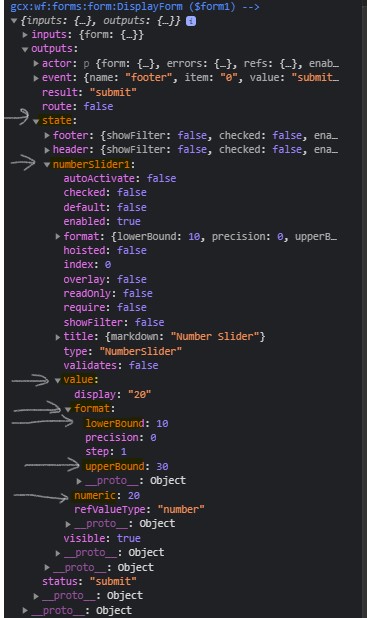
For reference, if you are wondering where these Json properties can be found, you can view them in the Console logs (Verbose logging enabled) after the form has been submitted. I've included a screenshot below.
 1
1 -
Thanks to both! It works!
Problem ist that I need to refresh it base on another selection. I'm using the change event of a dropDown and setting there format of my slider. But it seems it doesn't work.
Here an example of my Set Form Property Activity:
Element
=$querySubstanceForm.state.concentrationSlider
Property
format
Value
={
 lowerBound: 0.001,
 precision: 3,
 step: 0.1,
 upperBound: $queryMeasurements1.feature.attributes.max_value ?? 1
}
It seems to be that the slider is not updated automatically, so I do the following:
- In the change event of the dropdown I set up the visible property of dropdown to false
- I get the values I need
- I set the format property of the slider
- I set up the visible to true
It works the first time, after that it doesn't work, the slider is not updated :(
Do you have an idea? Is there a way to force a refresh?
0 -
Hi Victor,
I've updated the workflow so that it updates the format properties (lowerBound, upperBound etc) from a drop down change event.
I've included some screenshots below for reference:
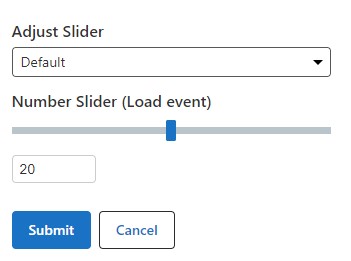
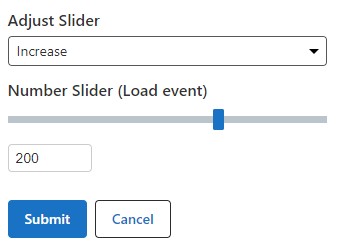
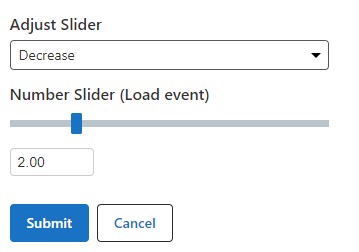
Perhaps there is an issue with setting your upperBound using the ?? 1 syntax (I've never used that before).
0 -
Hi Patrick,
I found the Issue: the number slider will be updated when the default value is also set. If not, slider will keep the previous format properties.
That was mainly the reason why mine was not updated. You're setting it up in your example and that gives me the hint.
Thanks for the support!
0 -

May have found a way that this does not work. I have a checkbox toggle that changes the visibility of the slider. If the slider is visible setting the value works and the slider handles move to the correct values.
However, if the slider element is hidden and then set to visible again (without submitting the form), setting the slider value from another form control fails to update the slider's visible controls. I can check the value in the console and it has changed, but the slider handles and the input boxes do not update.
Deployment: HTML5 Viewer
Workflow: 5.24.0
Process:
- Checkbox that toggles the visibility of a number slider
- In the checkbox change event toggle the number slider visibility based on the checkbox check value.
- If the checkbox is checked set the slider value.
- In the console the slider value will look correct but the form UI is not updated. The handles and inputs are at the min/max values and are not updated to match the value.
I was hoping setting the format and then the value would fix this behavior but it does not. It seems to work fine as long as the slider's visible state is never toggled off and then back on.
0 -

Hi @Tyson Schoepflin? I think we could consider that a product bug. Please email us with these details and a copy of your workflow to support@geocortex.com and we'll work with you to describe this bug and ideally find a workaround.
0
Du måste logga in om du vill lämna en kommentar.
Kommentarer
7 kommentarer