Run Geoprocessing (asynchronous) activity - Argument?

We are trying to use the Run Geoprocessing (asynchronous) activity. However it appears we are hung up on the argument that the activity wants. In the sample workflow it is passing in default parameters. Its not passing in something from a display form etc.
Sample example:
={ Query: "(\"DATE\" > date \'1998-01-01 00:00:00\' AND \"DATE\" <date \'1998-01-31 00:00:00\') AND (\"Day\" = \'SUN\' OR \"Day\"= \'SAT\')" }
Our example:
={ 'Enter Control Number': "(\"CONTROL_NO = \'$form1.state.autoComplete1.label\')" }
We have tried this as well:
={ Query: "(\"CONTROL_NO = \'$form1.state.autoComplete1.label\')" }
With no luck, it seems like the geoprocessing tool is just passing in the default value and not the submitted values from our form.
Any help appreciated!
Thanks,
Claire
-
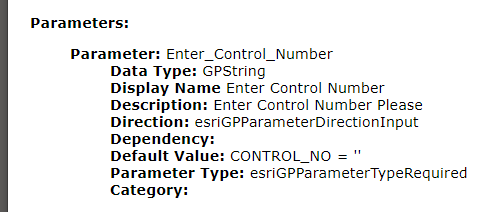 We were close, but here is the correct syntax:
={
"Enter_Control_Number": `CONTROL_NO = '${$form1.state.autoComplete1.label}'`
}
0
Du måste logga in om du vill lämna en kommentar.
Kommentarer
1 kommentar