How do you dynamically populate a dropdown list from two different features?

I'm trying to dynamically populate a dropdown list in a subworkflow using two different features. I have set the first Set Form Element Items Activity Reset value to "true" for adding the items from the first query and set the second Set Form Element Items Activity Reset to "false" for adding the items from the second query. The items from the second query are the only values that appear in the dropdown list. Am I doing this incorrectly, or is there something I'm missing in the configuration?
Thanks,
Frank

-

Hi @Frank Martin? ,
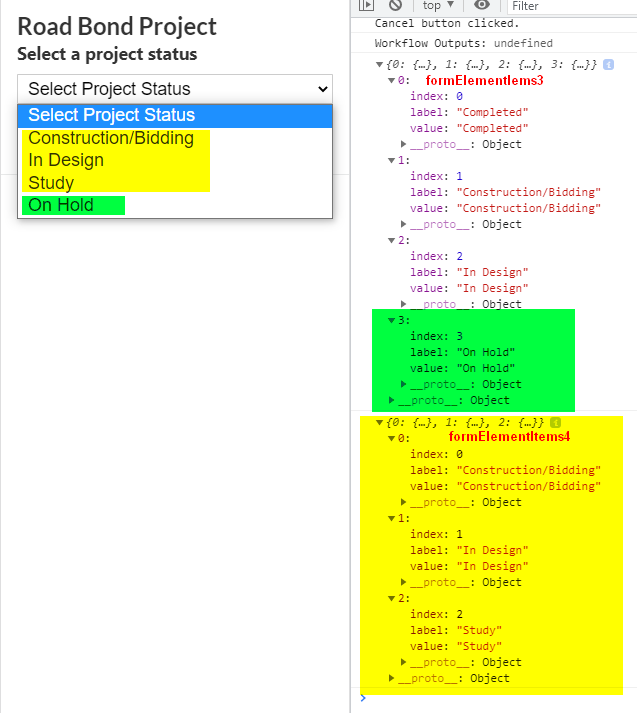
I think you have the right idea with the reset input. The problem seems to be that when new items are added, they are added based on the "key" value, which I think is probably "0", "1", "2" etc. when you use Get Form Element Items From Features. I think that your second set of results are overwriting the first. One way to test this theory would be to ensure the second query returns less results than the first. I expect you would see some entries replaced and other still there.
I think you'll need to somehow edit $formElementItems4.items to use different keys. Unfortunately, that's a bit tricky. I'm thinking of something like:
- Copy the contents of $formElementItems4.items to a separate object.
- For each item in (the new object)
- Delete the item with that key from $formElementItems4.items.
- Add the same feature from (the new object) to $formElementItems4.items using a different key (maybe with a text prefix on it).
- Pass the updated $formElementItems4.items to Set Form Element Items.
0 -
Hi Ken,
I tested your theory, and you are correct. The second set of results is overwriting the first set of results. Based on the Reset description documentation for the Set Form Element Items activity, I thought it would work something like the HTML 5 Select Features activity Combine Mode for Union and Replace settings. Was the the intent of the Reset function to be able to combine items from multiple sources?
Thanks,
Frank
0 -
Is this a bug in the Set Form Element Items activity?
0 -
Hi @Frank Martin? ,
I think it's more of a limitation with the way we track the items in the collection, although the distinction might be more academic than anything else.
As far as Set Form Element Items is concerned, it doesn't know that the assigned keys of "0", "1", "2" were automatically added rather than being important. It therefore replaces the existing items. Similarly, Get Form Element Items From Features doesn't know that its values will be appended rather than replacing the existing ones.
Maybe a workaround could be to manually go through the output of Get Form Element Items From Features and give it new ids that won't collide with the existing ones. Admittedly, this is not ideal. However, it might get you unstuck.
0 -

@Ken Lyon? @Frank Martin? - Would using the Add Items activity be helpful here? Take the second query results and add them to the collection you have established from your first query?
0 -
Hi @Nelson Dobbs??,
Yes, that sounds like it would work. Good idea!
0 -
@Nelson Dobbs? ,
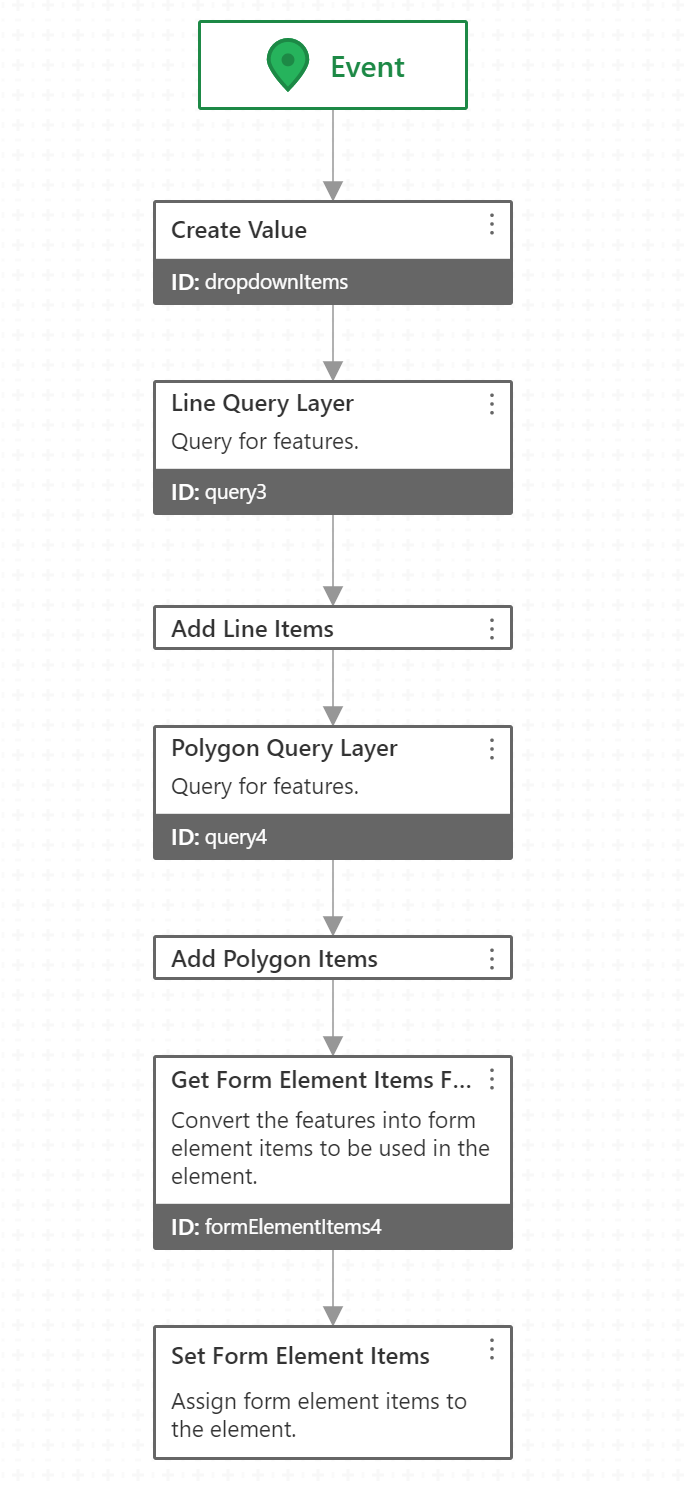
That was a great suggestion. I created a collection, added the features from each query to the collection, and then was able to use the Get Form Element Items From Features and Set Form Element Items to populate the dropdown list. One thing to consider is the attribute name and value that is being used for the dropdown. In this case, both feature sets contained the same attribute name, so it was not an issue. Thanks again for the suggestion. Community at work!
Thanks,
Frank
0 -
 0
0
Du måste logga in om du vill lämna en kommentar.
Kommentarer
8 kommentarer