Understanding Search in Geocortex Web

Some recent questions on the Geocortex Web (GXW) community indicated it was time for a good summary of how search works in GXW, and why. This will help everyone better understand search, and to be able to verify behavior they are observing against this description.
Many of the questions and reports were about substring matching. This was not enabled in GXW and caused confusion as substring matches were returned as part of Esri’s standard map viewer search results. At 5.13 substring matches are now included in search results in GXW, and this should resolve most of the confusion expressed in the communities.
GXW supports literal string searches by enclosing the search term in “”. This works well if you know exactly what you are looking for but is very unforgiving as it must match exactly. If I search for “1117 wharf street” any record containing that exact string will be returned, and with a very high rank. If I get the search string incorrect, I will get no matches. “1117 whart street” “1117 wharf st” would both fail to match.
Modern search engines take the information entered by the end user and break it into a set of search terms which are evaluated, and the results ranked. Entering 1117 wharf street into the search box will cause three terms to be evaluated: 1117, wharf, and street. The mathematical theory behind how this evaluation works is generally known as TF-IDF. In simple terms, the more often the terms match a record the higher the rank for that record. This is balanced by inverse document frequency which de-emphasizes common strings (e.g. ‘the’) and gives increased importance to unique strings.
Substrings are also evaluated and found but will have a lower rank that non-substrings. For example, if I have a record with the string ‘Michael’ in it. A search for Michael will return a higher rank than a search for Micha (leading substring) which will return a higher rank than a search for chae (interior substring).
In our industry, location matters, so the ranking of results also takes location into account.
If location services are enabled on the client, results closer to the user location are ranked higher than similar results further away. If there is a chain of coffee kiosks called Serious Coffee and I search for coffee, the kiosk closest to my location will be returned.
Even if location services are not enabled, location is still considered. If I search for coffee, a record within my current map extent will receive a higher rank than a record outside my current map extent.
TF-IDF evaluation against the search terms, and location are blended to give a result an overall rank. The order of search results displayed in GXW is determined by that rank.
A few other things to be aware of:
Search will not return results from layers that have had their visibility toggled off (programmatically or via layer list).
Search will return results from layers that are set to be visible in the layer list, including layers that are not currently visible because of map scale. (e.g. The Parcels layer may be set to visible, but may not be visible due to map scale; they will still be searched).
Search respects the isSearchable setting that you have control over for layers, and individual attributes in GXW Designer. You can choose to exclude certain layers or attribute fields from participating in search.
Search respects layer definition expressions (filters) configured in the webmap. Specifically, if you’ve use a layer definition expression to remove certain records, those records will not be returned by search.
A search term that looks like a number (e.g. the 1117 in 1117 wharf street) will be used to search against numeric fields of records, but must match exact numeric value. Said differently there is no concept of ‘close enough’ when searching numeric data. Search is smart enough to ignore thousands separators, and also smart enough to take locale into account. Search is also smart enough to accommodate the match to the precision displayed in the user interface for floating point values.
Date type fields are not searched by GXW search.
Geocode suggestions are automatically enclosed in “” when selected to make it more likely you will get that exact record as your search result.
Geocode results are also ranked numerically, but this is done in Esri code, not in GXW code, so you may see some discrepancies in ranking of results between Geocode and non-geocode results.
-

😑 Thanks for the explanation but users are not fans of the "quotes" around the search string especially since this did not work that way in GVH.
1 -

We have an issue with the quotes as well in Web 5.13.0. The geocoder does not work when the suggestion is enclosed in quotes. If the quotes are remove the entry is found. Searchability is turned off for all other layers. Is this a problem with the geocoder not being able to interpret the quotes or a Web issue?
0 -
@Frank Martin?
No need to add quotes to the geocoder. If you want to search a layer and not use the geocoder then you currently have 2 choices (1) Add quotes to your search ( ex "123 Main St") or (2) use a custom workflow. I would not mind if the regular layer search would work the way that it did in Geocortex Essentials NO QUOTES 😎 I think that's in the plans later down the road.
2 -
Thanks. We're not searching any layers in the map. We're only using the geocoder. The Web map is adding the quotes to the selected suggestion from the geocoder when the search is initiated.
Suggestions from geocoder:
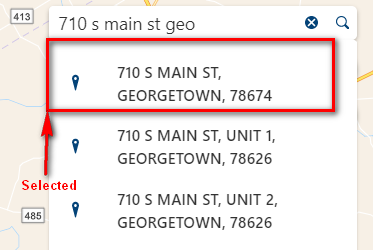 After selection:
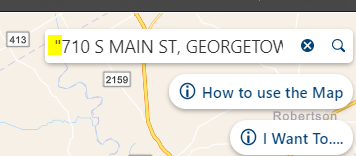 The quotes seem to be added one the suggestion is picked. If I manually delete the quotes and then execute the search, the address is found as expected. It's puzzling that the quotes are being added automatically.
 Thanks again,
Frank
0 -
The geocoder was auto-adding quotes last time I messed with it . Didn't know that you could remove the quotes. if you are getting unexpected results I would check with support. Perhaps a bug? As an aside looks like all 3 of those addresses are in Georgetown since Weir 78674 is overlapping with the larger Georgetown zip. I thought we were the only ones with these types of situations...
0 -
@Frank Martin? We auto-add quotes to geocoder suggestions to ensure you get an exact match (generally this means you get back a single result).
I just did some quick sanity checks in 5.13 and with Esri world geocoder things work as I would expect.
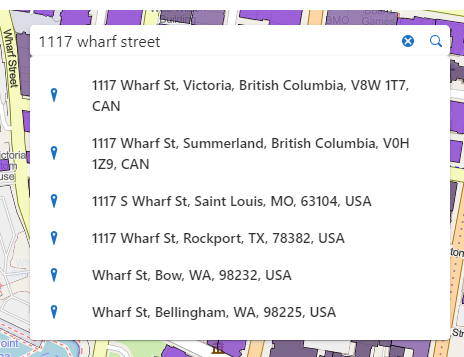
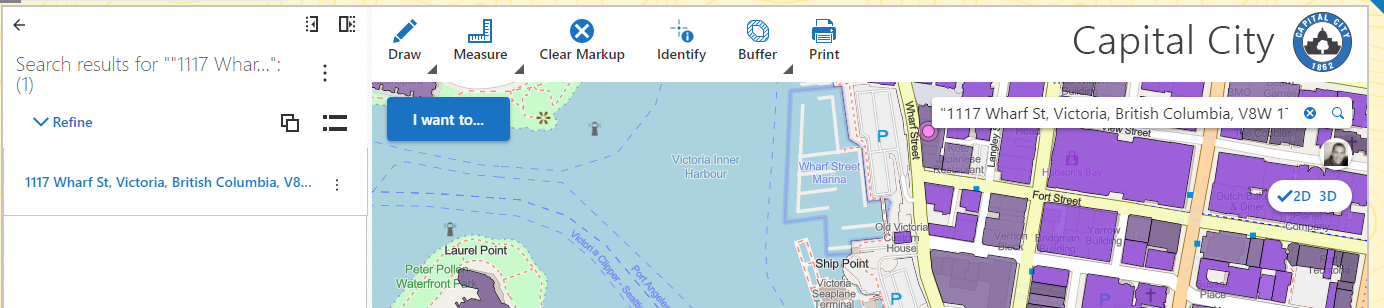 The reason we enclose geocode suggestions in quotes it to ensure you get 'exact match' behavior ... see my example where quotes are removed and string is treated as a set of tokens.
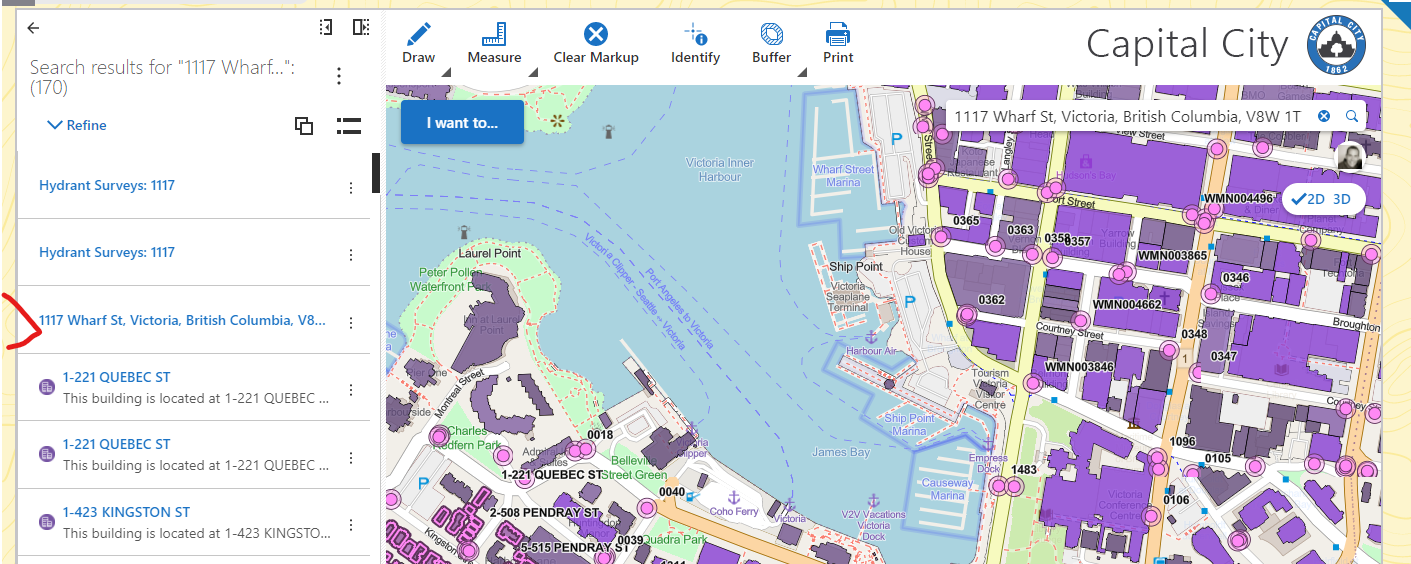 The "quoting" of geocoder suggestions has been there for several versions now so I don't think that is the source of the issue.
Is it possible that in your geocoder configuration the suggestion is configured differently (different order, subset of fields) than the actual geocoder result? That might cause problems with 'exact match' and would explain why the results are returned when you don't "quote" the suggestion.
0 -
Hi Cam,
Unfortunately, we don't use to the Esri world geocoder. We have our own Esri geocode services and auto-adding the quotes does not work with them. We have filed a case, and support filed a bug #47115 to look at make adding double quotes optional/configurable since the quotes do not work for all geocoders. We used instant search with an address layer in Essentials, but with that not available in Web we need to be able to use the our geocoder.
Thanks,
Frank
0 -
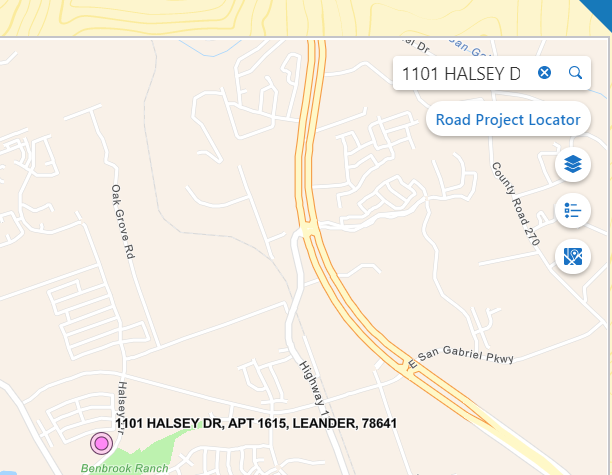
Sorry, I forgot to mention that if the quotes are removed from the selection "1101 HALSEY DR APT 1615, LEANDER, 78641" -> 1101 HALSEY DR APT 1615, LEANDER, 78641 and then submitted to the geocoder, our geocoder is able to find the address and location.
 0
0 -

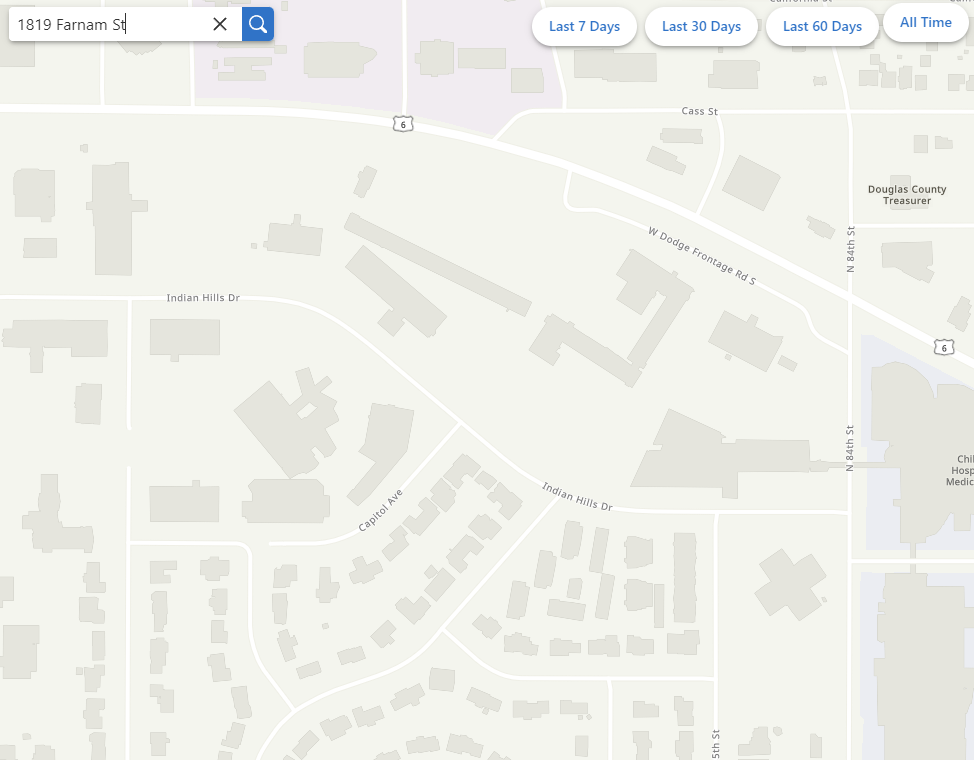
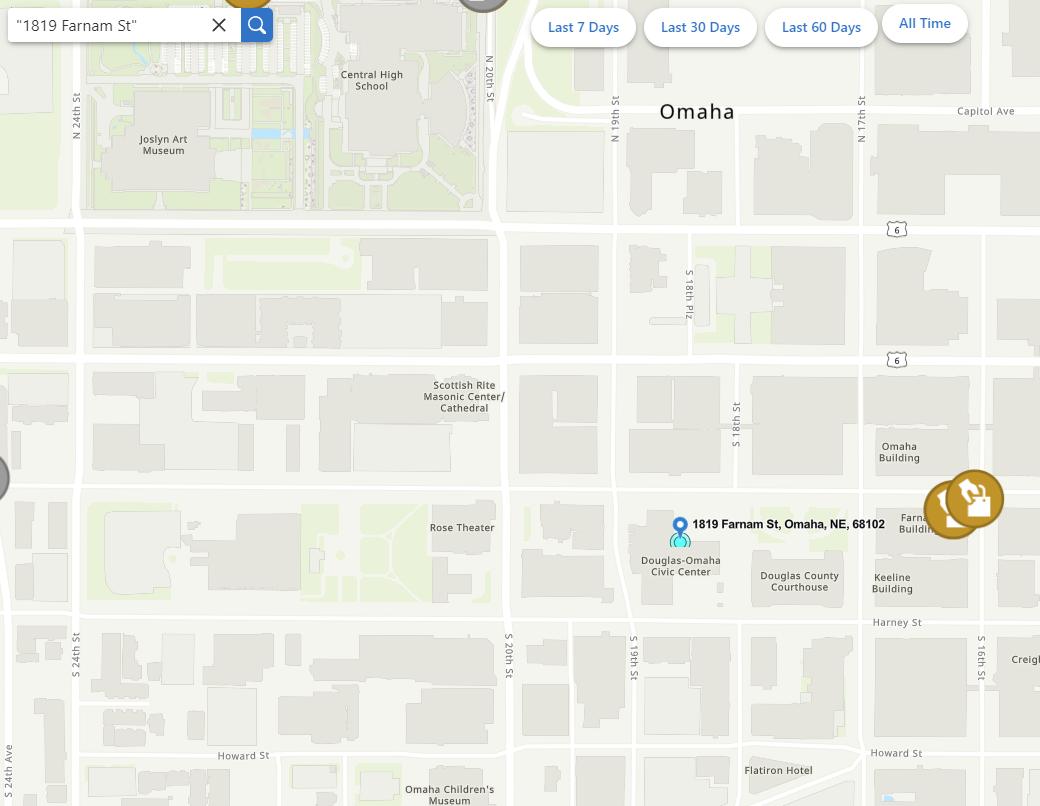
I've found the Search doesn't automatically add quotes if we hit Enter to execute the search, it only works if we click on a suggestion. I've tested this withour own geocoder as well as the ESRI world geocoder.
How can I make the search take whatever user input, and then automatically add the quotes so they get a result?
Example (when I hit Enter with no quotes):
Example (when I hit Enter WITH quotes):
 0
0 -

Hi there!
I just wanted to post my thoughts here (and a few other threads!) on search:
With the Esri 3.x api retirement we have been researching, planning, and testing VertiGIS Studio web functionality vs our current deployments of Essentials. We want to make sure we can give users at least the same functionality they have in Essentials with a new VSW application.
Currently, within our Essentials app, the users input what they wish to search on in the Global search input and it go through the geocoder and designated fields within many map layers and returns relevant results. However, when I do the same setup (geocoder + specific layer fields) in VSW it returns many seemingly irrelevant results.
After some searching, I found this thread here and it appears that VSW evaluates the input and returns results a bit different than Essentials.
One simple scenario is a simple intersection search that our users perform very regularly. In Essentials, the users would simply input ‘SW 6th Ave & SW Main St’ (without quotes or anything else) hit return and essentials would prioritize the geocoder and it would return a few results stating that they are form the geocoder and they click on usually the top result, it zooms, done.
That same scenario in VSW will produce many results (with the same geocoder + layer search fields defined) because it’s searching on “SW”, “6th", “Ave”, "SW”, “Main”, “St”. We have an open text “Description” field that must be searched by our users that often has lot of values like the ones above but aren’t truly relevant. Essentials didn’t search this way, so users weren’t presented with those many potentially irrelevant results. VSW will produce many results with many ranked above what appears to be the geocoder result (because there might be a “SW” and an “Ave” mentioned in that aforementioned “Description” text field), unless the user either puts the entire search string in quotes or selects from the suggestion drop down.
This really isn’t the search experience we were planning on for simply moving from Essentials to VSW. I just want to verify that’s the intended search experience in VSW and if there are any other ways I can help narrow down results for the users (aside from quotes and search suggestion picks) or if there are any plans to change the VSW search experience.
Thank you!
-andrew0 -

Hello. I have a composite geocoder that I built in Pro, that has the intersection connectors defined in the match options as "and","&","@","\","/","|". In Pro those all work, but in my VSW site it recognizes all of them except the forward slash, "/".
A lot of our users are accustomed to using / from our old Silverlight viewer, so they're going to be upset if it doesn't work in VSW. Is there a way to make the Search recognize "/" for intersections?
0 -

Adding my support behind making enclosing feature layer searches in quotes either a configurable option or not required at all so it mimics the behavior of search in GVH. Our users have been using Geocortex for over a decade and are use to how search works, I will be fielding countless emails and phone calls from people asking why search isn't working because they don't remember to use quotations.
3 -

Since any changes to the out of box search tool will displease someone (i.e. quotes around geocode text or not, this type of prioritization or not, etc.), can we make the search tool more customizable to best fit our specific needs for a given layer?
I know that I can create a workflow that taps into the “search” event, by which I can rewire the underlying commands. However, the bottleneck I've run into is understanding what can and cannot be altered with the arguments that feed into the tasks.search command.
In my particular case, I'd like to disable the geometry intersection operation that occurs when performing a search. While that's great for locating the closest XXXX near me, it becomes problematic when searching for a particular water well (ID# ABC123) across an entire state. The geometry intersection operation runs extremely slow as it runs against all 900,000 water wells to find 1 record. The same search without the geometry intersection operation takes under 3 seconds.
It seems at this point, it may be best that I created a custom workflow (or custom command??) for just water wells and use the search tool for geocoding purposes or other layers that fit into the specs that the search tool was built for.
2 -
Mike Diss-Torrance If you are going to go the Workflow route, you might even want to bypass search altogether and simply use the query command directly. If your app is fairly restricted in what you are searching for, reducing the # of search results to be returned will help tremendously. As an example, if you set max search results to 1, the algorithm will immediately stop once it finds something rather than continuing to search in larger and larger extents.
0 -
That's the direction I'm leaning towards.
However, just to confirm, is there no way to pass in an empty geometry into the tasks.search operation, so that the underlying query is just based on the search text?
One of the properties of the SearchArgs is searchArea which indicates that “If specified, results are limited to features that intersect the geometry”. I assume if none is provided, it uses the current map extent.
0 -
Mike Diss-Torrance …. hmmm … makes me wonder. Leave it with me for a day or so and I'll see if I can jimmy up a new command chain that might work better for you.
0 -

Hello Cam Barnard, I would like to ask if you had anything more to add on Mike Diss-Torrance's potential work around. I have a similar problem with our parcels layer (~2.4 million records) and would greatly appreciate a way to exclude the geometry from a search for this layer. Or, perhaps, a way to take the search text from the "SearchArgs" to build a query for just this one layer which can then added to the results pane. Thanks.
0 -

I've been trying to configure the search by using the tasks.search arguments.
The default “disableSearchAreaExpansion” (= false) makes everything much slower and is makes our ArcGIS Server reach it limits. There are a lot of layers to be queried.
Setting “disableSearchAreaExpansion” to true made it much faster, but it only uses the current map extent. This behaviour is not what we want.
Nice plus: with “
maxResults” we could get more than the maximum of 200 results that you can configure within VertiGIS Studio Web Designer.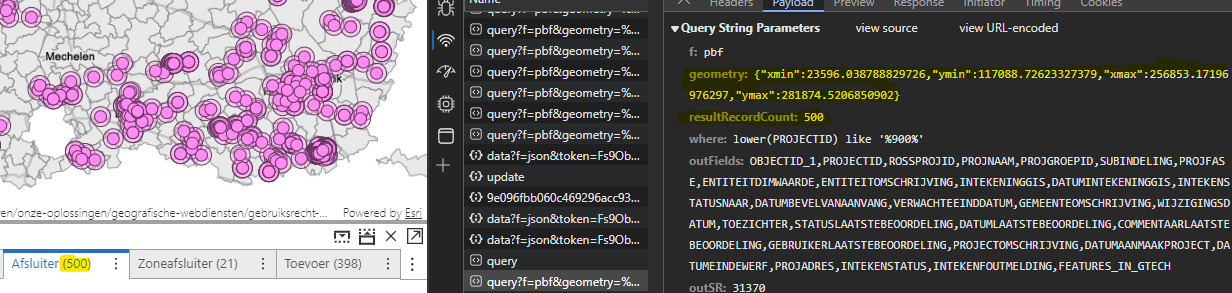
I was hoping that using the “
searchArea”-argument would make it work by providing an extent or polygon which contains the whole area where data is available, but it failed to provide any result. No queries where launched.{ "name": "tasks.search", "arguments": { "disableSearchAreaExpansion": true, "maxResults": 500, "searchArea": { "type": "polygon", "rings": [[[0,0],[0,300000],[300000,300000],[300000,0],[0,0]]], "spatialReference": { "wkid": 31370 } } } }Somebody any idea what is going wrong here?
I'm also interested in the “
near”-argument, but can't get “searchArea” to work properly0 -
I don't know if this link will work for you, but try this: Altered_Search_2_VS_CWF - Overview (arcgis.com). You'll likely need to download it, clone it, then run it from the “search” event of the search tool.
I created a new workflow that uses a tabular query. The one that ships with Vertigis Studio web uses a tabular and spatial query. It was designed for a different use case than what our customers needed.
0 -
Hi Mike,
I have no access to the workflow. I've tried creating an account (tim.baert_wisconsin, you may remove this user), but that wasn't sufficient enough. Would it be possible to send the json by mail to tim.baert @ siggis.be? I'm very interested. Thanks!
0 -

Hi Tim.
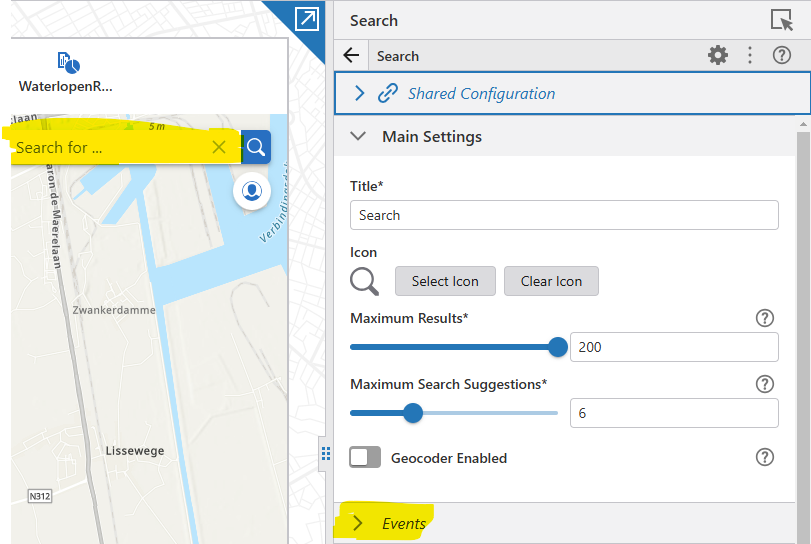
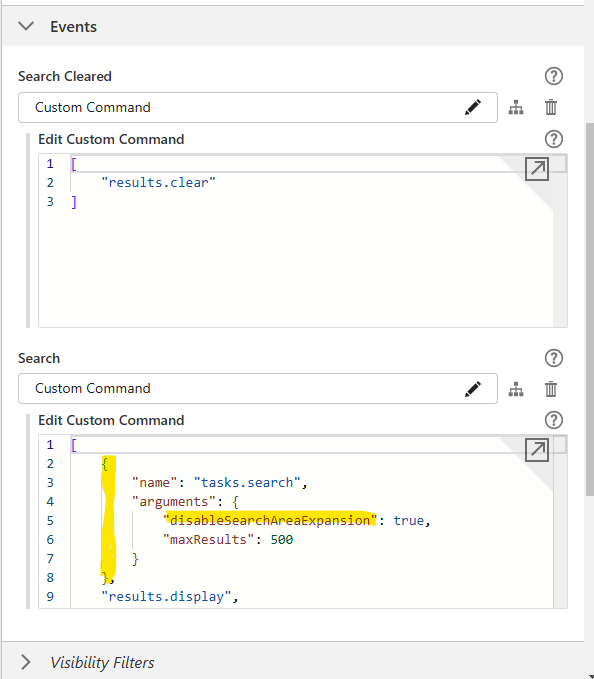
Can you please help me, I am trying to set the "disableSearchAreaExpansion": true, but i am not able to find the exact location where this json property should go.
I did search on the application json config but did not find the section : "name": “tasks.search”
Thanks in advance
0 -
Hi Bledar,
You need to add it to the “search”-event. Initialy you’ll only see “tasks.search” and it will take all default arguments. You have to change it to {“name”: “tasks.search”, “arguments”: {…}} https://developers.vertigisstudio.com/docs/web/api-argument-definitions/#definition-SearchArgs
Kind regards, Tim
 0
0 -

Cam Barnard
We are also looking to disable the geometry argument while using the Search. We have some layers that are view layers, and it is extremely slow to return any results. Our users are very frustrated with this.
By including this geometry argument it is putting way more load on our servers. We feel it doesn't need to be include. Any idea on how we can disable this?0
Du måste logga in om du vill lämna en kommentar.
Kommentarer
23 kommentarer