Deployment to Production Issue - Different Registered Apps For Signing In

I am receiving an error when I attempt to push a web viewer through the deployment process. The error states:
Pre-Deployment Summary
This app contains references to items stored in different portals or items that use a different Registered App for signing in. Deploying is not supported in this scenario.
The two offending items are my print templates that are loaded into the map viewer. I am a bit confused on what the issue is. My print designer, and workflow designer utilize the same registered app, but I am only seeing this issue with my print templates, not with any of the workflows that I have in the map.
Any thoughts?
Thanks,
Brian
-

Hi Brian,
We've been unable to reproduce this issue. Are you Workflow, Printing, and Web designers all using the same registered app with the same Portal? Also, are all of the print templates shared with the user attempting to run them?
Thanks, Stefan
0 -
Good morning @Stefan Schweigert? ,
I have one registered app for the web viewer designer, and a separate registered app for the workflow, and printing designers (one app for both designers, not one app for each). So, the workflow and print are using the same registered app, however the issue only appears to be with the print templates. I have multiple workflows in my map, and they are not included in the error notification. All of the print templates are shared with my organization, and everything is in the same Portal.
This is occurring when I attempt to push the viewer through the deployment process; I have the viewer in the "development" phase currently, and users can print without issue. This error comes up in the web viewer designer when I click Deploy -> Push to Production.
Much appreciated,
Brian
0 -
Good Morning Brian,
Thanks for your quick reply; it is possible to register all of your apps to the same registered app in Portal, which should resolve this issue. I'll follow-up with our dev team as to why this particular issue occurs.
Thanks, Stefan
0 -
Hi @Stefan Schweigert? ,
I re-ran the post installer for my web viewer designer and registered it with the same app as my print and workflow designers, but I am still seeing the same issue.
I have attached a couple images below of the dev tools console log:
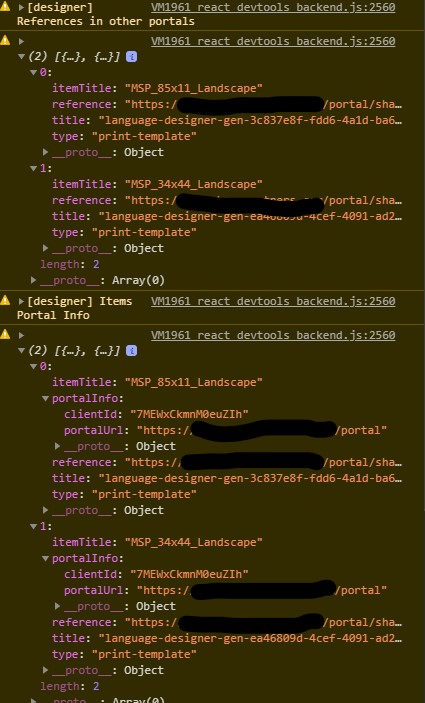
The first image shows the two items that are causing the issue - the print templates - and their clientId is the AppID of the item that they're registered with. That now matches the AppID that the web viewer designer is registered with. I have blacked out the specifics of the portalURLs in the image, but they are indeed registered with my on-premise Portal.
 The second image shows the 5 Portal items that are registered with this app: The actual map; the two print templates; and the two workflows. Again, I have blacked out the specifics of the URL, but they do all match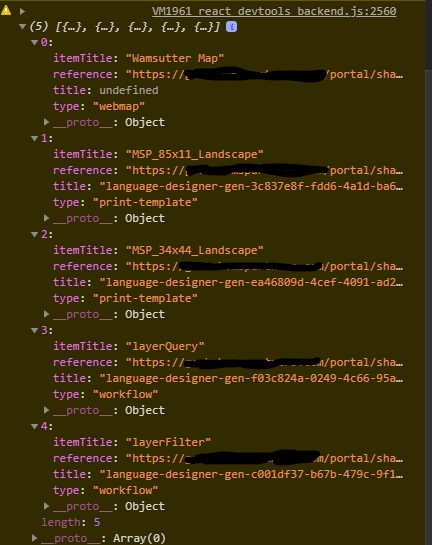
Thanks for any guidance,
Brian
0 -
Hi Brian,
If you create a new web app within the Designer and add print templates and workflows to the app, do you still see this dialog?
Thanks, Stefan
0 -
Hey @Stefan Schweigert? ,
This issue was resolved with the most recent web viewer upgrade to version 5.13.
However, now that I have deployed my applications, I am unable to run the print jobs unless the print templates and everything associated with the web viewer is shared with "everyone". This is another known bug: number 46482.
Thanks,
Brian
0
Du måste logga in om du vill lämna en kommentar.
Kommentarer
6 kommentarer