Issue with Workflow visibility in Designer

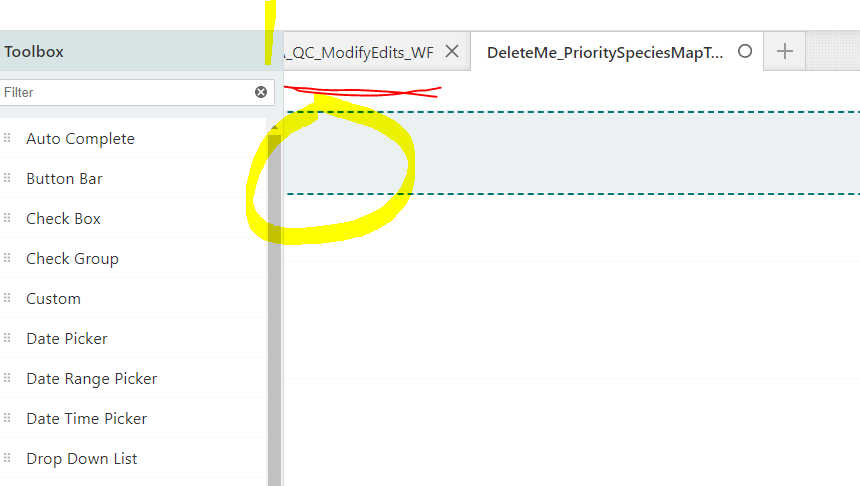 I am unable to see the left portion of the tabs on top of the Workflow5 Designer in 5.22.2 on prem. Plus, when I open a display form, all of the left sides of the form items are hidden. If I click on a Display Form activity, I cannot see the flow like Start > Display Form. I have tried in Chrome and MS Edge with same results. I do not have this issue with 5.22.2 in SaaS. We cannot work with type of behavior and will have to rollback our on prem version.
-

@Ryan Kelley? I've also noticed this issue, I think I saw it in the SaaS designer (5.22 or 5.22.1).
It could be related to the new Drag & Drop Editor Tabs functionality in the Designer at 5.22.
0 -
Good to hear Nico it isn't just me. It does seem to be somewhat inconsistent. At the moment, everything is fine, but an hour ago I was getting that behavior often.
0 -

Hi @Ryan Kelley? ,
I think it might have been introduced when we changed the preview of the form to be wider. It doesn't always happen because it is related to the timing of the rendering.
We're aware of the problem. We're working on a fix which will be in 5.23.
As a workaround, if you see this happen you can press Ctrl + Alt +T twice to hide then show the toolbox. This will force the editor to re-calculate its size and position.
0
Du måste logga in om du vill lämna en kommentar.
Kommentarer
3 kommentarer