The input may not be compatible with the workflow's deployment

We have an ArcGIS on-prem enterprise set up (version 10.8.1). I am using Geocortex Workflow 5.22.1 Our production workflows are now showing a warning stating that the input may not be compatible with the workflow's deployment. Anyone know why we are getting this warning?
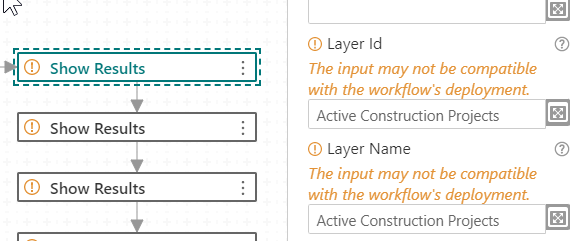
Thanks,
Chris.
-

Hi @Christopher Wiebke? ,
This warning is happening because these inputs are not supported by all of the target applications that can run workflows.
- In the designer, click Info on the sidebar then choose Deployment from the list.
- Select the applications that you intend to run your workflow on.
The warnings will either:
(a) disappear or
(b) change to say "The input is not compatible with the workflow's deployment configuration."
0 -
Thank you for clarifying. I see what you mean.
I have ArcGIS Web AppBuilder checked in the deployment section, and the show results warning returns IS NOT compatible. When I run the workflow my query results do open in the attribute table in WAB. It does seem to run a little slow though. Do you expect the show results activity to fail in WAB? Thanks.
0 -
It just means it will ignore the inputs with the warnings. They will have no effect.
The two inputs you showed tend to be mutually exclusive, though. You either want to search by name or id. In the case of Web AppBuilder, you must use the Layer Name input.
0
Du måste logga in om du vill lämna en kommentar.
Kommentarer
3 kommentarer