Close one workflow when another one is initialized.

I have a few workflows that I am using for my AGOL Web App Builder - and they are being initialized by buttons within the environment. 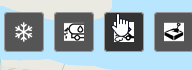 Each button launches a separate workflow that has a Display Form element on it - and within the workflow of the display form on the LOAD event of the form - I use the Set Layer Visibility to turn layers on the map on and off to meet the needs of that particular button. This works great when you initially open each form, but.....
It doesn't work when you click button #1 then button #2 and then button #1 again. This user sequence will run the following:
- Click button #1 - workflow 1 display form LOAD event runs - layers appear visible/not visible as expected.
- Click button #2 - workflow 2 display form LOAD event runs - layers appear visible/not visible as expected.
- Click button #1 a 2nd time - workflow 1 display form LOAD event doesn't run - so layer visibility isn't adjusted. The form re-appears thought.
How do I either force the 1st form to close when the 2nd one is opened or force the LOAD event to run each time the button is clicked?
-

I don't think that is possible with WAB.
A workaround would be to make a 'master' workflow from where wf1 and wf2 are started. Now a user will be forced to close their current wf to return to the master.
0 -

Hi @Darryl Klassen?,
The difficulty is that in Web AppBuilder, when you click the button for a widget that is already visible, it just hides it without exiting. This is true for all panel-based widgets in Web AppBuilder. The other option we have for running workflows is using the Modal widget. It shows the form in a modal dialog box rather than a typical panel.
This might not work for you, though, if you still need to interact with the map while the workflow is running.
0 -
My work around is to move the dialog box to cover up the buttons (using CSS), this would then force the user to click the close button if they want to open one of the other widgets. Not the most elegant, but it seems to work.
0
Du måste logga in om du vill lämna en kommentar.
Kommentarer
3 kommentarer