Display Form and Drop Down List are not resetting

I'm having issues with trying to get a display form to reset that has a geometry picker and a drop down list in it. The reset option on the form input has been set to 'true' but the drop down list will not clear.
When the form first opens, the drop down list is blank, when I choose one of the values in the drop down list then hit the reset button it clears the values of the geometry picker and the drop down list but will not clear the label out of the drop down list. When I check the browser log in the console, it is showing that there is no value in the drop down list but the label is still present
Any ideas would be appreciated.
-

Hi @Bingham, Bryan? ,
I have a few questions about your situation. Does this happen in a particular viewer? I tried it in the sandbox and it worked as expected for me.
Also, what do you mean by "the reset button"? The "Reset" input takes effect when the form is dismissed by clicking a button that has a value set and then having a transition back to the same Display Form activity.
0 -
@Ken Lyon? Thanks for getting back to me. I've attached a copy of the workflow i'm trying to use in Geocortex Web.
In the form, there is a button at the bottom that says 'Reset', the idea being that the user is able to clear all of their search entries and filters from the form.
Currently, the display form will reset itself (clears the geometry picker and the drop down list value), but the label from the select by RIN drop down label will not clear from the dropdown list.
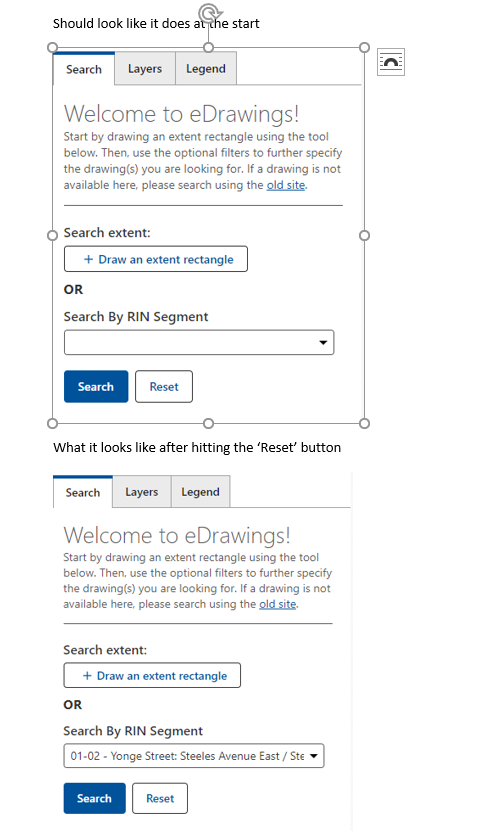 0
0 -
@Bingham, Bryan? Thanks for the explanation. Now I see what you mean.
I think that should work. Could you try running it in the sandbox to see if it behaves correctly there? I'm wondering if this issue is specific to Geocortex Web.
0 -
@Ken Lyon? is there something special that I need to do in order to get it working in the sandbox?
We are running an on-prem installation.
0 -
Yes, if your workflow expects the map to contain specific layers then you would need to use your map. You can do this by clicking "Settings" in the side menu in the Sandbox and pasting in your map's url in the appropriate field. Click Save then try running the workflow.
It shouldn't make a difference that you're on premises as this isn't a server workflow.
0 -
@Ken Lyon? Confirmed, it works as expected in the sandbox environment.
Any suggestions as how to work around this in Geocortex Web?
0 -
@Bingham, Bryan? Thanks for confirming this. I will follow up with our Web team to determine next steps. It's likely this will need a code change.
0 -

@Ken Lyon? What is the status regarding this issue? I'm setting up a workflow to generate KPI cards and charts, with a series of display forms to gather input from the user. With the possibility to navigate back and forth between the forms. When drop downs have several options it is just annoying that they appear with a label without a value set. How ever when drop downs only have one option, this issue kinda breaks the form by making it impossible to select the actual value.
0 -
Hi @Sindre?. I checked with the Geocortex Web team and the bug fix is in progress. It is expected to be in the next release (Geocortex Web 5.15) which is scheduled for mid-November.
0
Du måste logga in om du vill lämna en kommentar.
Kommentarer
9 kommentarer