Get Layer with a Map Service

I'm attempting to use the Get Layer activity with a layer in the web map, which is using a non-cached map service. I've tried entering the layer name and the layer ID in the 'Layer ID' box but neither work. I've created a log to record the result and $maplayer.layer and $maplayer.sublayer always show 'undefined'. Should this work, or does it only work with feature layers? I'm having similar problems with the 'Set layer visibility' activity. I'm using GXW 5.13.0, and GX Workflow 5.22.2 both on-premises. If this should work what am I doing wrong? Thanks.
-

This works with on prem map services and feature services for me with on prem portal with GXW 5.22.2.
Make sure you have your layer name exactly as is as defined in the Layer List of your app. For example:
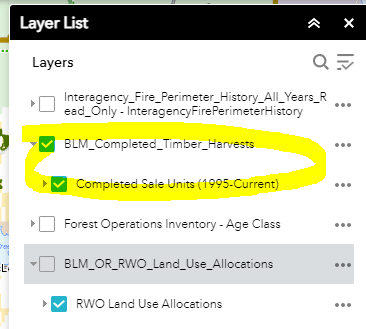 workflow (layer1 as output):
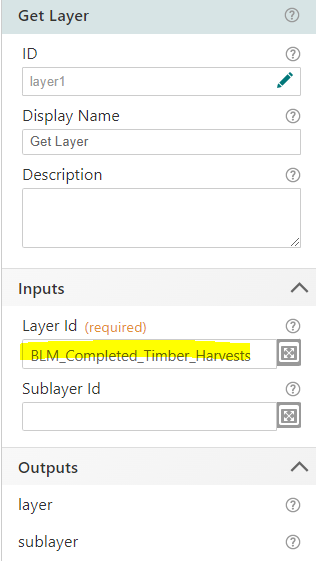 then you can use a Set Definition Expression. Notice I am using sub layer 0 as I am setting the def query on layer 0 in that map service.
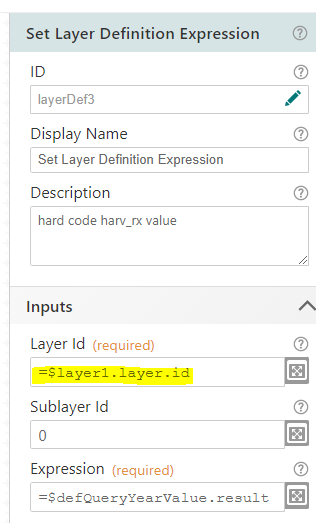 Might be other ways to do this, but this works for me.0
 -
Hi Ryan
Thanks for your response. When you say GXW are you referring to Geocortex Web or Geocortex Workflow? I suspect the latter, because the latest version of Geocortex Web as of today is 5.14.0. Your screenshot image looks like Web AppBuilder. Is this what you're using? I wonder if this works with Geocortex Web. Maybe it only works with Web AppBuilder.
0 -
Sorry, Geocortex Workflow is what I was referring to.
GCWorkflow 5.22.2
GCWeb 5.14.0
I was using WAB in the screen shot yes, but the tool works in both WAB and GC Web.
0 -
I've done some experimentation with this. If the layer is one of a number of layers within a map service that has been added to the web map, then it looks like it can't be used in the Get Layer activity. This is what I was attempting: I was adding the map service to the web map using its URL ../MapServiceName/Mapserver. Instead if I directly add an individual layer to the web map then it can be used with Get Layer. In other words I need to select the actual layer using its layer ID, eg. .../MapServiceName/MapServer/25 to add it to the web map. Is this what you did, Ryan? This would explain why it was working for you but not for me.
0 -
I am adding the map service root only (i.e. /MapServer) to my web map, and then layer 0 is added underneath. Red zero = layer 0.
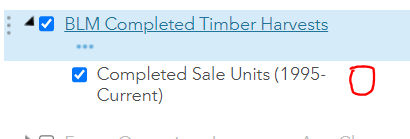 0
0 -
Ryan, thanks for your help with this. I've got it to work now. For the benefit of others, here is what I've done.
I've added a map service to the web map using its endpoint as '../mapservicename/MapServer'. mapservicename is shown as the layer name in the web map, with several layers within it, shown below it. The layer I want to query is one of these and has layer id 104.
The Get Layer activity in the workflow has ID mapLayer and uses mapservicename for its Layer Id and 104 for its Sublayer Id.
The Query Layer activity uses =$mapLayer.sublayer.url for its Url.
The Set Layer Visibility activity uses =$mapLayer.layer.id for its Layer Id and =$mapLayer.sublayer.id for its Sublayer Id.
The Show Results activity uses =$mapLayer.layer.id for its Map Service Id and =$mapLayer.sublayer.id for its Layer Id.
0
Du måste logga in om du vill lämna en kommentar.
Kommentarer
6 kommentarer