Deployment Strategies - Best Practices?

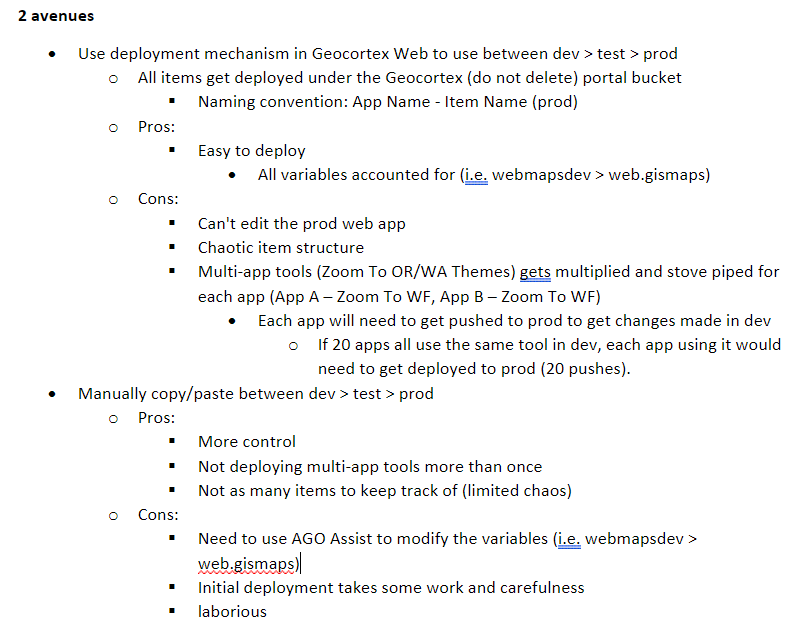
Wondering if anyone has a proven and effective way to deploy from dev > (possibly test) > prod. We have Web apps that share tools (feedback, email, zoom to). When I deploy an app from dev > prod, the deployment mechanism in Web copies / makes a new item or updates what was already deployed. So if I have two Web apps with the same tool, each tool gets deployed as its own item. This can get very confusing if we want to update that tool. Seem like we need to re-deploy each app to push that out? I wish there was a way in the deployment mechanism where you could allow/disallow certain tools from getting pushed. Maybe there is?
I have also tried manually moving things from dev > prd using AGO Assist, then swapping dev/prd urls or domain names per item. But, this is tedious and I'd rather just use the built in option since the variables are handled for you.
Are people ok with tons of production items just hanging out in the portal folder they get deployed to? I'd love some ideas on what has worked for people. I worry about others on our team managing all of these items. The "old" way of doing things with Essentials is VERY easy in comparison... as there is actually a directory structure.
-
I've outlined what I see... please tell me I am wrong and there is a better way.
 🙏 0
🙏 0 -

Hi Ryan,
I think I'm well and truly late to the party here, but you raise some very interesting points above. I've only just started looking into the whole deployment scenarios, and within a day or two of this, I'm starting to ask the very same questions you are above. The older way was just sooooo much easier. Write once, deploy to many type patterns seem to be gone now - across site config, viewer config, workflows etc. We actually deploy everything from github via jenkins, so I'm really wondering how we get to this sort of scenario!
I'd love this deployment option to be able to even deploy to a dedicated folder on the target portal - is this even possible?
Penny (or some beers) for any ideas around this and how you're managing to do deployments now that you've had some time to digest it all.
cheers
Gareth
0 -

Not sure when it was introduced, but under Deploy in the Web Designer (5.29.0), there's “Exclude Deployment Items" which allows you to check which items you don't want it to make copies of. The app will just use the original item itself.
0 -

This was introduced in Web 5.18.
0
Du måste logga in om du vill lämna en kommentar.
Kommentarer
4 kommentarer