Problem Setting Template for a Show Feature Popup in Workflow and Web App Builder

I am performing a Get Layer to obtain a layer from my Web Map, then a Query against that layer. When I call Show Feature Popup from features returned from the query the popup appears in the correct location but is empty despite having a setup a popup:
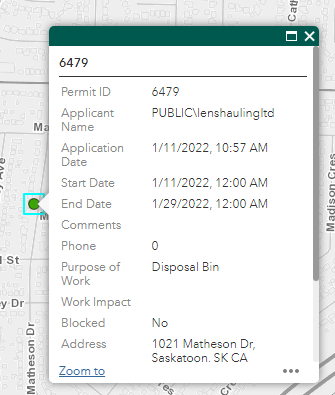
Prior to calling Show Feature Popup
 After calling get Show Feature Popup
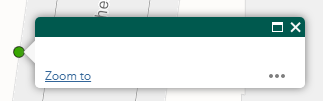 Now I am assuming that results are technically missing a template and I need to call Set Feature Popup and set a template prior to calling Show.
I tried calling Set Feature Popup and passing in the following as the template:
={
"title": "testing title {Permit_ID}",
"content": "testing content {Permit_ID}"
}
When the pop appears I get the title but not the content
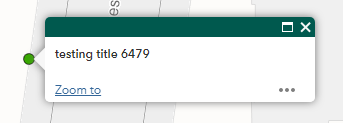
I am assuming the template is based on the following from ESRI:
https://developers.arcgis.com/javascript/latest/api-reference/esri-PopupTemplate.html
The Geocortex Workflow documentation on this subject does not give any indication on how to setup the template so the above is the closest I have come. What am I missing for setting up the content.
-
Providing an example (the content it references is not public)
0
Du måste logga in om du vill lämna en kommentar.
Kommentarer
1 kommentar