VertiGIS Workflow - Check to ensure values entered in form are unique

We need to ensure users cannot enter in duplicate records to a related table through a form. What activity can I use to ensure duplicate records are not added?
For example, we have a street name table with an auto sequence ID as the primary key established, however, this allows for potentially duplicate records to be added by the user by mistake.
Thank you.
-

Hey Tonya C. Kauhi, I've moved this to the VSW community topic as the Ideas topic is intended for proposed product feature ideas.
To answer your question around how to prevent duplicate records, I think you could do this with some logic in your workflow. Something like a For Each for each row in your table, and an If to check the condition of whether the provided string is in that row. If it is found to be in there, you can bail out and show the user an alert to try again using the existing street name.
0 -
Thank you @..., any chance you have a sample workflow to share?
0 -

First of all, I'd suggest adding a unique index on that ID field. This will make sure no duplicates can exist in the table ever.
Then, in the validate event of the form control, execute a query on the related table with the ID. If a record is found, use the Set Form Element Error activity to prevent saving.
1 -
Thanks Berend Veldkamp! We do have a unique index on the ID field, however, this is an incremented number and not created until the record is created. While the ID is unique, the user can still input duplicate records for the remaining information. In this case a street name table, when the user inputs a street name, for example, Main, the ID is auto numbered at the next highest value. For example, the 1st user enters Main and it get assigned an ID of 1000, the next user can still come in and enter Main which will be assigned an ID of 1001. While training should address this and users should not enter a street name is its already there, we want to try to have some additional checks before the record is added.
I think a query layer would work, with checking the street name field to be found or not nd will look into the Set Form Element error activity.
Thank you for the advice.
0 -

Hi Tonya,
I think you could still do something similar to what Berend is suggesting. You could still execute a query on the related table, but rather than using the id, you'd need to match on all the relevant fields. If you find a result, don't attempt to add those values.
0 -
Agree Ken Lyon and thank you. That is what I was thinking with the Street Name field example.
Here is where I landed with my "Where" statement in the Query Layer as we have four fields that need to be checked and two of them may be NULL. Here is what I have so far (with Amanda's help) but having issues with the Nulls as sometimes the fields are Null and sometimes, they have values. Any advice on how to handle these?
This statement works if all fields are populated but two of them (prefix and suffix) may be Null.
=`Prefix='${$addStreetOprions1.state.dropDownList_streetPrefix1.value}' AND StreetName='${$addStreetOptions1.state.textBox_addStreetName1.value}' AND StreetType='${$addStreetOptions1.state.dropDownList_addstreetType1.value}' AND Suffix='${$addStreetOptions1.state.dropDownList_streetSuffix1.value}' `
Thanks in advance!
0 -
That does complicate things a bit. For each of the fields that can be null, you could say something like:
(
(Prefix IS NULL AND $addStreetOprions1.state.dropDownList_streetPrefix1.value = '')
OR
(Prefix='${$addStreetOprions1.state.dropDownList_streetPrefix1.value}')
)0 -
Thank you Ken Lyon, I will give it a try.
0 -
Thanks everyone for their help here, just wanted to follow-up with the solution Caleigh Mitchell helped me with.
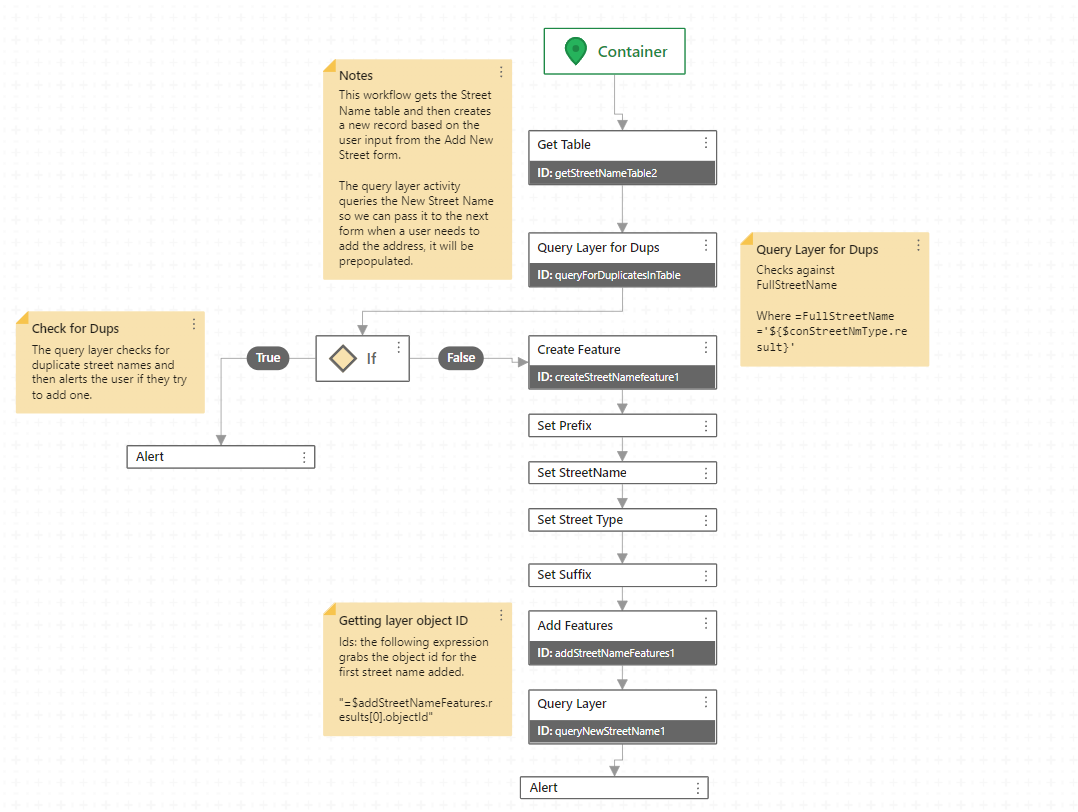
We determined that the unselected dropdown lists were returning an 'undefined' value, so in order to simplify the problem of comparing with the existing values in the table we switched to comparing the concatenated address rather than the individual fields (prefix, suffix, streetname and streettype). We used a couple of if statements to check whether the optional dropdown values were being used and built the full address piece by piece and then compared it with the table values.
Happy to share the workflow is anyone is interested.
1 -
I'm glad to hear you got it working!
0 -
Excellent, go team! Tonya C. Kauhi please do share that workflow, no doubt other people are wondering how to approach this same problem.
0 -
Thanks @..., how do I share the workflow? I don't see a way to upload files. In the meantime, here are a couple of screenshots of the workflow.

Then Check for Dups and add new street name if it doesn't exist.
 0
0
Du måste logga in om du vill lämna en kommentar.
Kommentarer
12 kommentarer