Send Web Request Syntax

Hello I have the following that is generated from PostMan to upload a file to the server. How do I translate the code at the bottom into Send Web Request workflow activity.
POST /fmerest/v3/resources/connections/FME_SHAREDRESOURCE_DATA/filesys/SaferSpeed HTTP/1.1
Host: xxxxx
Authorization: Basic XXXXXXXXXXXXXXXXX
Content-Length: 202
Content-Type: multipart/form-data; boundary=----WebKitFormBoundary7MA4YWxkTrZu0gW----WebKitFormBoundary7MA4YWxkTrZu0gW
Content-Disposition: form-data; name="file"; filename="/D:/Safer Speeds/QPS_Sites_20210622.csv"
Content-Type: text/csv(data)
----WebKitFormBoundary7MA4YWxkTrZu0gW
-

Hi Dean,
Unfortunately the "Send Web Request" activity is not able to make a multipart/form-data request today.
Are you by any chance using the FME activity pack for your other requests to FME? If so we could likely deliver a solution much more quickly with a change to the "Use FME Service" activity, which is really just an equivalent to "Send Web Request" that handles a few FME authentication and serialization concerns.
I've already added some code to the FME activity pack that will allow "Use FME Service" to issue a multipart/form-data request. See https://github.com/geocortex/workflow-activities-fme/pull/30/files. But I don't really have a way to test it.
--Ryan
1 -
Thanks Ryan, very much appreciated. I will definitely look into the activity pack for FME as it looks like there could be some good things to assist in there.
0 -
I did manage to get a solution of sorts and would like to share it here for others that might have a similar issue.
As the file I was trying to upload to FME was a text / csv file, I ended up reading the contents in and using that info to populate the table on the server. Not elegant but solved my issue but not sure if it would work for non-text files.
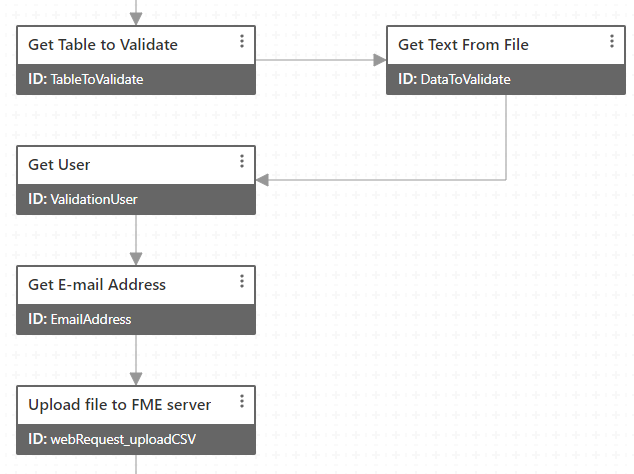
Send Web Request Activity

Header Info
={
"Authorization": "Basic XXXXXXXXXXXXXXXXXXXXXXX",
"Content-Disposition": "attachment; filename="+$TableToValidate.result+"",
"Content-Type": "application/octet-stream",
"Accept": "application.json"
}
I would recommend that more people share their solutions and for VertiGIS support provide more examples as I have found much of the information here in the community very old and lacking in solutions. I know there are many ways to configure the activities but a couple of examples in the help pages would go a long way to "supporting" the users.
3 -
I have completed that pull request on the FME activity pack. Even though we can't test your specific use case we are able to confirm that it does do a multipart/form-data request and it doesn't break any existing functionality.
If you use version 2.1.0 of the activity pack it would look something like this:
Use FME Service
- Path: resources/connections/FME_SHAREDRESOURCE_DATA/filesys/SaferSpeed
- Method: POST
- Content Type: multipart/form-data
- Data: ={ file: $form1.state.filePicker1.value.files[0], createDirectories: false, overwrite: false }
--Ryan
1 -
Thanks again Ryan, that will certainly be very useful.
0 -

Dean Howell
Do you know this demonstration viewer for worfklow activities.
https://gedemo.geocortex.com/Html5Viewer/index.html?viewer=GXWF_Sample_Site.GVH
For most workflows it shows the URL of the ArcGIS Online portal item. You can load the workflow in Workflow Designer through Filen > Open by URL.
Send Web Request sample workflow https://latitudegeo.maps.arcgis.com/home/item.html?id=b88d1b850c8643ff8ae55a6453808075
Or see the workflow samples in https://apps.vertigisstudio.com/web/?app=9147d8afb59c4e8293791baec8f7a46c (Tools > Workflows tab)
Further described here https://community.vertigis.com/hc/en-us/articles/4666866718610-VertiGIS-Studio-Web-Sample-Package
API Request sample workflow https://www.arcgis.com/home/item.html?id=7cda90cffa5f420a9bbbb41e6e113fd72 -
Thanks Nico Burgerhart,I will have a look at these samples but as a suggestion to VertiGIS maybe links to these sorts of examples in the actual help would be beneficial.
0 -

Hi Ryan, the method of using the activity Use FME Service seems very promising to upload a file to FME Server. I'm following your instructions closely, but I can't get it to work, I keep getting errors... Any idea what went wrong?
Choosing the POST method, I'm getting this error 500:
"An unhandled exception has occurred due to some unexpectedly omitted information, consult the web service logs for further details"
I tried the PUT method as well, not changing anything else. That resulted in a 405 error and an empty response.
The activity has the following inputs:
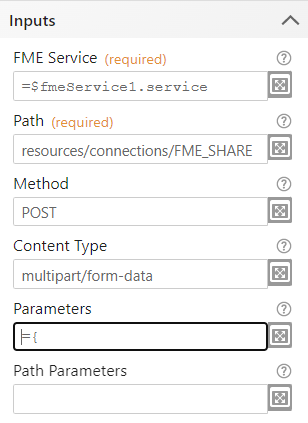
- Path: resources/connections/FME_SHAREDRESOURCE_SYSTEM/filesys/temp/upload/repository/workbench.fmw
- The parameters are created using your example:
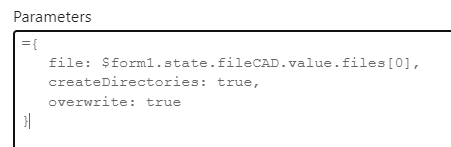 0
0 -

Hi, have anyone had any success with the example from Ryan Cooney?
My FME Flow just responds with an 500 (Internal Server Error).
I have completed that pull request on the FME activity pack. Even though we can't test your specific use case we are able to confirm that it does do a multipart/form-data request and it doesn't break any existing functionality.If you use version 2.1.0 of the activity pack it would look something like this:
Use FME Service
- Path: resources/connections/FME_SHAREDRESOURCE_DATA/filesys/SaferSpeed
- Method: POST
- Content Type: multipart/form-data
- Data: ={ file: $form1.state.filePicker1.value.files[0], createDirectories: false, overwrite: false }
--Ryan
0 -
I found a solution now with the Send Web Request activity, and not the Use FME Service, to upload a file to FME Flow:
- Url: <your FME Flow>/fmerest/v3/resources/connections/FME_SHAREDRESOURCE_DATA/filesys/vertigis
- Method: POST
- Headers:
={
"Authorization": "fmetoken token=<token-value>",
"Content-Disposition":"attachment"
} - Form: ={file:$form1.state.filePicker1.value.files[0]}
0
Du måste logga in om du vill lämna en kommentar.
Kommentarer
10 kommentarer