Item Picker default selected items?

Hello,
I want to know if it is possible to default select items in an Item Picker. I use a querytask for the items en behind the scenes I have a list of values(in a array). If one value corresponds with an item in the Item Picker I would like to select this item by default. I tried
Set Form Element Property with propertie : checked. I tried so many things but no result.
Anyone?
-

Use a For Each activity with a variable set to false put into the Exit field. Then use an if activity inside the For Each activity to check the array for item once it is found then set the exist variable to true. Then use the Set Current Form Element Item activity with the Match Type field to Index the value would be the forEach.pass object.
0 -
Ash,
I don't understand what you are trying to say. I attached some screenshots
 I want those last values to be checked if these values are in an array with the vales as the labels.
array would be["Aardkundig monumenten","Aardkundige waarden"] if only one is int this array I would like this one to be checked only. Because in the form there are other elements this list will change often and I cannot use a fixed list for the Item Picker. Also they want to filter so I must use Item Picker.

I use a query task to determine all elements and only the ones that are in a separate array should be checked. So the main questions is how to get these elements checked on. I tried hard coded before making it flexible but can't get it to work. I can provide you the current workflow
0 -
Check out the documentation for For Each activity.
https://docs.geocortex.com/workflow/latest/help/Default.htm#wf5/help/loops.htm#use-for-each-activity
You would need to do this first to see if the items are in the array. If they are then set a variable to true. You would need two variables, one for each item. You can then set your checklist to automatically be checked if those variables are true.
If your indexing, then you will need to use an exit once the condition the item you want to index to is found. Documentation has a section on that as well.
0 -
Ash,
I know how to use for Each but how to set checked Item Picker to true. When I select an item
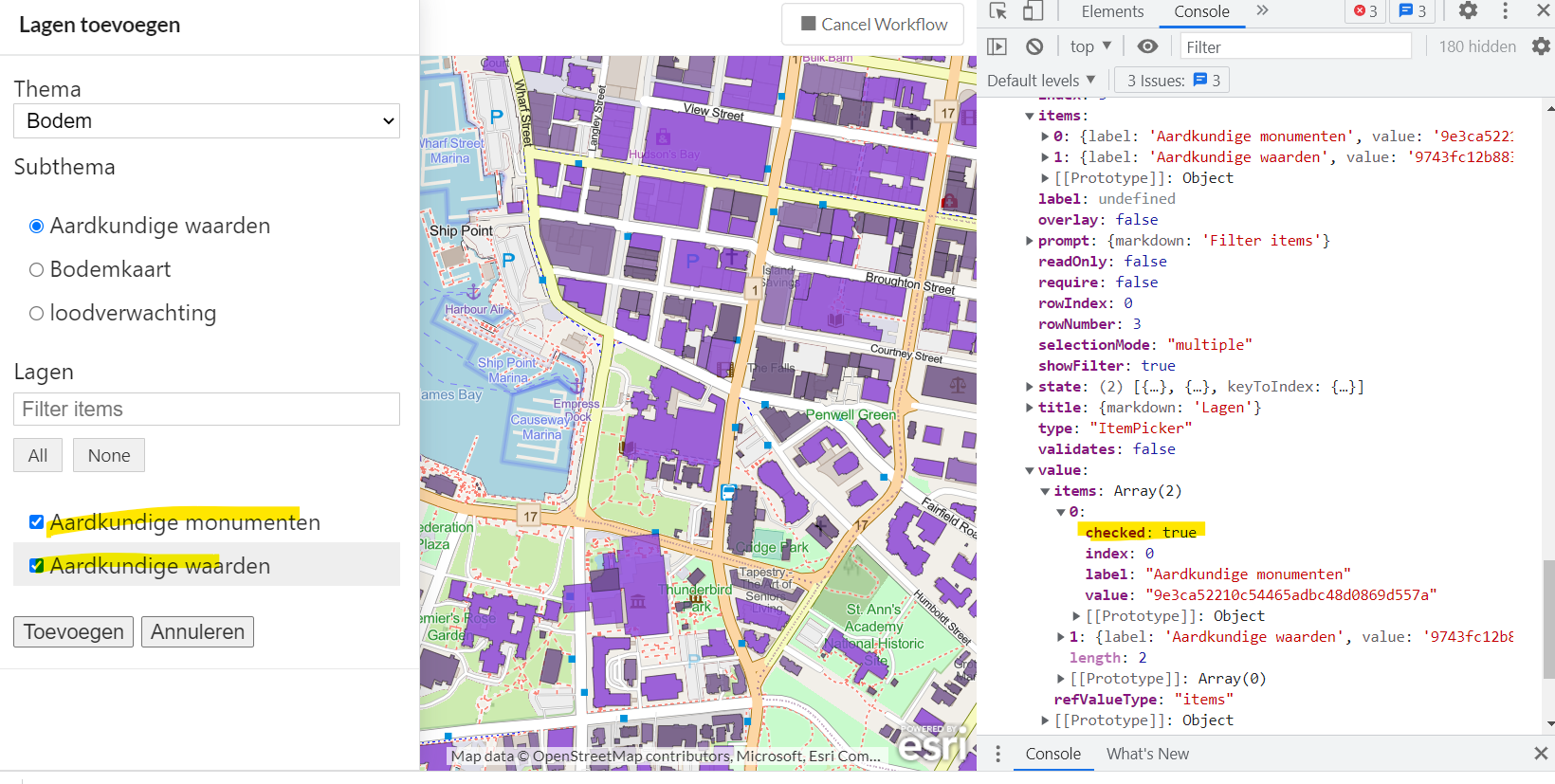 value.items[0] checked:true but when i try to set this to checked nothing happens. And I want the values checked on default....0
 -
You can use a change event with an if statement with a Set Form element property. If a condition is met for a different element then set the checked items to true. if not then set the checked item to false. You may have to do two different check boxes so that each element would have it's own conditions.
 0
0 -
Ash,
I follow what you want me to do. I did this multiple time on listboxes but the ItemPicker does not behave in this way. If I set the property to checked nothing happens. The thin is that in item[] there is no checked property. It is in the state array. and that differs from the other (checkbox and other). I file a support call on this one. Thanks for thinking with me.
Kind regards,
Erik
0 -

Once you have determined the index of the item that you want to select, use the "Set Form Element Item Property" activity to set the checked property of the relevant item.
Example - Select the first item in itemPicker1 in $form1.
Element: =$form1.state.itemPicker1
Item Key: ="0"
Property Name: checked
Property Value: true
Markdown:NOTE: It's important that the Item Key is an expression. The key is a string containing a number, which is a bit of a nuisance in expressions. If you just entered a number, it would not work.
1 -
Ken,
Thanks that what I was missing. I took the wrong element (i used ItemPicker.item) and the number for an item. I got it working now. Thanks a lot.
Erik
0 -
You're welcome. I'm glad I could help!
0
Du måste logga in om du vill lämna en kommentar.
Kommentarer
9 kommentarer