Features to KML - geoWidgets Conversion Activities for Geocortex Workflow 5

Tom Neer - I noticed a previous post that had this question but I didn't see an answer. Is there a trick to having the feature set attributes available in the KML? Currently just the points,lines,polys display but with no additional information included.
The demonstration video shows the attributes.
Thanks in advance!
Matt
-

Matt,
When you query the layer be sure to define the "Output Fields" with an asterisk or string of fields to return.
In the documentation, we include the Workflow (https://www.arcgis.com/home/item.html?id=fecd04e1d02e4a7fa291f98563159abb) that was used for the video. In Workflow Designer, you can open that Workflow to see what we were doing.
Best,
-Tom0 -
Hi Tom,
I actually used that workflow link and tested against the map services you currently have in there and get the same results. I get the North Dakota wells, etc points and no attributes. I noticed in the video demo that the workflow at the beginning is actually a bit different as well than the sample (different layout, different data sources).
Any other thoughts?
Thanks again for the quick response!
Matt
0 -
Matt,
We are in the process of testing for an updated release that is based on the new VertiGIS Studio SDK, not the original Workflow SDK. Could you check that the query actually is responding with geometries and attributes in the Developer Panel.
We may have mucked our demo services during some migrations.
-Tom
0 -
Hi Tom,
Thanks again! I double-checked and the query is definitely returning geom and attributes.
Matt
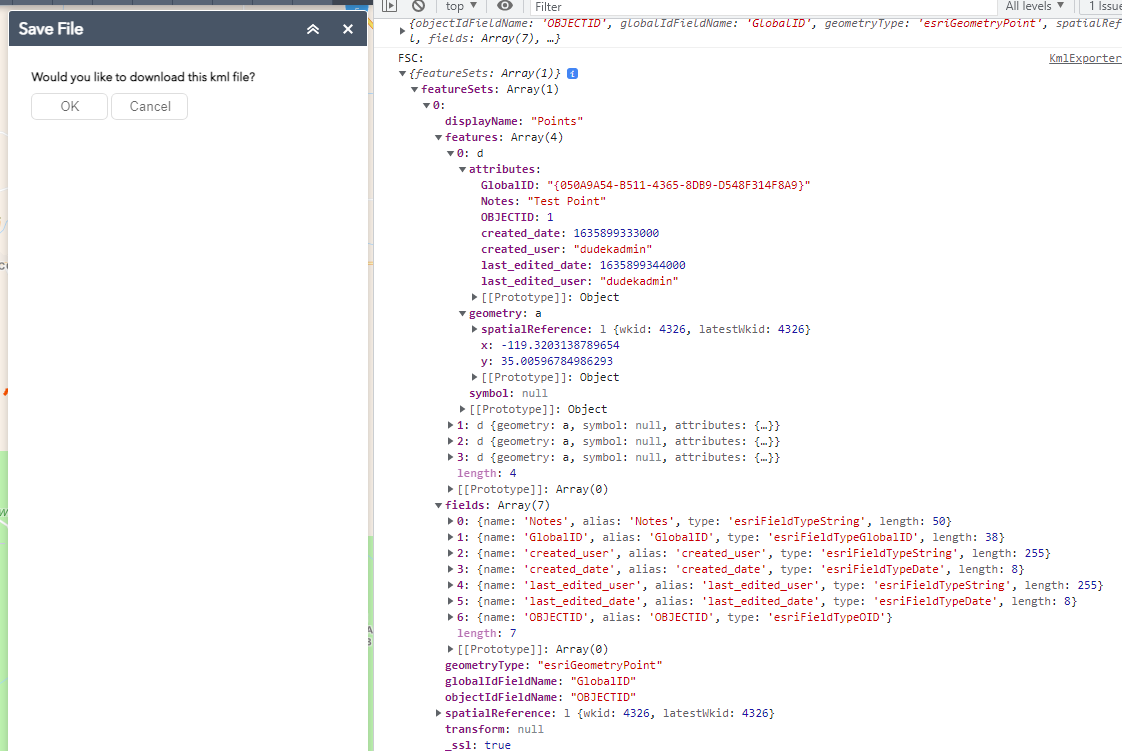 0
0 -
Are there any warnings or errors on the Features to KML activity and what are the values you are using within the Activity?
0 -
No warnings, and it produces a KML file with the geometry. I've made the workflow public so you can check it out.
https://geoportal.dudek.com/arcgis/home/item.html?id=d01686e88c934b0c979180609a988d23
It works with any layers in a web app, no configuration required.
0 -
Matt,
I will take a look tomorrow. Could you send the Workflow JSON to techsupport@digitaldataservices.com. We cannot import the Workflow, probably due to CORS. I also need to reconfigure our environment back to the current libraries from new version that we are developing.
Best,
-Tom0
Du måste logga in om du vill lämna en kommentar.
Kommentarer
7 kommentarer