Possible for user to tab through fields in form, and use enter to set the field?

Our users would like to be able to use their keyboards as much as possible, rather than going back and forth between the keyboard and mouse. Right now in Workflow 5.22.2, tabbing through a form's fields highlights the fields and once you have a text field highlighted you can start typing. With radio buttons (that have a default value set) and drop down lists you start using the arrow keys and it will move through the options, then they're set when you tab away.
But if you try to work with a calendar or checkbox or a radio group without a default value set, there doesn't seem to be away select the value once you have it highlighted. Using the arrow keys on checkboxes moves through the options, but clicking "Enter" to check them submits the form. The tab key doesn't seem to interact with the calendar at all for date pickers.
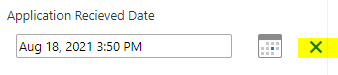
Our users like the OOTB functionality of Edit Feature for calendars with the plus sign. They can tab over to highlight it, then hit "Enter" and the current date is filled in without having to type anything or click the mouse. When filling in 30+ applications, this can save a lot of time.
Finally, the tab key doesn't interact with the Submit button, which may be part of why hitting "Enter" automatically submits the form.
I assume there must be a way to do this as many people prefer keyboard only data entry.
Any info is much appreciated!
-

What is your host application: VertiGIS Studio Web, VertiGIS Studio Mobile, ArcGIS Experience Builder, ArcGIS Web AppBuilder, Geocortex Viewer for HTML5?
1 -
Hi Nico, sorry for the delayed response, I've been out with an injury.
We're using Viewer for HTML5 4.14.3. I've been playing around with the idea of moving this application to a version built in Web AppBuilder or Experience Builder, but that's a ways off. We'll be using Viewer for HTML5 for a while yet.
0 -
Nico Burgerhart Does the form behavior change based on the viewer used? Like I said, we're not planning on moving from Viewer for HTML5 yet but if I know that another viewer might behave differently, I can start experimenting.
0 -
I'm not sure, but I can imagine, because of difference in technology/form controls, WCAG support, etc.
0 -

Emily Renkema I'm curious why you're using Workflow 5.22.2. That version's over a year old. You could try running your workflow in the sandbox via our SaaS environment (https://apps.vertigisstudio.com/workflow/designer/) to get a sense of the current behaviour.
Nico Burgerhart You are correct that different viewers will render things differently. VertiGIS Studio Web, for example, uses a more modern third-party library of UI controls within the form elements. It's quite common for the logic and/or appearance to be tweaked slightly between viewers to address different needs.
0
Du måste logga in om du vill lämna en kommentar.
Kommentarer
5 kommentarer