VertiGIS Studio Web 5.20 Released

VertiGIS Studio Web 5.20 was released on October 19th, 2022.
VertiGIS Studio Web 5.20 is now live in our SaaS environment
https://apps.vertigisstudio.com/web/designer/
On-premises installer: https://apps.vertigisstudio.com/downloads/
This release includes an improved add layer UX, the ability to require end users to click a button in our dialog component to support disclaimer use cases, and lots of bug fixes for issues reported by you.
Full release notes are live and can be found here:
https://docs.vertigisstudio.com/webviewer/latest/admin-help/Default.htm#gwv/release-notes.htm
In addition to the features in 5.20 this release also includes support for the upcoming release of VertiGIS Studio Analytics, and the infrastructure to support data linking which you will see exposed in 5.21 version. We are also making great progress on snapping which you should expect in the 5.21 release and on extending your configuration options for the display of results in the results list which I know many of you have been waiting for.
Finally, we noted some issues with running VSW in a browser on an iOS16 device that we were not able to resolve prior to release. They generally don’t prevent use, but they are annoying. Two specific examples. Attempting to download a file will throw an error, but still works. Entering a value with a decimal place in the geometry toolbar clears the input (whole numbers work fine).
-

Heck I'll be brave and ask when will we see 5.21, November? December? and what about the "new search"?
1 -
VertiGIS Studio Web 5.21 should land on December 14th. Based on today's view, you should see snapping, visual improvements and more configurability for results list and result details, starred results, and data linking.
VertiGIS Studio Search 1.0 should be out before the end of November.
0 -

And a filter/query tool?
2 -
Nico Burgerhart ... we are working on the Query/Filter tool, but you won't see it in 5.21.
0 -

We are experiencing issues with Single Sign On in Vertigis Studio Web. Having set up an on prem web designer against our ArcGIS Enterprise with Azure AD logins, I expected SSO to function in apps created with VertiGIS Studio Web. However, I always have to sign in if an app is shared with the organization only as an example. I actively have to click on Sign in if an app is shared with everyone. This is very frustrating. Not sure if there is anything "wrong" with my setup, but whenever I access resources from the portal directly in a browser, I am signed in automatically as expected. Please enlighten me.
0 -

Hi Kristine Smaadal! We are using the ArcGIS Enterprise permissions model for the items involved in your VSW app.
A few questions:
- Are you using VSW SaaS, are you on a specific on-prem version?
- You mention SSO in an organizational context, also that you're trying to share with everyone. Are you intending to have a public-facing viewer with no sign-in required?
Based on this context I'm inferring we're talking VSW SaaS & the intention is to have a public facing viewer.
I've seen a similar scenario where in a VSW app intended for public consumption, the users were being prompted for organizational sign in. The culprit was that there were specific resources in the VSW app that had not been shared publicly.
In Designer, you can review the sharing permissions of your apps and its items, such as web maps, workflows, reports, and print templates. To open this in designer: Taskbar (on left) > Deploy > (select deployment stage you're working on) > Sharing Permissions. You should see a window like this:
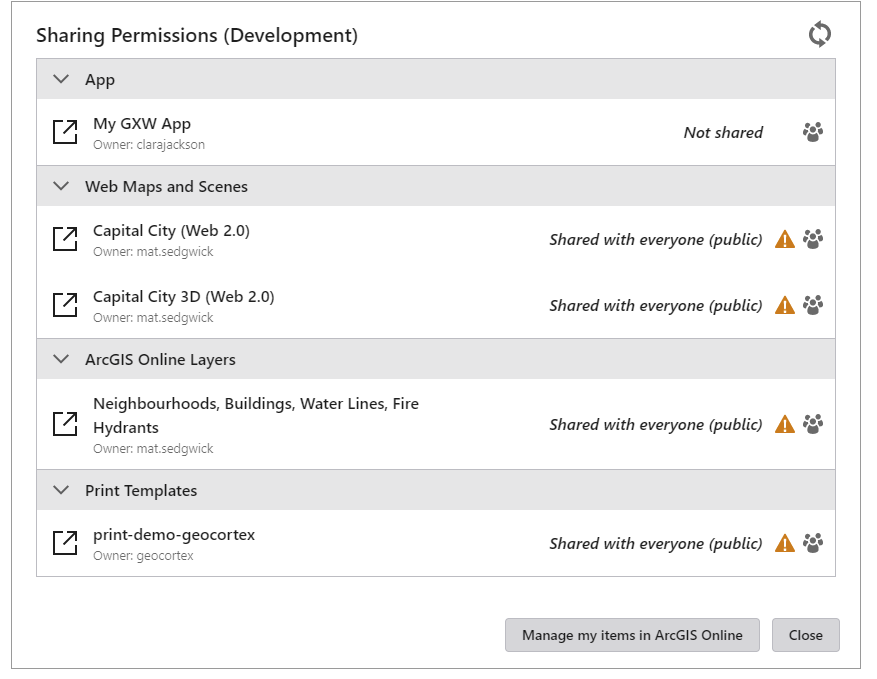
Note how in this example, not all items are marked 'shared with everyone'. This means that when opening the viewer, we need to have you identify with Portal so that we can determine whether you should have access to the app. If all items are shared with everyone, we don't need to do that.Here's our documentation around how to Configure Sharing Permissions (vertigisstudio.com)
Here's a community thread where a similar scenario came up, and Cam summarized the Sharing Permissions tool: Authentication Required window does not go away when adding a Web Map. – VertiGIS. Same thing there: for a public app, all the included items must be shared publicly.
If the above doesn't help you get that viewer launch experience working as expected, here's a few options:
- Make a community thread (or reply to that existing one!). If you're getting stuck on this, chances are others in the community are as well. Having a dedicated thread of conversation helps for these types of back-and-forth questions.
- If you have access to our VGNA Support team (submit a request for support from our VertiGIS NA Support team) or support through a reseller, I'd encourage you to submit a request so that they can work with you directly. Having direct contact means we can look more closely at the issue and be more responsive.
1 -

Hey Cam Barnard,
Any news on when 5.21 will drop?
Thanks,
Brian
2 -
Brian Cunningham ... will be released Wed Jan 4
1
Du måste logga in om du vill lämna en kommentar.
Kommentarer
8 kommentarer