REST service layers not loading in Web 5.21, fine in ArcGIS Enterprise/WAB

Hi all!
I've come across an issue in VertiGIS Studio Web where I pick a map from our ArcGIS Enterprise instance, and it can't read externally facing REST services. The map and attempts at a WAB interface of this map look just fine and load the REST services just fine, but when I try to bring the map forward with Studio Web it gives the following error:
Displaying some issues with regards to CORS. We've set CORS before in Essentials, but Web Viewer doesn't have the capability, and Enterprise doesn't have any restriction. Does anyone have any advice on how to get rid of the warnings to look at external services?
Console: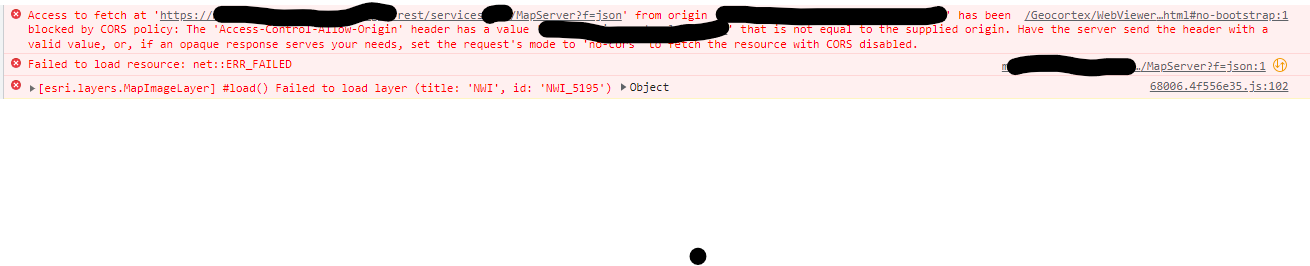
-

Hi Vyla
It's curious you're seeing different behaviour across VSW & WAB - I'd expect them to be the same in a CORS context.
VSW honours ArcGIS Enterprise/ArcGIS Online's security configuration for Allow Origins (https://enterprise.arcgis.com/en/portal/latest/administer/windows/restrict-cross-domain-requests-to-your-portal.htm).
By default, the Allow Origins list is empty so we allow all Origins (aka a CORS : * header). If you configure any Allow Origins, this list becomes a specific allow list.
This error implies you're requesting from an origin not in your Allow Origins, which means it's probably got something set in there. I'd double check your settings there. If the list is empty, it could be that your ArcGIS Server has it's own independent Allow Origins set: https://enterprise.arcgis.com/en/server/latest/administer/windows/restricting-cross-domain-requests-to-arcgis-server.htm
0 -
I know, right? I'd expect them to react similarly, but alas.
My Allow Origins list is empty in Enterprise, and ArcGIS Server AllowedOrigins is *, so there are no allow origins restrictions on either. I'm a bit stuck on this :/0 -

We also are getting "layer initialization failed' error. It happens randomly, for different layers, so it's hard to replicate the issue. I set my layers to ‘silent failure’, hoping that will make the error go away, but that doesn't seem to help.
0 -

We also get “layer initialization failed” errors randomly but these usually disappear if we simply refresh/reopen our app. Sometimes it may take a couple of attempts. There is no problem in the ESRI web map itself.
0
Du måste logga in om du vill lämna en kommentar.
Kommentarer
4 kommentarer