Convert picked file from file picker to json file

Hi All,
I couldn’t figure out if there is a way to convert the picked file from the end user to json file
The below workflow that I started with but it return an error, What could be the issue here or what is the best practice to do that

{
  "_properties": {
    "isServerWorkflow": false
  },
  "components": [
    {
      "id": 2,
      "steps": [
        {
          "id": 3,
          "inputs": {},
          "position": "0,0",
          "purpose": "start",
          "title": "Start",
          "transitions": [
            {
              "id": 6,
              "inputs": {},
              "position": "90,60 90,110",
              "sourceConnector": "bottom",
              "target": {
                "id": 4
              }
            }
          ]
        },
        {
          "action": "gcx:wf:forms:form:DisplayForm",
          "id": 4,
          "inputs": {
            "form": {
              "accessors": [],
              "code": "resources.forms[values.id]",
              "values": {
                "id": 5
              }
            }
          },
          "name": "form1",
          "position": "-30,110",
          "title": "Display Form",
          "transitions": [
            {
              "id": 12,
              "inputs": {},
              "position": "90,230 90,280",
              "sourceConnector": "bottom",
              "target": {
                "id": 11
              }
            }
          ]
        },
        {
          "action": "gcx:wf:core::GetBase64StringFromFile",
          "id": 11,
          "inputs": {
            "file": {
              "accessors": [
                "$form1"
              ],
              "annotations": [
                {
                  "count": 6,
                  "index": 0,
                  "kind": "idref"
                }
              ],
              "code": "$form1.state.filePicker1.value.files[0]",
              "source": "$form1.state.filePicker1.value.files[0]"
            }
          },
          "name": "getBase64",
          "position": "-30,280",
          "title": "Get Base64 String From File",
          "transitions": [
            {
              "id": 55,
              "position": "90,350 90,440",
              "sourceConnector": "bottom",
              "target": {
                "id": 50
              },
              "targetConnector": "top"
            }
          ]
        },
        {
          "action": "gcx:wf:ui::Alert",
          "id": 20,
          "inputs": {
            "text": {
              "accessors": [
                "$getBytesFromBase64String2"
              ],
              "annotations": [
                {
                  "count": 26,
                  "index": 0,
                  "kind": "idref"
                }
              ],
              "code": "$getBytesFromBase64String2.join",
              "source": "$getBytesFromBase64String2.join"
            },
            "title": "json file"
          },
          "position": "-30,640",
          "title": "Alert"
        },
        {
          "action": "gcx:wf:core::GetBytesFromBase64String",
          "id": 50,
          "inputs": {
            "base64": {
              "accessors": [
                "$getBase64"
              ],
              "annotations": [
                {
                  "count": 10,
                  "index": 0,
                  "kind": "idref"
                }
              ],
              "code": "$getBase64.result",
              "source": "$getBase64.result"
            }
          },
          "name": "getBytesFromBase64String2",
          "position": "-30,440",
          "title": "Get Bytes From Base64 String",
          "transitions": [
            {
              "id": 52,
              "position": "90,510 90,640",
              "sourceConnector": "bottom",
              "target": {
                "id": 20
              }
            }
          ]
        }
      ]
    }
  ],
  "designerVersion": "5.30.1+1",
  "forms": [
    {
      "defaults": {},
      "elements": {
        "filePicker1": {
          "enabled": true,
          "fileTypes": "*",
          "index": 0,
          "prompt": {
            "markdown": "Add File"
          },
          "rowIndex": 0,
          "rowNumber": 0,
          "size": 1,
          "title": {
            "markdown": "File Picker"
          },
          "type": "FilePicker"
        },
        "footer": {
          "enabled": true,
          "items": {
            "0": {
              "default": true,
              "index": 0,
              "label": {
                "markdown": "Submit"
              },
              "validates": true,
              "value": "submit"
            },
            "1": {
              "index": 1,
              "label": {
                "markdown": "Cancel"
              },
              "validates": false,
              "value": "cancel"
            }
          },
          "section": "footer",
          "type": "ButtonBar"
        },
        "header": {
          "section": "header",
          "title": {
            "markdown": "Form Title"
          },
          "type": "Header"
        }
      },
      "id": 5
    }
  ],
  "licenseInfo": {
    "licenseUrl": "https://lubnaj-pc.molg.pna.ps/vertigisstudio/workflow/service/auth/license"
  },
  "start": {
    "id": 3
  }
}
Best,
Lubna
-

+1
1 -

You can do that by using the Get Text From File activity, passing the file from the file picker as input, i.e. =$form1.state.filePicker1.value.files[0]
Jamal Numan You can use the Up arrow on the right to upvote posts.
2 -
Dear Berend Veldkamp
I want to convert file to json with the coordinates to be like below file, I tried your suggestion but it seams that output text not clear content

What your suggestion in this case
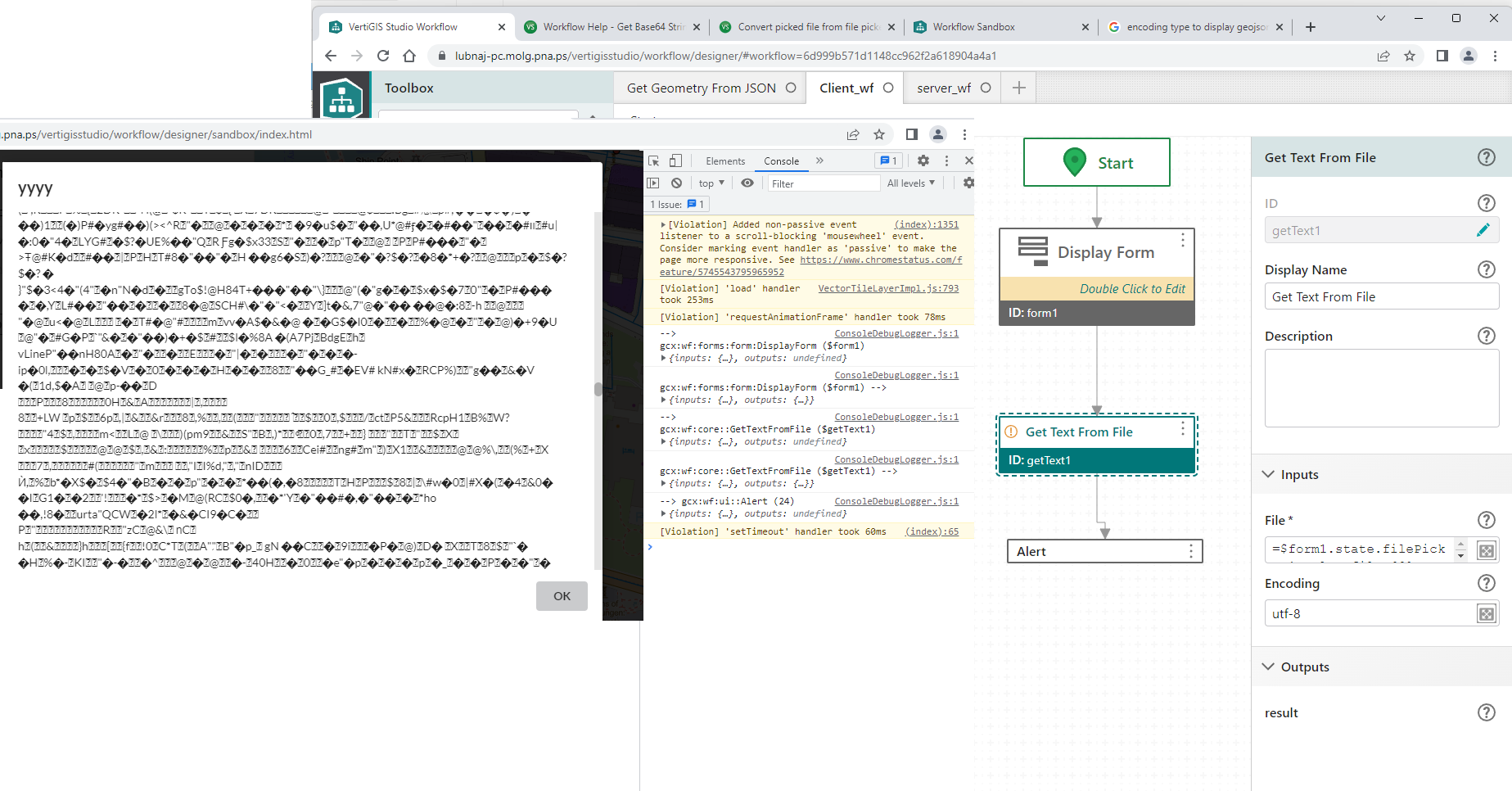
Thanks in advance
Lubna
1 -

What is the file type of the file you are trying to upload?
2 -
Hi Nico Burgerhart,
the file type is .dwg (cad file) to convert it to feature to display it as a graphic layer into vertigis viewer
Best,
Lubna
1 -
Dwg is a binary file format, and converting it to json using workflow alone would be a major undertaking.
3 -
Thank you Berend Veldkamp
I used fme workbench to read ".dwg" file and convert it to "json" file and save it on the server, then I publish it using fme server to be used in send web request activity.
Now, the workflow is worked fine with me
Best,
Lubna
1
Du måste logga in om du vill lämna en kommentar.
Kommentarer
7 kommentarer