Dead space under toolbar

Hi guys, does anyone have any idea on how to fix this dead space under the toolbar? Appears in compact and full arrangements. VertiGIS Studio Web Version: 5.41.2
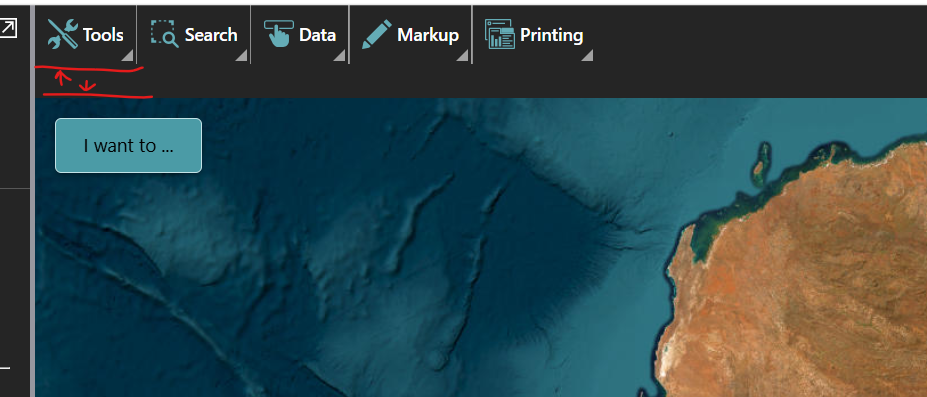
When you click on the menu item it then expands into the full space:

Which means as you navigate the toolbar it bounces between big and small.
If I remove and re-add the toolbar with the config from another app, the issue comes back
-

Hi Luke,
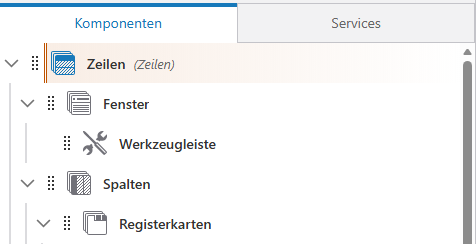
I had the same problem and fixed it by arranging the toolbar into a panel. See screenshot attached. You can then adjust the space for the panel in the settings of the row. This constellation provides a steady and limited space for the toolbar and any expansion which of the submenus.
Cheers,
Sebastian
 0
0 -

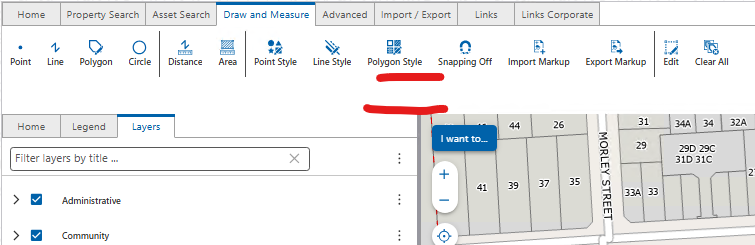
I also have this issue. Placing my menu tabs under a row component only gives you adjustability for a fixed % off spacing. I would like to allow the toolbar tabs group to use as much space or as little as it requires so it works with compact and full automatically.
 0
0
Vous devez vous connecter pour laisser un commentaire.
Commentaires
2 commentaires