Is there a way to close an expand component when another one is opened?

Hey everyone,
I'm currently working on our application's toolbar layout and would love to make it a bit more modern and compact compared to the usual ribbon toolbar. “Toolbars nested inside Expand Components” is what I've liked the most so far:

Unfortunately, what's missing is a way to close an Expand Component if another one is opened. This causes the toolbars to stack on top of each other, like in this example:
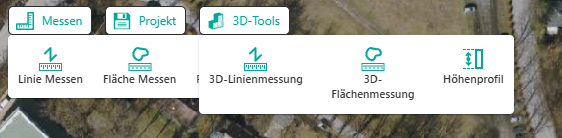
Is there a way to prevent this behavior? Maybe via Triggers?
What I've found so far:
There is a way to change an Expands' open/closed state via the ui.set-visual-state command.
This works fine. But how does one trigger this automatically if one of the other expands is activated?
-

I haven't tried this, but you could look into adding an event listener (In the designer, click Event Service on the Services tab) that responds to the ui.activated event.
It should start a workflow that uses the ui.deactivate or ui.set-visual-state command to close all other expanded items.
0 -
Thank you Berend, that seems to be the right track!
This seems to require adding arguments to an event. But I'm not sure what the syntax is.
The command to close an expand looks like this:
[
{
"name": "ui.set-visual-state",
"arguments": {
"id": "<all the other expands in the toolbar>",
"visualState": "closed"
}
}
]So I imagine the Event (https://developers.vertigisstudio.com/docs/web/api-argument-definitions/#definition-VisualStateChangeEvent) would look something like this (?):
[
{
"name": "VisualStateChangeEvent",
"arguments": {
"component": "<current expand>",
"current": "closed",
"previous": "open"
}
}
]Unfortunately, this doesn't work and I wonder how it could when the “Event Listener" only has a single row:
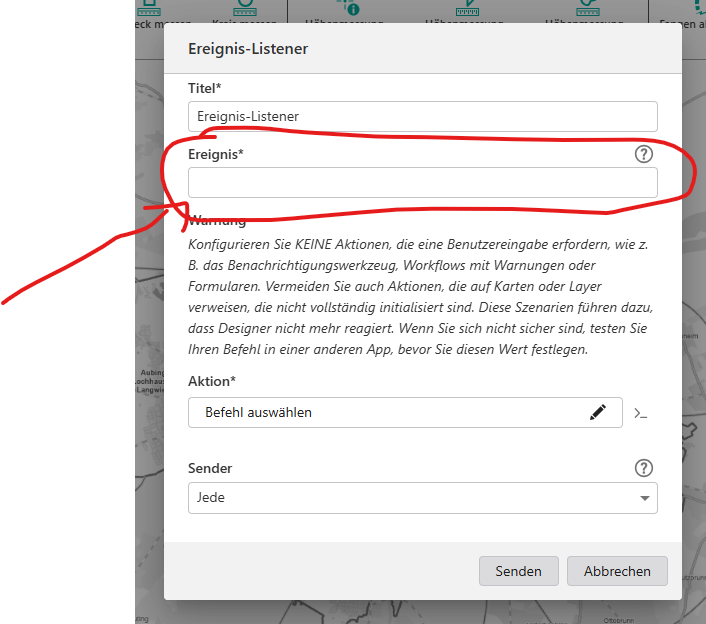
Does anyone have experience with this?
0 -
How did you add the expands to the map? I tried this, but I can't get two of them to be open at the same time.
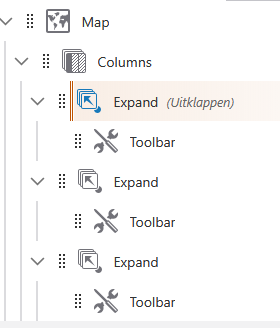 1
1 -
Oops, I forgot to mention this:
My expands have the setting modal:false in the layout.xml:

This causes Toolbars nested in Expands to work like they would if they were placed in Tabs instead: they don't deactivate after using a tool and the tools can be used right away, without having to make that extra click on the map. Unfortunately, this also causes the “stacking” effect.
0 -
The event you need to listen to is ui.visual-state-changed:
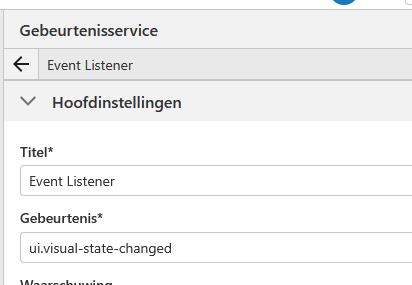
The ID of the expand that is being opened will be passed as an argument to the workflow automatically, there is no need to configure any other inputs manually.
In the workflow, you then close all expands, skipping the one that was just opened. Here's an example. Update the expandIds activity so that it matches the ID's of all your expands.
{"_properties":{},"components":[{"id":2,"steps":[{"id":3,"inputs":{},"position":"0,0","purpose":"start","title":"Start","transitions":[{"id":54,"position":"90,60 90,100","target":{"id":47}}]},{"action":"gcx:wf:core:loop:ForEach","id":41,"inputs":{"itemType":"string","items":{"accessors":["$expandIds"],"annotations":[{"count":10,"index":0,"kind":"idref"}],"code":"$expandIds.result","source":"$expandIds.result"}},"name":"forEachExpandId","position":"-220,460","title":"For Each"},{"action":"gcx:wf:core::GetWorkflowInputs","id":47,"inputs":{},"name":"getWorkflowInputs","position":"-30,100","title":"Get Workflow Inputs","transitions":[{"id":55,"position":"90,160 90,210","target":{"id":50}}]},{"action":"gcx:wf:core::Cast","id":50,"inputs":{"input":{"accessors":[],"annotations":[],"code":"[\"expand-d940dfcb\", \"expand-984f26c0\"]","source":"[\"expand-d940dfcb\", \"expand-984f26c0\"]"},"type":"string[]"},"name":"expandIds","position":"-30,210","title":"Cast","transitions":[{"id":57,"position":"90,270 90,320","target":{"id":56}}]},{"action":"gcx:wf:core::If","description":"Only do something if an Expand is activated","id":56,"inputs":{"condition":{"accessors":["$expandIds","$getWorkflowInputs"],"annotations":[{"count":10,"index":0,"kind":"idref"},{"count":18,"index":27,"kind":"idref"}],"code":"$expandIds.result.includes($getWorkflowInputs.inputs.context.component)","source":"$expandIds.result.includes($getWorkflowInputs.inputs.context.component)"}},"position":"-30,320","title":"If","transitions":[{"branch":"true","id":58,"position":"-30,375 -100,375 -100,460","target":{"id":41}}]}]},{"id":29,"steps":[{"id":31,"inputs":{},"position":"0,0","purpose":"start","title":"For Each","transitions":[{"id":37,"inputs":{},"position":"90,60 90,110","target":{"id":33}}]},{"action":"gcx:wf:core::If","description":"Skip the expand that is being opened now","id":33,"inputs":{"condition":{"accessors":["$forEachExpandId","$getWorkflowInputs","$getWorkflowInputs"],"annotations":[{"count":16,"index":0,"kind":"idref"},{"count":18,"index":25,"kind":"idref"},{"count":18,"index":72,"kind":"idref"}],"code":"$forEachExpandId.item != $getWorkflowInputs.inputs.context.component && $getWorkflowInputs.inputs.context.current == \"open\"","source":"$forEachExpandId.item != $getWorkflowInputs.inputs.context.component && $getWorkflowInputs.inputs.context.current == \"open\""}},"position":"-30,110","title":"If","transitions":[{"branch":"true","id":39,"inputs":{},"position":"-30,165 -110,165 -110,270","sourceConnector":"left","target":{"id":35}}]},{"action":"gcx:wf:app::RunCommand","id":35,"inputs":{"commandName":"ui.set-visual-state","commandParameter":{"accessors":["$forEachExpandId"],"annotations":[{"count":16,"index":10,"kind":"idref"}],"code":"{\n id: $forEachExpandId.item,\n visualState: \"closed\"\n}","source":"{\n id: $forEachExpandId.item,\n visualState: \"closed\"\n}"}},"position":"-230,270","title":"ui.set-visual-state"}]}],"deploymentConfig":{"supportedApps":{"VSW":true},"worksOffline":false},"designerVersion":"5.49.0+7","licenseInfo":{"licenseUrl":"https://nlamsas131.sweco.se/geocortex/workflow/service/auth/license"},"start":{"id":3},"transitions":[{"branch":"loop","id":43,"inputs":{},"source":{"id":41},"target":{"id":31}}]}1 -
Thank you so much Berend!
I just realized, this probably can never work - the problem is if you close all other expands via ui.set-visual-state, this triggers all the other ui.visual-state-changed-events because it counts as “ui.visual-state-changed", creating an infinite loop and crashing the entire app.
Really unfortunate. Guess I'll have to go with a “boring” ribbon toolbar.
0 -
It works for me. The trick is that you need to check for $getWorkflowInputs.inputs.context.current == "open" as well, which is what I did in my workflow. This will make sure that a closing expand does not cause an infinite loop.
(I just realized that you can add that check to the If activity on the top level of the workflow, to make it a little bit more efficient)
And another thing: Before closing an expand, you could call the ui.get-visual-state operation to see if that expand is not already closed. This will prevent the event from being raised unnecessarily in the first place.
1 -
You are right, using your workflow it works like a charm! I was still trying to get by with custom commands.
Thank you so much!
0
Vous devez vous connecter pour laisser un commentaire.
Commentaires
8 commentaires