How to configure the legend control in printing template for graphics layer

In a workflow, I use the following activities:
- “Add Graphics” activity to visualize query results on the map
- “Run Print” activity to print the map and the query results passed as parameters
In the printed PDF, the legend displays the symbol of the graphics layer and the text “Override 1”.
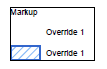
1. How can I modify the text next to the sysmbol ("Override 1") so that it shows the actual layer name instead?
2. How can I remove the text “Markup”?
I couldn´t find any options in the VertiGIS printing designer. Do I have to use the Expression Editor?
Thank you!!!
0
Vous devez vous connecter pour laisser un commentaire.
Commentaires
0 commentaire