Geocortex Essential and ArcGIS Enterprise 12 being tested?

Hi VertiGIS,
Similar to Studio: VertiGIS Studio Products and ArcGIS Enterprise 12 – VertiGIS Support
I am wondering if GXE is also being tested for compatibility with Enterprise v12?
Thanks,
Mat
-

Hi Matthew,
I performed a quick test for support with Enterprise 12.0 and Geocortex Essentials was functioning as expected. We no longer perform in-depth testing for compatibility for GXE versions, which is why it was not included in this post.Thanks, Stefan
1 -
Thank you Stefan!
0 -

Hi Stefan Schweigert, since GXE 4.15 is supported until June 2028, from our perspective we need it to be included in any posts about compatibility with ArcGIS Enterprise versions. Also any details about what testing is done will be helpful. Can you please confirm if this is possible for v12.0 and future versions?
0 -

One thing that will be affected by going to Enterprise 12 - the map viewer classic will no longer be available. This may affect anyone who is using the HTML5 Viewer's “Save to ArcGIS” toolbar item to convert their site to an Esri webmap.
We're in the process of doing this (using Enterprise 11.5), and one thing we've noticed is, webmaps created with the Save to ArcGIS command are corrupted when viewed in the standard 11.5 Map Viewer. There are blank layers that aren't accessible. To get around it, we open up the webmap in Map Viewer Classic, then save it. We can then open it successfully in the standard Map Viewer. If Map Viewer Classic is going away in 12, this workaround will no longer be available.
I can't test this with Enterprise 12 as we don't have it installed, but we're definitely holding off on v12 until we get all our Essentials sites ported over to Esri webmaps.
Chris
0 -

Couple of updates.
1. We completed compatibility testing for Geocortex 4.15.3 against ArcGIS Enterprise 12 (no issues) and have updated the article: https://support.vertigis.com/hc/en-us/articles/31955574671250-VertiGIS-Studio-Products-and-ArcGIS-Enterprise-12
2. Chris Dunlop … we took your report to heart and did quite a bit of testing for the exportWebmap module and Esri (new) Map Viewer. We weren't able to find any cases where it didn't work.
If something isn't working for you, do reach out to Support so we can track down what the specific issue is that you are having … the general case worked well across a variety of Sites > webmaps.1 -
Hi Cam. Thanks for looking into the issue I have on my end with exporting to webmaps. Since I have the work around of opening up the webmap in Map View Classic and resaving it, I'm not going to worry about submitting a ticket (we'll have finished converting all our Essentials apps before making the upgrade to 12).
I did do a little testing, and the issue seems to be that the webmap that Essentials creates puts the following line into the webmap json for each operational layer:
“capabilities”:"Map,Query,Data",
This has the result of excluding the layers from the layer list in Map Viewer (although the layers do appear on the map).
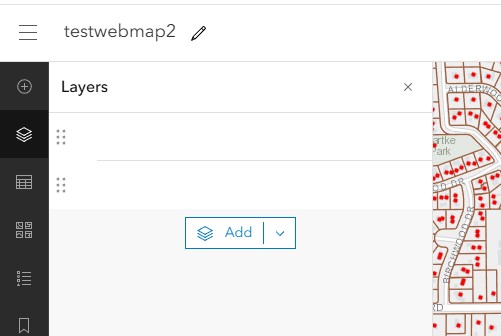
If I remove that line from the json (using the ArcGIS Online Assistant), the layer appears normally in the layer list. Opening the webmap in Map Viewer Classic and saving it has the same effect.
Perhaps it's related to the versions I'm running (Essentials 4.15.1, Enterprise 11.5). Anyway, just wanted to give you the information on what I'm seeing, in case anyone else runs into it.
Chris
0
Vous devez vous connecter pour laisser un commentaire.
Commentaires
6 commentaires