Layer Presets Drop Down

Hopefully I am missing something here, but the Layer Presets presentation seems clunky compared to what it was in Geocortex for themes.
Issue #1: This is not the type of item you typically use a large amount of real estate on your app to present to the user as many times the user would just select a specific theme and be done. Maybe switching back and forth from time to time. This is why it is baffling that it would be presented is a lengthy list as opposed to a drop down like it was in Geocortex. I would like the option to have this presented simply as a drop down.
Issue #2: Once a preset is selected the display doesn't show which one is selected. At least with the drop down you always knew which theme you were on.
Basically I would like to see an option to just make layer preset control be a drop down list of all presets.
While this could likely be done as a workflow, the idea is to have it always visible indicating which preset is currently selected. That would mean the workflow would never stop running….this is not a good design pattern.
-

Hi Kevin, we are accomplishing Issue #1 by putting a Layer Presets map component within an Expand layout component and then placing both of those within the Layers Row so that the layer presets appear as a dropdown button above the layer list. Although doing this does not fix Issue #2.
I agree, it would be nice once a user selects a layer preset, to somehow identify what preset is currently selected.
0 -

+1 on the ability to simply configure a drop-down of the presets. I came here to add this idea, and good to see I'm not the only one screaming for this. It was just so much nicer in the Geocortex viewer.
and. showing the active preset is also needed!
0 -

+1 for me too. I haven't started developing my layer themes yet.
0 -

Vote for this Idea to show the active layer preset.
https://support.vertigis.com/hc/en-us/community/posts/23007246905234-Show-active-layer-preset
0 -
We ended up just building a workflow that runs at startup.
You submit the list of presets as parameters and a default preset (couldn't find a way to get at the presets from workflow).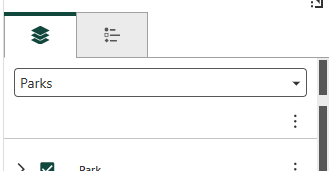
Also gives the ability to set the preset through the URL.

NOTE: We dropped the “item” portion of the preset link, because when we sent in the entire thing, it would act like an object, which would have been nice, if all the settings didn't appear to be innaccessible.
Example
{"presets": [
{
"name": "Aerial Photo Locator",
"value": "//layer-preset/36a9c691-b403-43d1-a9a3-9dd6a92e2fdd"
},
{
"name": "Document Retrieval",
"value": "//layer-preset/2c099530-0ec7-425b-ac0e-2519d6cb26a8"
“default”: true
},
{
"name": "Parks",
"value": "//layer-preset/c5a8f4a5-e52b-4097-802f-1a287fbaaa5e"
},
{
"name": "Survey Benchmarks",
"value": "//layer-preset/288abf1c-8b60-4d3e-ab86-ad3a11d1011c"
},
{
"name": "Facilities",
"value": "//layer-preset/772653d5-f47f-47fa-99a6-d1d39047407c"
},
{
"name": "Pest Management",
"value": "//layer-preset/ffbac5bf-6c09-4ea0-8831-ad2262a497c9"
}
]
}
0
Vous devez vous connecter pour laisser un commentaire.
Commentaires
5 commentaires