Now Available: VertiGIS Studio Web 5.39

This release of VertiGIS Studio Web 5.39 delivers powerful new visualization tools and flexible search capabilities, alongside significant performance optimizations. This version introduces dynamic runtime symbology for end-users, a highly configurable "Nearby Search" command, and essential security enhancements for SaaS printing.
✨ New Features
Symbology by Unique Value: End-users can now change layer symbology at runtime based on unique attribute values. This allows for dynamic and individualized data visualization, empowering users to highlight specific data patterns on the fly without administrator intervention.
Flexible Nearby Search: A new "Nearby Search" command has been added to support no-context, layer-context, and feature-context scenarios. This enables administrators to configure flexible spatial queries across layers, allowing users to easily find features near a specific location or surrounding existing features.
Portal Explorer Improvements: The Portal Explorer in the App Designer has been updated with new toggle switches for filter chips, panels, and menus, significantly improving usability and navigation for administrators.
Enhanced Printing Capabilities: Printing requests to the new SaaS instance of Studio Printing (based on ArcGIS Pro) now include a token for improved security. Additionally, support has been added for updating prepared print requests via custom operations.
Deployment Keywords: To improve deployment tracking, an environment type keyword is now automatically added when a Gen2 layout is deployed to a non-DEV environment.
🛠️ Behavioral Changes and UX Improvements
Enhanced UI Performance with Async Arcade: UI performance has been significantly improved by updating components to utilize asynchronous Arcade expressions. This reduces main thread blocking and improves overall application responsiveness, ensuring a smoother user experience.
KML Import Styling: The KML import tool has been enhanced to parse inline styles in addition to styleUrls, ensuring that imported KML data renders correctly and maintains its intended visual fidelity.
Removed Fixed Scales for Chromium: The unintended ability to define fixed print scales for Chromium-based printing has been removed to prevent configuration errors.
🚀 Security and Technology
- Highcharts Upgrade: The Highcharts library has been upgraded to version 12.x.
- Workflow Integration: The platform has been updated to integrate with VertiGIS Studio Workflow 5.48.2.
🐞 Bug Fixes
This release includes numerous fixes that improve stability and performance across the platform. Key issues addressed include:
- App Designer: Resolved issues where the Designer failed to resolve schema references for custom libraries, fixed "Invalid Arguments" errors in extension commands, and prevented the Designer from hanging during specific startup workflows.
- Data Import & Export: Uploading shapefiles with "Guided Add Layer" is more robust, supporting WKT-defined custom projections and case-insensitive file extensions. Excel export issues regarding geometry limits have also been resolved.
- UI & Results: Fixed column sizing resets in the Result Table, restored column separators in pop-out windows, and corrected pagination for related table results.
- Layers & Maps: Addressed errors when updating settings on grouped layers, fixed label field updates for map service sublayers, and resolved conflicts with Custom Basemap settings.
Check out the Release Notes for a complete list of changes in this version.
VertiGIS Studio Web is available as a SaaS offering at https://apps.vertigisstudio.com/web/designer.
If you are using a subdomain, update your Esri portal authentication app item and add a URI redirect entry for yourdomain.apps.vertigisstudio.com in addition to your existing yourdomain.apps.geocortex.com entry.
On-premises installer: https://apps.vertigisstudio.com/downloads
Questions? Ask your questions and join the conversation in the VertiGIS Studio Web community forum
Reminder for the early warning: Future breaking change in VertiGIS Studio Web SDK
If your VertiGIS Studio Web application uses a custom library or component, please read it through:
- You have written a custom component using the VertiGIS Studio Web SDK
- You have had a Services organization create a custom component using the VertiGIS Studio Web SDK
- You are using one of our pre-built incubator custom libraries built with the VertiGIS Studio Web SDK
Esri recently deprecated a part of the Esri Maps SDK for JavaScript related to how code can watch for and detect changes. This code will be removed from Esri's API in a future release.
This part of the Esri Maps SDK was used by VertiGIS Studio Web, and we recently completed a significant project to find a new way to maintain the functionality you expect.
We encourage our effected customers to finalize changing your custom code to use this new pattern. The old patterns will still work (for now) and will issue deprecation warning in the console log. For more details, check out this post: https://support.vertigis.com/hc/en-us/community/posts/28599233913234-Future-breaking-change-in-VertiGIS-Studio-Web-SDK. We anticipate that somewhere around the Studio Web 5.40 release in February 2026 we will have updated to use a version of the Esri Maps SDK for JavaScript where this functionality has been removed, and your un-updated code will break.
If you'd like a detailed technical view of what is changing, check out this excellent blog post on our VertiGIS Studio Developer Center https://developers.vertigisstudio.com/blog/2025/08/05/web-observable-overhaul/
-

Where can I find the “Nearby Search”?
(Perhaps this was shown in the recent Road Ahead webinar?)
0 -
Also a question on “Portal Explorer Improvements”, which dialog is meant here?
0 -

Great to see that the Highchart library has been updated. Would have been nice if it included also gauge charts, unfortunately they were not added.
0 -
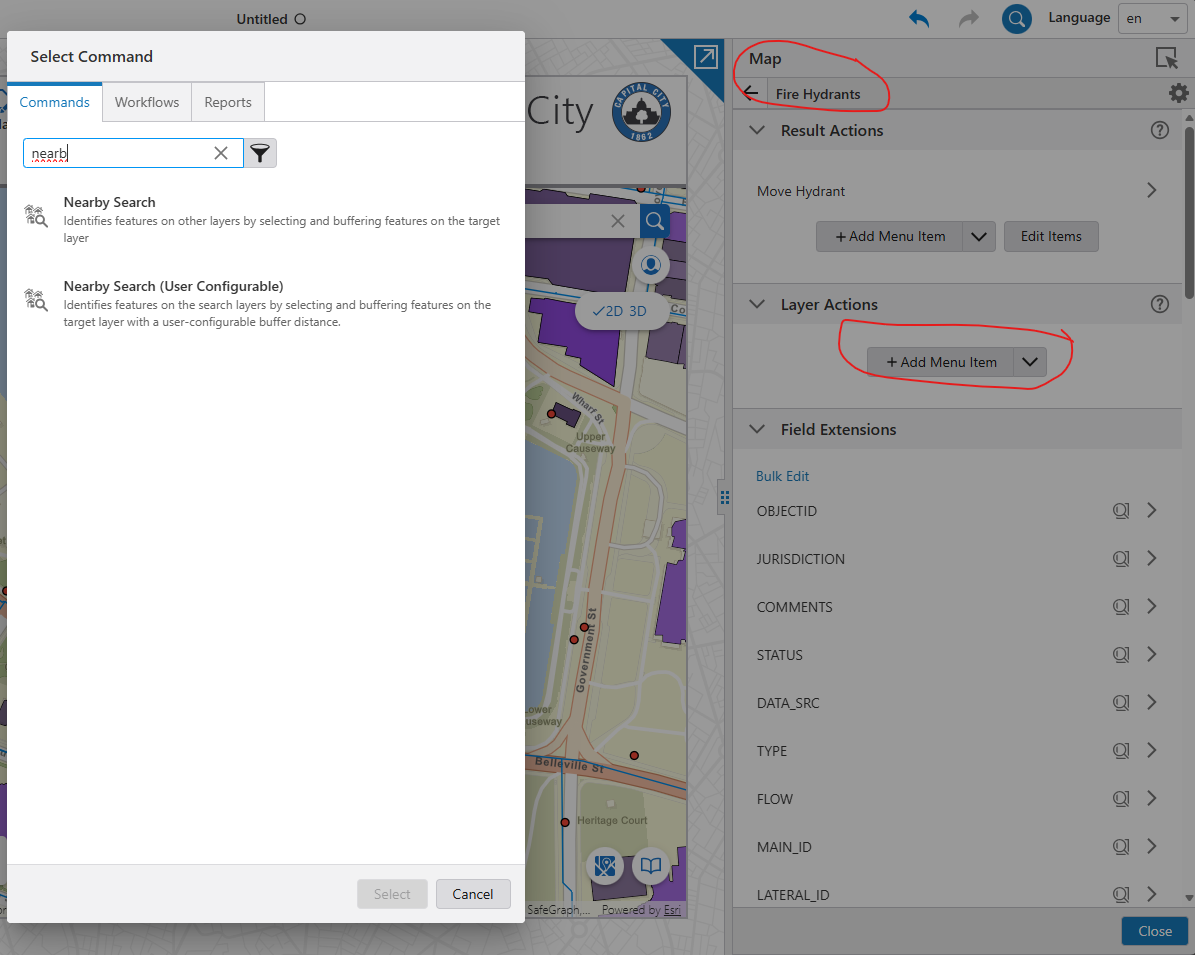
Nearby search (yes, it was presented in detail in the Road Ahead webinar):
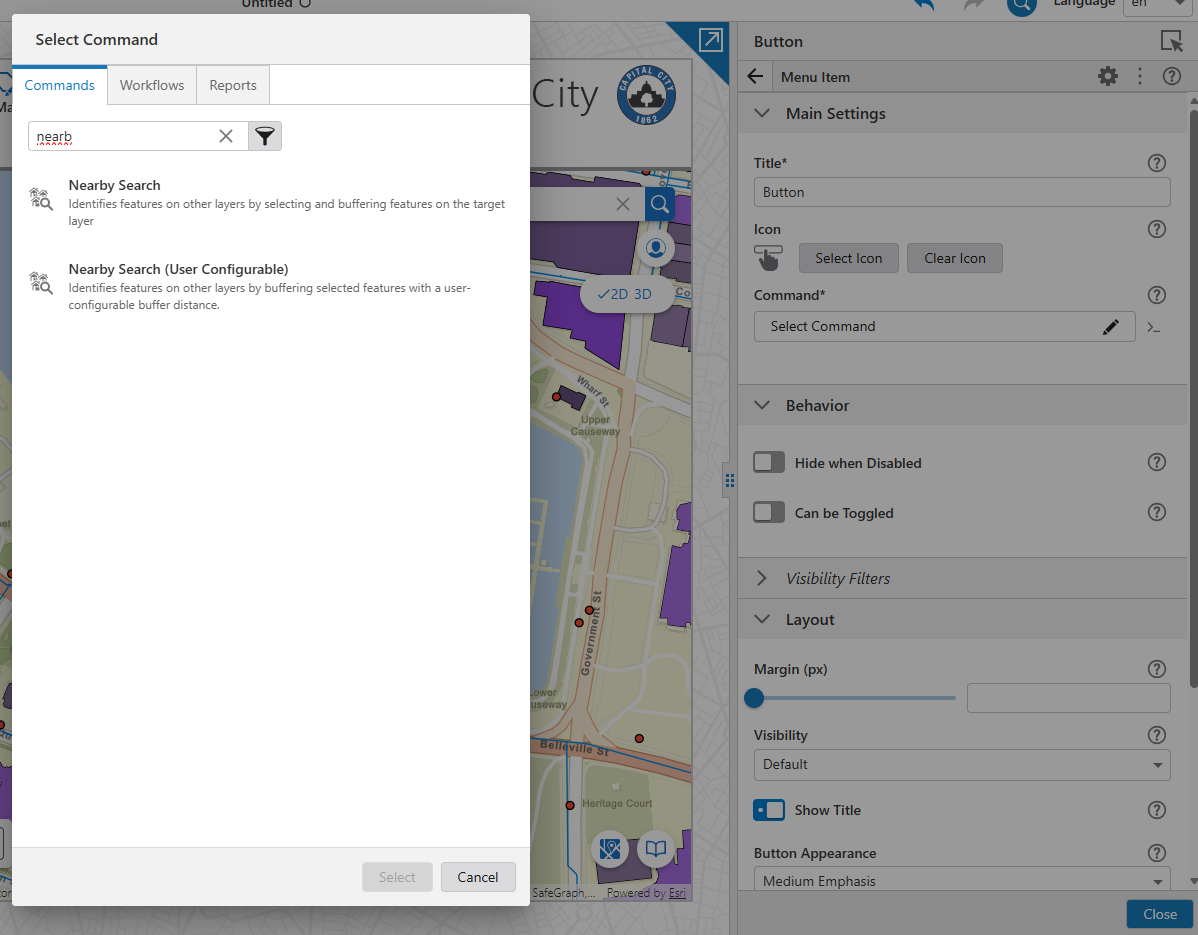
Nearby search can be added on a global level, where also the source layer can be configured; or also on layer level, then the source layer is automatically the layer where it's configured on.
 0
0 -
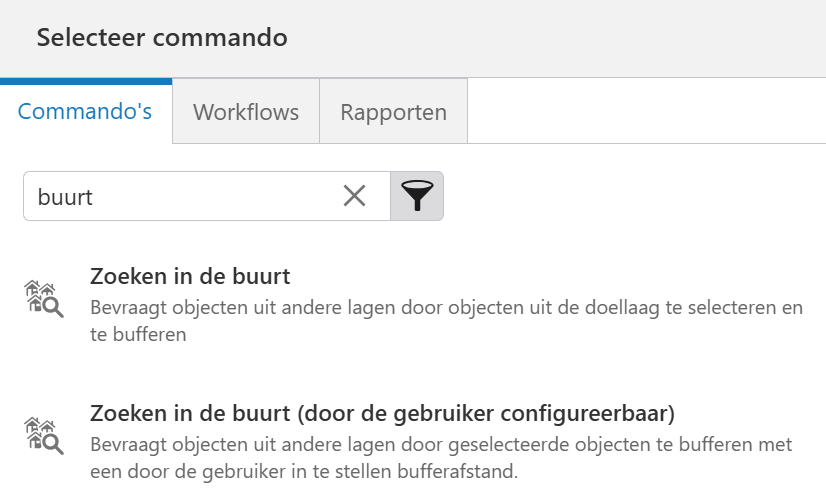
Thanks, found the Dutch equivalent of the commands.
Should have a look at the webinar recording, when available here https://support.vertigis.com/hc/en-us/articles/11461033818898-Road-Ahead-Webinar-Recordings
 0
0 -
Christian Wohlmutter Where can I find this?
Portal Explorer Improvements: The Portal Explorer in the App Designer has been updated with new toggle switches for filter chips, panels, and menus, significantly improving usability and navigation for administrators.
0 -
Happy new year Everyone!
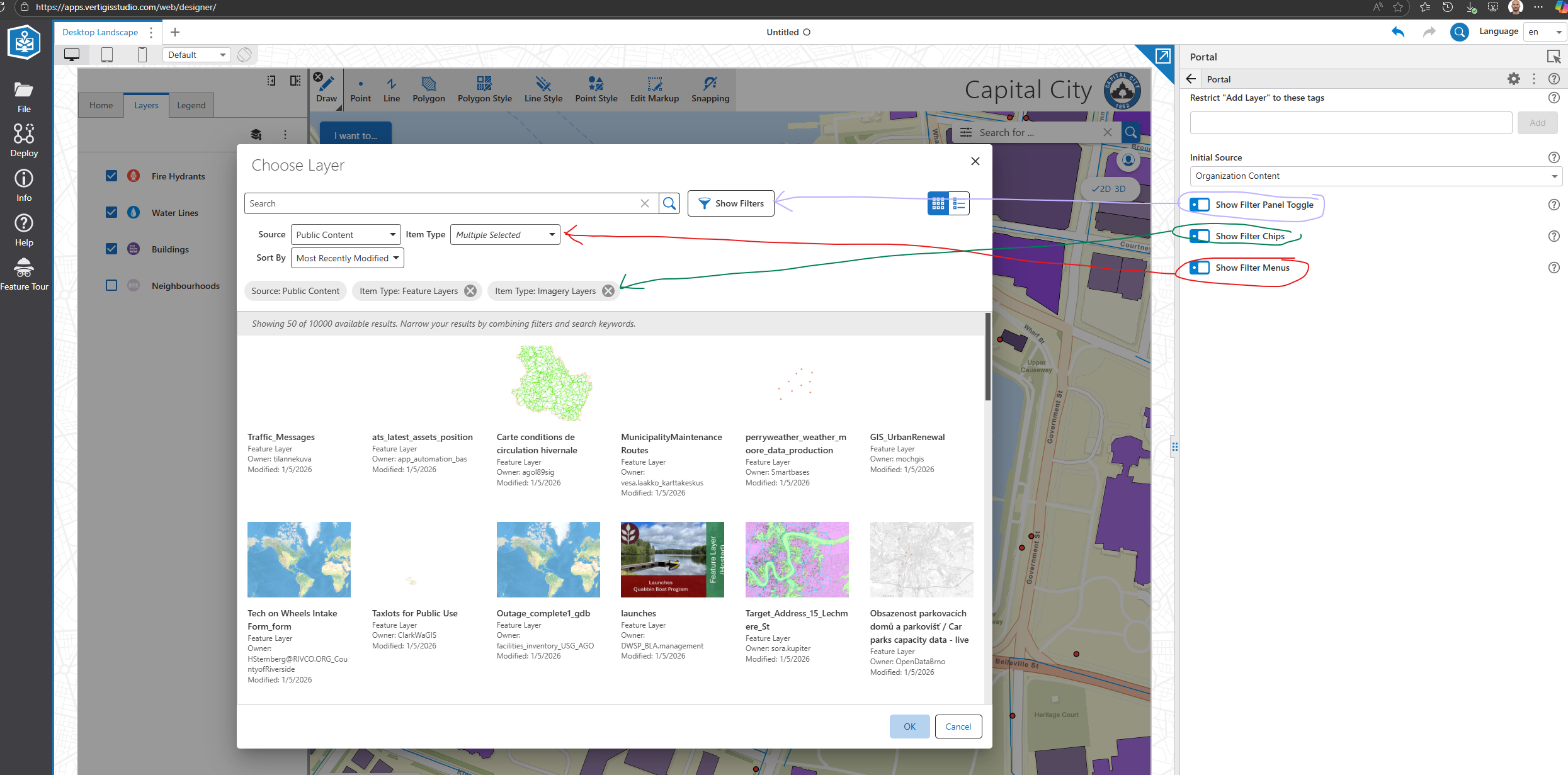
Nico Burgerhart If you activate in the App Designer under Services/Portal the ‘Show Filter Menus’ toggle, then you see additional dropdowns for an easier filtering.
 0
0 -
Thanks Christian Wohlmutter
0 -

Can you please elaborate on what ‘layers’ refers to in relation to the new "Symbology by Unique Value" feature? I’m unable to symbolize Map Image Layers, and it seems I can only symbolize Hosted Feature Layers. Or is it because one layer is editable while the other is not?
We have many users who want to be able to symbolize by unique values, but we exclusively use Map Image Layers when publishing data to these users.
I just want to know which layers are able to use this new feature and maybe why its now available for Map Image Layers (or whatever my issue is).
A random Map Image layer: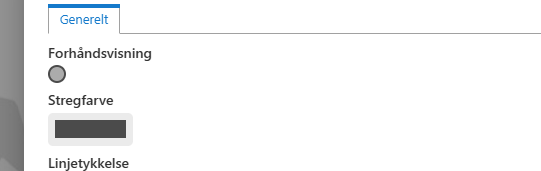
A editable hosted feature layer
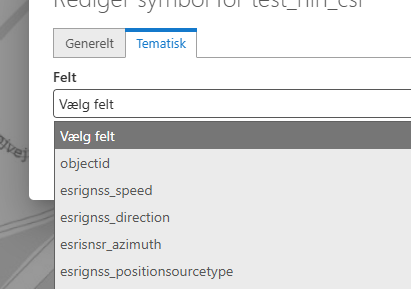 0
0 -

I have experienced the same thing. I looked at the documentation and there is nothing there that says what type of layer that works with the thematic tab. Map Image layers don't work for me either. Once this is clarified from VertiGIS can the documentation be updated.
1 -
Thank you for your messages!
Unique Values Symbology is mainly for Feature Layers that has Simple Marker Symbols (esriSMS), Simple Line Symbols (esriSLS), or Simple Fill Symbols (esriSFS).Feature Layers and Hosted Feature Layers are supported as they expose their schema and support dynamic renderers.
Sublayers as well as Map Image Layers that are rendered server-side are not supported.
We are updating the documentation with this information.0 -
Hi Christian,
Thanks for the clarification and for updating the documentation.
0
Vous devez vous connecter pour laisser un commentaire.
Commentaires
12 commentaires