Dynamic date/time stamp on VertiGIS print templates

I have created several print templates using ArcGIS Pro and uploaded them to VertiGIS Print Designer. I then added my print templates to VertiGIS Web. All of the print templates contain a Date/Time element. However, the time displays in UTC instead of the local time.
Our web server was originally set to UTC, but we have since changed the time zone to local. We thought changing the server's time zone would certainly resolve the issue with the time stamp, but the time stamp on the print template still shows in UTC.
Is there any way to convert the time to the local time zone in the print template?
-

How do you add a dynamic date timestamp to the lay-out? I added a textbox (Label) and then tried to discover where you can add that. Possibly through the expressions tab (right-ribbon), possibly through the properties tab. What to add where? Below didnt work.
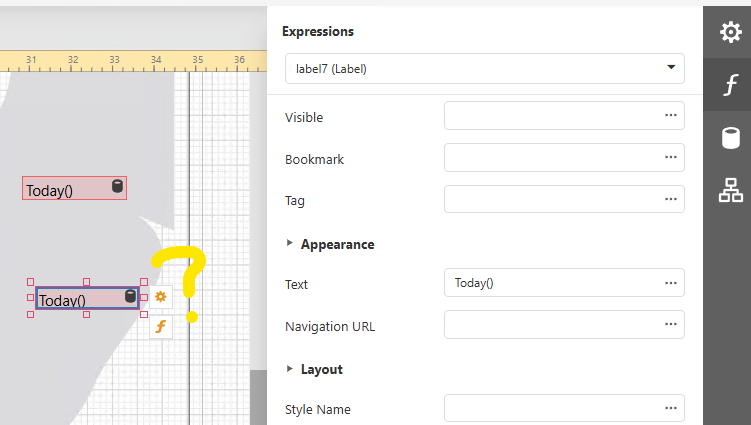 0
0 -

Kees Hoogenboom
You can use a Page Info Control.
See
https://docs.vertigisstudio.com/printing/latest/help/Default.htm#shr/help/page-info-control.htm
and
Does this help?
0 -

The links are helpful, but I'm not seeing the format string options. I'm trying to set this up on the newer ArcGIS Pro layout in Print Designer, so not sure if that's a different process or not?
0 -

I'm not seeing the format string option either - and I too are looking at this through the Arc Pro printing engine approach. I can get the page info item working, but cant get the format option to show, as John has alluded to. thoughts/advice appreciated
0 -
As described here, scripting support is not available in gen2 (ArcGIS Pro‑based) layouts
https://support.vertigis.com/hc/en-us/articles/33733504053266-Working-with-gen1-and-gen2-Printing-Layouts-Limitations-Conversions-and-Best-Practices4.2 Scripting Support Disabled
Scripting is a DevExpress-only feature and cannot be mapped to gen2. Therefore:
* The scripting toolbox is disabled
* All script-related properties are hidden
* Any existing script elements in a gen1 template are skipped0 -
Thanks Nico Burgerhart for the link. That's extremely useful, and makes things a little clearer now :)
0 -
and Nico Burgerhart - off the top, do you know if the Legend properties in a Pro-based legend are respected when importing the .pagx file into Printing Designer? My first guess is they're not and hence why my legend in pro looks nothing like the final result once printed from VSWeb
0
Vous devez vous connecter pour laisser un commentaire.
Commentaires
7 commentaires