VertiGIS Studio Web – CSV Import Column Mapping (Lat/Long Picker)

In VertiGIS Studio Web, the built-in Import from CSV command only works reliably when the CSV uses specific header names like Latitude / Longitude. Many of our source systems export fields as GPS Latitude, GPS Longitude, Y, X, etc., which forces users to edit the CSV in Excel before they can import.
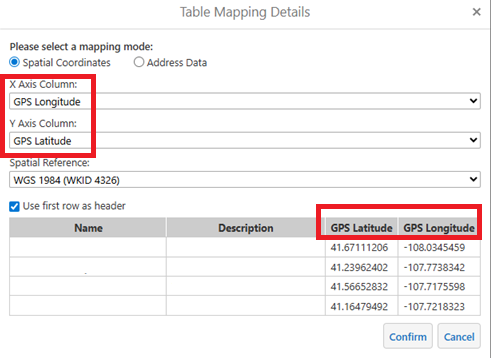
In the legacy Essentials viewer we had a Table Mapping dialog where users could:
- Choose mapping mode (spatial coordinates vs address)
- Pick X / Longitude and Y / Latitude from dropdowns of the CSV headers
- Set the spatial reference (e.g., WKID 4326)
- Preview the data before loading
Request
Add a similar Column Mapping step to VertiGIS Studio Web’s CSV import:
User selects a CSV.
At this time a user has to rename the CSV column Latitude and Longitude in order to import.
Web reads the header row and shows a dialog with:
- Dropdown for X / Longitude field
- Dropdown for Y / Latitude field
- Optional SR (default 4326)
Web then creates the layer/graphics using those fields.
Geocortex import CSV mapping columns
Example below
Vous devez vous connecter pour laisser un commentaire.
Commentaires
0 commentaire