Add html attributes to HTML elements

With the upcoming federal mandate that we need to support accessibility, I was hoping to be able to apply additional aria HTML attributes throughout my application. While I'm aware that Vertigis Studio already addresses a lot of it already (see Accessibility), I want to go one step further and designate specific layout elements, buttons, etc.
For instance, we have a common banner (i.e. ROW layout component) at the top of our applications that includes the company logo, title, etc. I'd like to add the role=”banner” attribute to the generated DIV tag (see ARIA: banner role - ARIA | MDN)
My idea is to allow the Vertigis Studio web designer software to support adding additional attributes to any component.
FWIW, I was able to do this through a workflow, but I find the implementation less than ideal:
1) Get the Layout ID of the component
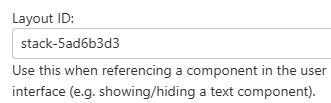
2) Create a workflow that runs when the layout is loading
3) Add an “evaluate expression” component that runs these 2 lines of code:
const elem = document.querySelector(div[data-layout-id='stack-5ad6b3d3']);
elem.setAttribute('role', 'banner');
FYI: the querySelector method will isolate the specific HTML element based on a CSS selector definition: HTML DOM Document querySelector() Method.
Vous devez vous connecter pour laisser un commentaire.
Commentaires
0 commentaire