Can we Load Project on startup?

Hi All,
Apologies if this has been asked, but I can't find any relevant posts on what I'm asking here - and that is the potential to Load Projects on startup? Akin to way you can run a workflow on startup - is there a way to run/load a project, I assume via a url that a user can run and or bookmark in the browser for future use.
We see the Projects as a way of potentially minimising the amount of layers we store (and configure) in the single webmap (Currently we have 400+ in Essentials sites), and I'm not super keen on keeping a webmap that big in transitioning from Essentials to VertiGIS Web.
The plan would be to create a ‘core’ application/site based on a ‘core’ webmap and allow the users to build their own specific view by adding extra layers to the layerlist via the Add Layers from Catalog tool.
Once they're happy with their own view of the world, they can save to a project. But rather than load the core site, and then load the project manually, can we jsut auto-load their specific project?
Any thoughts appreciated on how we can potentially achieve this. It's only thoughts at present, and there's some further things to flesh out like webmap changes, and portal layer changes etc, and keeping the projects in sync, and that's a rabbit hole that could prove rather deep (thoughts appreciated here also!)
thanks again
Gareth
-

Hi Gareth
I’m pretty sure you can use ‘Share’ if you’re using an S3 solution.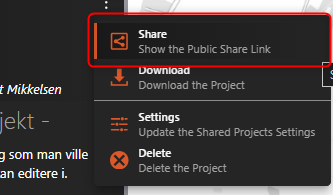
This will create a link with a projectShareId:
app=xyz123&projectShareId=s2b5b4e3-ea0a-22c5-aa19-0eed123a1234
This vil honour your saved project using the S3 solution.I know it is not exactly what you're looking for, but it might be a workaround for the users to bookmark the shared link (given the project is shared with them).
0 -

We created functionality like this as well, when transitioning from Essentials to Web, for the same reason (Essentials had way too many layers).
We use an alternative to the S3-approach, a bit more cumbersome, but it works. Users store projects (the entire file) in a feature service, as attachments. Then there's a startup workflow that checks if there are any parameters in the URL of the viewer, and if so, loads the project from the feature service.
Users can also create, open, update and delete projects from a workflow.
It works pretty neet, butttt we haven't touched on the rabbit hole of keeping projects in sync if there are major changes in the viewer/services.. Since the projectfiles are all json, we could potentially pass changes to all the existing projects at once (say, if a layer url changes, just loop and find and replace). Luckily we haven't had that yet.
0 -

Yannick Mijnheer your workflow sounds fantastic! At the moment our users are creating projects, saving them locally and then re-loading them, which they complain about. The projects also break when we make major changes to our app/webmap, which annoys them. Keeping everything in sync is definitely an issue.
0 -

Hi Yannick Mijnheer, we are also trying to use the project.load command in a workflow without much success. Can you please provide some details on the configuration of the Run Command with the project.load activities in your workflow? We are running the command and it appear to execute successfully and we are getting a green ‘Project Loaded’ notification, but the map or layers don't change to match the project file. thanks in advance
0
Vous devez vous connecter pour laisser un commentaire.
Commentaires
4 commentaires