Configuration options: Legend Smart modus Advanced settings

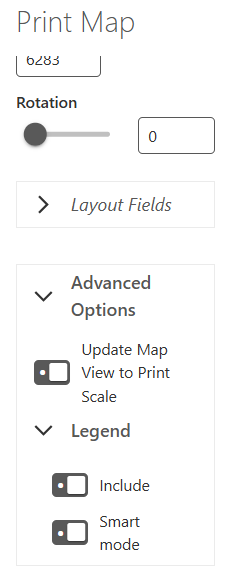
When printing arcgis pro lay-out packages, the user has to option to toggle the legend smart modus on in order to see only the relevant legend.
This in a little bit hided in the advanced settings, so for end users with limited knowledge this is not so clear.
With the chromium engine, the legend filtering depends on the setting in de VS Printing designer of the enabled smart filtering. So it woul make sense to use something similar for layout packages.
For instance if the legend in the layout package has the setting ‘Only show features visible in the map extent’ checked, that smart modus is automatically enabled:
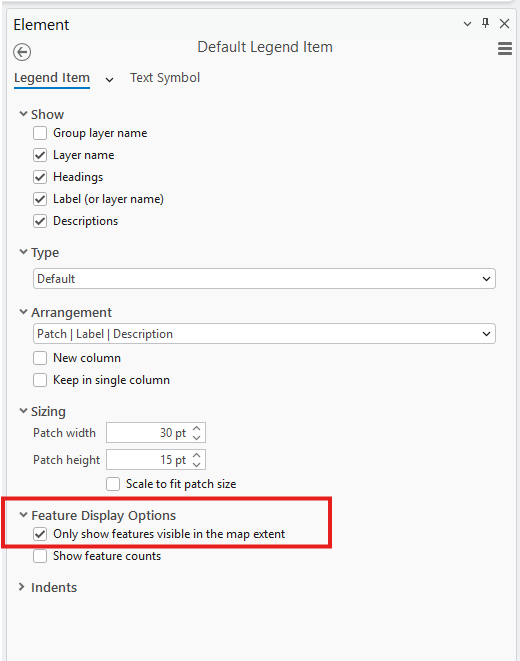
Or that the layout package could somehow be opened in the VS Printing designer and set the smart filtering settings there.
-
Commentaire officiel

Current Behavior
- In Studio Web, the checkbox "Smart mode" is only displayed in the Printing tool, if a layout package that contains a layout of type "legend" is currently selected in the Printing tool.
- Smart Mode must currently be enabled manually by the user via Advanced Options → Legend in the Printing panel.
- Smart Mode is disabled by default because it may negatively impact performance:
- With many layers, filtering can add up to ~30 seconds to print generation.
Related Backlog Items
-
User Story 340931: [Printing Designer] Rename the option 'Enable Smart Filter' to 'Only show features visible in the map extent'
- So that the terminology in Studio Printing Designer aligns with ArcGIS Pro and reflects expected behavior.
- So that the terminology in Studio Printing Designer aligns with ArcGIS Pro and reflects expected behavior.
-
User Story 371178: [Printing Engine] The 'Get Layout Templates Info Task' shall indicate the value of the attribute 'Only show features visible in the map extent' for layouts of type 'legend'
- To provide the new initial value for Studio Web through the Studio Printing API .
- To provide the new initial value for Studio Web through the Studio Printing API .
-
User Story 339955: [Printing Web] Rename the option 'Smart Mode' to 'Only show features visible in the map extent' and load the initial value from the 'legend' layout
- So that the terminology in Studio Web aligns with ArcGIS Pro and reflects expected behavior.
- To allow setting the initial value as desired (by changing the attribute in the layout of type “legend”)
Note
- The attribute 'Only show features visible in the map extent' can be set on any element of type “legend” in ArcGIS Pro or Studio Printing Designer.
However, in Studio Web the option to override this setting is only offered regarding the (potentially multi-page) legend that is specified as part of a layer package. - This new functionality is on the road map for Studio Printing, but no specific release date has been scheduled.
-

Hi, I'm using SaaS VertiGIS Studio Printing (Version v5.29.1) and found this to be an issue for customers as well. When using the app (VertiGIS Studio Web), the legend Smart Mode is buried under Advanced options > Legend, which is easily overlooked. This option should be either on the first level of Printing panel (without having user to expand some options) or ON by default.
 2
2
Vous devez vous connecter pour laisser un commentaire.
Commentaires
2 commentaires