Guided Add layers from file

Hi, I would like help to edit the “Guided Add Layers from File” component.
I only want the users to edit the title and symbol of the layer/layers in the zipped shape file added.
The tool does not allow me to edit the layer title if I remove “layers.edit-settings”.
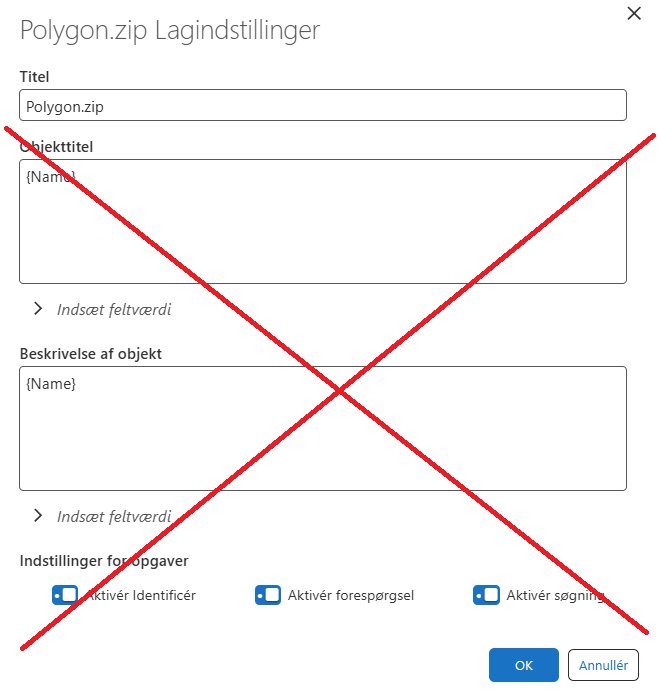
However if I keep “layers.edit-settings” the user can edit several other irrelevant settings (market with a red cross in the picture).
Can anybody help me?
Thanks, Lea
[
{
"name": "system.read-files",
"arguments": {
"multiple": true,
"fileTypeDescription": "language-import-from-files-prompt-description"
}
},
"results.upload-data-from-files",
"results.upload-data-to-features",
"results.convert-to-layers",
"layers.edit-settings",
"layers.edit-symbols",
"layers.set-title",
"layers.set-symbol",
"map.add-layers"
]
-

There is no possibility to customize the layers.edit-settings command.
The best way to modify an specific command is to create a Workflow that performs the operation the user needs and continue using the same context. In this case, the workflow would show an input to insert an string and then, programatically, use the value to change the layer title.
0 -
Thanks Victor Catalán
To reduce the complexity I will consider having a workflow created.
0
Vous devez vous connecter pour laisser un commentaire.
Commentaires
2 commentaires