We'd love to hear from you: Which workflow activities should be included in the docs?
Épinglée En avant
Many of you have expressed a desire for additional examples in the VertiGIS Studio Workflow documentation. We would like to prioritize them according to your needs as it is not possible to give examples for all 400 Workflow activities at once.
Please let us know which activities, particularly those that are difficult to understand without further context, are frequently used, or are not self-explanatory, would most benefit from examples.
Your suggestions will assist us in concentrating our efforts where they will most effectively benefit the community.
We appreciate your help with improving the Workflow documentation!
-

Show Results example for VS Web
https://docs.vertigisstudio.com/workflow/latest/help/visualization-using-show-results.html
261318 - [DOCS] Missing documentation on the use of the Show Results activity in Web1 -
For those unfamiliar with it, here are several sample workflows with explanations.
https://support.vertigis.com/hc/en-us/articles/11461058301586-VSWF-Workflows-Sample-Site1 -
The inputs of the Get Layer activity are documented here
1 -

-
Publish Event Activity. I know the documentation indicates that is it for Geocortex Viewer for HTML5 events, but I noticed that it can leveraged with the Vertigis Studio Web Event services too. Are there other ways to leverage it?
-
Custom Form Elements. A simple ‘Hello World’ example would be useful.
-
Run Command Activity and Run Operation Activity. I used these extensively, but several of them are a bit of black box as to what the various input/output arguments are. Today, I'm trying to see if I can minimize/maximize a panel, but that may not be supported as a workflow activity or command.
-
Any of the activity packs that ship with Workflow. Some are self-evident, but others are a bit of a mystery, or I'm not sure where to look.
-
Any techniques that pass the model URI from web to workflow.
As an example, I've been doing this as an alternative to the Get Layer activity to get access to the esri.layer of a Vertigis Studio layer.
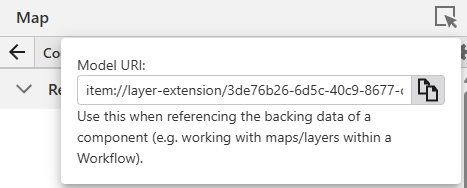
"COUNTY": { "FIELD": "COUNTY_NAME", "LAYER": "item://layer-extension/3de76b26-6d5c-40c9-8677-dd34f4c86928" }=$getWorkflowInputs1.inputs.COUNTY.LAYER.layerListSettings._esriLayerThe Query Layer activity allows one to pass in the esriLayer:
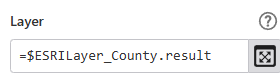 5
5 -
-

I would love to see more examples for Set Form Element Property and Set Form Element Item Property.
I know how they work in theory, but setting a property is often a matter of trial and error. For instance, how do I select an item in a listbox, what is the ‘Item Key’, and which property name corresponds to which item in the element's designer interface.
0 -

I'd also love to see some more examples of
- Set Form Element* items
- Custom Form Elements, and how to start and implement perhaps
- Operations and Commands, used here, but as Mike says, a bit black boxed. Some examples of json definitions would be good
- More string literals examples, and how to form useful alerts and messages based on combos of variables and strings
and, is there any chance you can post the json versions of the example workflows (.zip set) - or are these to found somewhere I'm not looking :)
Thanks for reaching out, and kudos to the work so far in improving the help notes and examples. It's come a long way.
3 -
- Add Image To PDF Activity
- Query Layer Activity (examples on the different inputs)
- Run Application Activity
- Run Arcade Script activity
- Send Web Request Activity
- Set Imagery Layer Options Activity
1 -

Samples on how to style Display Forms using the styleName property of Form Elements, and the Inject CSS activity. The Iject CSS sample available here only works in GVH, not in Web.
- What is the best way to change the background and/or border color of an entire Display Form, and/or individual form elements?
- How to implement rounded corners.
- How to densify forms (reducing margins)
6 -

As already mentioned, I think samples for commands and operations arguments would help a lot.
1 -
An example how to configure a chart and fill it with data from a workflow.
2 -

- Workflow sample from customised Guided Add File command to change default coordinate system (not in 4326 EPSG)
- Workflow sample that enables multiple options for coordinate system transformations when importing file. This workflow is from VertiGIS Sample App Energy VSW
Has there been any update if this workflow samples release will be coming out soon?
0 -

binding of a form to a featureset (load and save)
1 -
Set Layer Property https://docs.vertigisstudio.com/workflow/latest/help/set-layer-property.html
0 -
0
-
For those unfamiliar with it, here are several sample workflows with explanations.
https://support.vertigis.com/hc/en-us/articles/11461058301586-VSWF-Workflows-Sample-SiteVSWF Workflows Sample App
https://apps.vertigisstudio.eu/web/?app=e69e17cb09274fbcb08575b1d59c6c231 -
Hi Nico Burgerhart that's great, thanks for sharing the new sample app with workflows. Is there a link to the app's JSON itself that we can download? Thank you!
0 -

I'm late to the party so I figure I better overdo it. I'd like to add a handful to the list:
- Get Form Element Items from Collection
- Query/Add Attachments
- (Execute) Function
- Await Asynchronous
- Run Activity (advanced, but I still always need to relearn how to use this when I end up doing so)
-
Inject CSS (already has good documentation but I think would really benefit from showing new WF authors how to bind to a specific form elements, which I do all the time and several people have asked me how to do it themselves)
- using an attribute selector on a form element id or layout model id
- using styleName
I'd also like to echo a few others' suggestions for my priority activities that would benefit from examples in documentation (I notice you already added several examples by the way, thank you!):
- Get Layer
- Get/Set Form Element Items
- Run Python Script (I was going to say Arcade too but you seem to have already done it)
Special shout out to Mike Diss-Torrance's suggestion on Commands and Operations, which I sometimes find frustrating.
- results commands, generally
- workflow.run
- ui.display-notification
A related note for something that I think could use a little more documentation: I think just about everyone that I've taught Set Form Element Items to (along with myself) has tripped over the fact that while they can reference the same Items Collection from multiple form elements, doing so means they are viewing the same Items Collection in multiple places. At some point, almost everyone wants to reuse the same check group for multiple sections of a form; and it takes some time (in my case, several times) for an author to realize their mistake and figure out why check group B copies check group A. It's a classic reference variable problem. I don't know how documentation can ever solve this, there's clearly something about human nature going on here, but maybe some bright red text and a spinning exclamation point gif would help.
1

Vous devez vous connecter pour laisser un commentaire.
Commentaires
18 commentaires