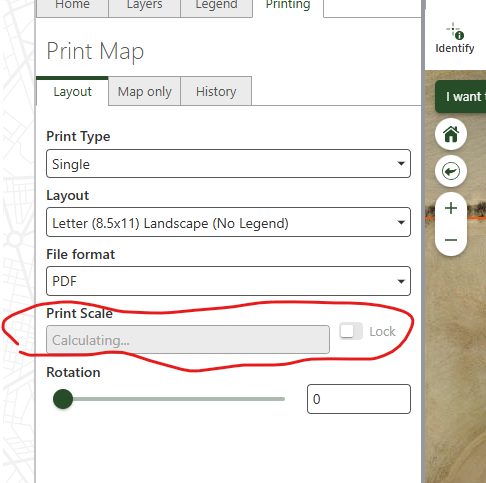
Print Scale, Calculating... takes long time

Every time I try to print it take a while and its says Print Scale ‘Calculating…’. Once it's done ‘calculating’ everything else work fine. But if I switch a Layout, it starts ‘calculating…’ again. Why is it happening, and is there anything that can be done to fix this so its not so slow.
-
Commentaire officiel

Understanding Layout Info Retrieval in VertiGIS Printing Tools
Why is layout info retrieval necessary?To display layout-specific fields (e.g., those listed under “Advanced Options”) in the printing component, the layout details must be fetched from the ArcGIS Server. This is done via the geoprocessing task:
VertiGIS_Utilities/VertiGIS_Printing_Tools/GPServer/Get Layout Templates Info Task.Using your browser’s Developer Tools, you can observe the following request sequence:
- A
submitJobrequest is sent. - Several polling requests check for completion.
- Once ready, the result is retrieved.
This process typically completes within a few seconds.
What causes delays?
If layout info retrieval takes longer than ~10 seconds, it may indicate:
- Suboptimal ArcGIS Server configuration
- High server load or limited processing capacity
The final polling response includes the actual processing time.

If the total duration is significantly longer, the request likely spent time waiting in queue, due to other jobs occupying available resources.
Improving Performance
If layout info retrieval is consistently slow, consider adjusting the ArcGIS Server’s geoprocessing service settings:
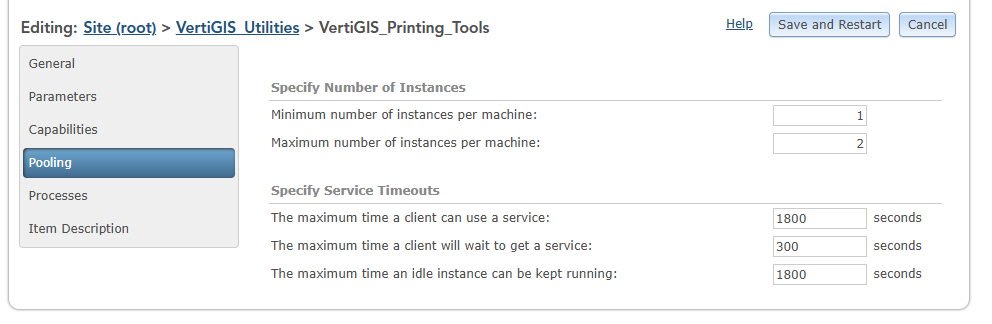
- Increase the maximum number of service instances (ArcSOC processes) for the printing service.
- Refer to ArcGIS Server documentation: Configure service instance settings.
Example:
If only two instances are configured and both are busy with long-running print jobs, layout info requests must wait — resulting in noticeable delays.
Increasing the instance count (e.g., to 5) allows more requests to be processed in parallel.⚠️ Note: Higher instance counts increase resource usage. Finding the right balance between performance and system load is essential.
Why is layout info fetched only when needed?
Fetching layout info on startup is inefficient, especially when many templates are configured. Since it’s unclear which layout will be used (or whether printing will be used at all), the system waits until a layout is selected.
Once the layout info is retrieved, switching between layouts does not trigger additional “calculating…” actions — improving responsiveness for subsequent selections.
- A
-
Hi Nataliya Lys ,
Could you please describe your experience in a bit more detail?You mentioned that it “takes a while” — could you clarify the time frame you're referring to?
Are we talking about something like 5 seconds, 30 seconds, or longer?This will help us better understand and troubleshoot the issue.
0 -
Jakob,
Thank you for the information.
Every time I open the print widget for the first time, the Print Scale ‘calculating…’ takes about 20-30 seconds, sometimes longer. But if I close and reopen the widget, Print Scale loads right away. When I switch between different print template the ‘calculating…’ takes about 3-5 seconds.
Our pooling setting for the VertiGIS Print geoprocessing service was set to min 1 and max 2. We changed max to 3, but that didn't make any difference.
0 -
Hi Nataliya,
Thanks — that gives us a much clearer picture.
At this point, it's still unclear whether your ArcGIS Server is underutilized or overloaded, but either way, the root cause of the performance issue likely lies in the configuration of the Esri component.
-
Every time I open the print widget for the first time, the Print Scale ‘calculating…’ takes about 20-30 seconds, sometimes longer.
This is clearly the most disruptive part of the experience.
Possible causes:-
(a) Complex layout:
If the layout is unusually complex, the analysis might take longer. However, in practice, layout info requests rarely exceed ~5 seconds, so this seems unlikely. -
(b) Server overload:
If all available ArcSOC processes are busy (e.g., handling long-running print jobs), your layout info request may be queued. Depending on the current load, the observed delay would fluctuate significantly throughout the day.
This can be mitigated by increasing the number of service instances, based on expected concurrent usage. -
(c) Cold start behavior:
If the server has been idle for a while, ArcSOC processes may enter hibernation. The first request then incurs overhead to reinitialize the environment. You can test this by restarting the web app (e.g., pressingCTRL+F5in the browser). If the layout loads faster the second time, this may be the cause.
-
(a) Complex layout:
-
But if I close and reopen the widget, Print Scale loads right away.
Correct, once the layout info (of all involved layouts) has been retrieved, subsequent interactions (e.g., switching templates or reopening the widget) should be much faster, because no because no additional “calculating…” actions are necessary.
-
When I switch between different print template the ‘calculating…’ takes about 3-5 seconds.
This suggests the layout info wasn’t preloaded but was fetched quickly — which is within expected performance bounds and points to either (a) or (c) above.
Regards,
Jakob0 -
Every time I open the print widget for the first time, the Print Scale ‘calculating…’ takes about 20-30 seconds, sometimes longer.
Vous devez vous connecter pour laisser un commentaire.
Commentaires
4 commentaires