Change the size of the dropdown in a display form in Mobile.

Hi,
Is there a way to change the size of the dropdown form a display form in Mobile?
Thanks,
Andreas
-

Hi Andreas Broothaerts, can you elaborate on this please? Why do you need this change, and do you want to make it bigger or smaller?
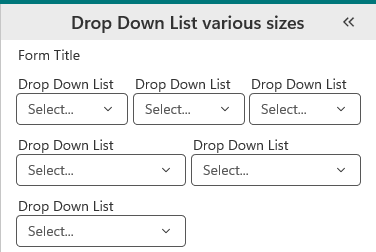
Unfortunately, we don't have this capability just yet. As a workaround, you can make the Drop Down List's size halved horizontally by adding an empty text box beside it. Note that this only works when the title is set to Above. If you'd like to see this worked on in the future, please write it as a post in the ideas board. Some mark-ups and drawings would definitely help us see your vision :)
 1
1 -

Jack Basha See for instance this idea, which so far no-one responded to, unfortunately
1 -
Berend Veldkamp It's unfortunate but it's an ideas board with voting; one can only hope others share the same vision as you and would like to see this implemented :)
I'm only on the Mobile team haha. I try my best to respond here but teams and priorities differ. We only adapt what the Workflow team does rather than work on Workflow ourselves. I can at least say that all ideas shared are greatly valued and will be reached eventually, but I don't have a timeframe for when that happens :/
0 -
HI Jack Basha I'm sorry for the delayed answer. Some holidays and work came in between.
I was wondering if it is possible in a dropdown list to not having the scroll element, I want to present all of the options in one big list. Currently I was only able to change the size on an item picker element but not for others. Hopefully it is a bit clear. 0
0 -
Andreas Broothaerts No worries, apologies on my end as well as we've been pretty busy. Unfotunately, the Drop Down List's size cannot be configured. It only expands until a certain amount of the screen is covered and won't expand further than that.
Other elements that you may consider are Item Picker, which expands when many elements are configured so it matches the requirement that you have. There's also List Box and Autocomplete that may solve your case and show all the items.
0
Vous devez vous connecter pour laisser un commentaire.
Commentaires
5 commentaires