Run a server workflow from a server workflow
Terminée
It seems that the Run Workflow activity is not available in server workflows. Now, I can see why running a client workflow from a server workflow is not possible, but running another server workflow should definitely be an option.
I have a set of workflows that have a large part in common, so I would like to extract that part to a separate workflow.
The only alternative would be to merge all these workflows, and use a Switch to separate the parts that are different. This would however result is a big, hard to maintain workflow.
-

This has been possible for a while but it seems the compatibility metadata in the Workflow Designer was out of date, so you got a warning when trying to use Run Workflow within a server workflow.
I've updated the metadata in v5.51 so you'll see that in the next release.
0 -
I'm not sure it's just that. I don't get a warning because I can't even drag a Run Workflow activity onto the designer canvas. The activity is not in the toolbox for server workflows:
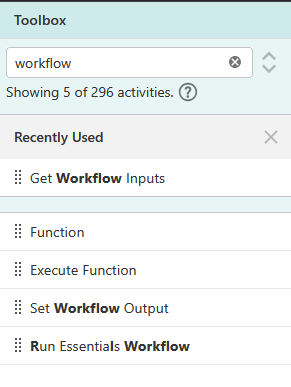
Or does the toolbox use the same compatibility metadata?
I see now that I can copy a Run Workflow from a client workflow, or temporarily switch the workflow type, and that gives me an incompatibility warning.
0 -
Berend Veldkamp Sorry, I should have explained that better. It's the same metadata that causes both things.
1. It filters unsupported activities from the toolbox based on your deployment configuration.
2. It warns you if you have any unsupported activities present in the workflow. This happens if you add an activity then change the deployment configuration to an environment where it's no longer supported.Both of these will be fixed for Server Workflows using the Run Workflow activity in the next release.
0 -

Hi Berend Veldkamp ,
It is possible to do so, but it requires several steps.
1. Get an ArcGis token
2. Create a vertigis token
3. Run the server workflow
4. Polling the status and get the result of the server workflow.
It would be great not to have to implement this for every server workflow :)
Kind regards,
Tim Nagelkerke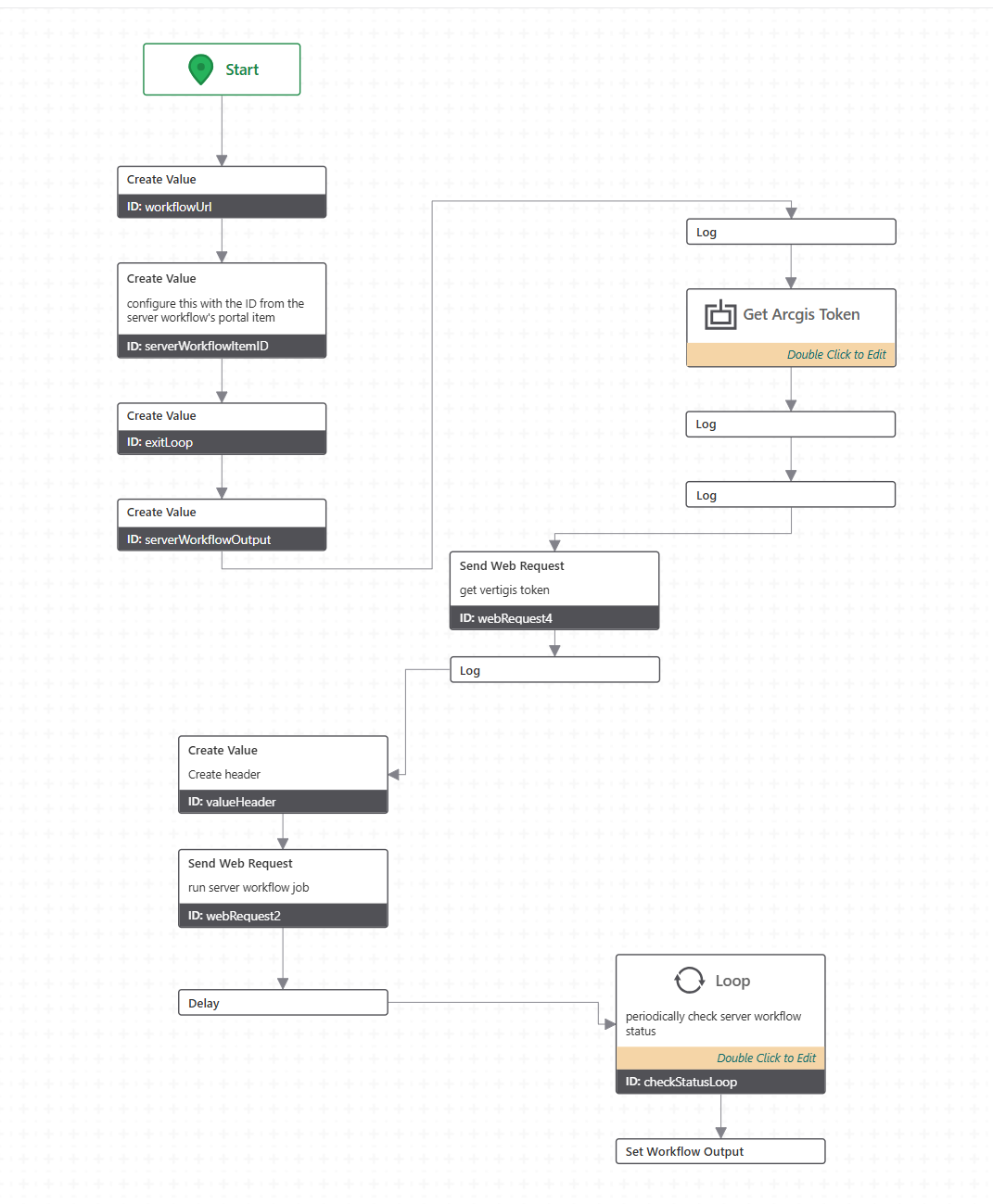 0
0 -
Tim Nagelkerke Although I haven't tested it yet, I think we can take Ken's word for it that it already works.
0 -
You could try temporarily changing a server workflow to a client workflow (don't save it!) and then add the Run Workflow activity and change it back to a Server Workflow.
The designer will still show a warning that the activity is not compatible, but it will work.
0
Vous devez vous connecter pour laisser un commentaire.
Commentaires
6 commentaires